
 Arabic
  English
  Turkish
  Chinese
  Japanese
  Russian
  Spanish
  German
  French
  Hindi
Hindi Download Classic eReader – book reader for Android
Download Classic eReader – book reader for Android.
Classic eReader – book reader Overview
This is a simple and intuitive e-reader app for reading books in the epub format.Features of Classic eReader – book reader
The redesigned user interface, optimized for phones, 7'' and 10'' tablets
TalkBack support
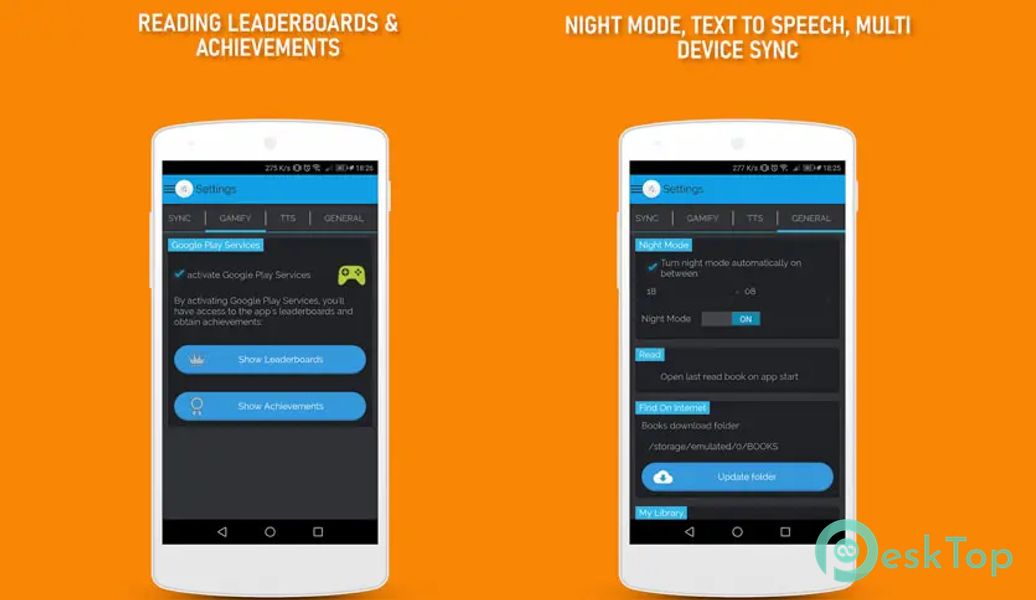
App gamification option (through Google Play Services, go to Settings → GAMIFY to activate it): reading Leaderboards + in-app badges through Achievements
Dropbox synchronization option so you can read your favorite books on any of your android devices (a Dropbox account is needed to be able to use this option)
Complete dark mode theme customizable from Settings → General → Night Mode
Organizes your books in (multilevel) collections
Highlighting and notes
Library icons view or book covers view options
Library search option for books and collections
Multi-select feature (select multiple books and collections to move or delete)
Multiple book import (you can select multiple folders and books to import in your library)
Online library with most read books from the public domain (free books in English, for all ages)
Statistics with time spent reading per month
Built-in Text To Speech (TTS - reads the text in the book aloud). Supported languages: German, English (+localizations), Spanish (+localizations), French (+localizations), Japanese, Korean, Dutch, Polish, Portuguese (+localizations), Russian, Chinese (+localizations) (*)
Option to customize the TTS voice pitch and speech rate
Text align, text color, and font resize options
Option to change the page transition mode (7 available transitions at the moment)
Night mode reading feature
Screen brightness change feature
Jump to page option
Bookmarks (add, manage and go to bookmark)
Book description
Page Progress
Full-screen reading mode
You can open epub files in Classic eReader from any external file explorer
Option to add a book to "My Library" when opening it from "Find On Device" or an external file explorer
Sorting options for books and collections in "My Library" (setup from Settings → General → My Library)
Option to open last read book on app start (setup from Settings → General → Read)

-
App Size6.08 MB
-
Google Play LinkNot available
-
Version Numberv3.3
-
App Languagemultilanguage
-
Last updatedBefore 8 Month
-
Downloads7
 Volume Styles - Custom control
 GG Mouse Pro
 Simple Launcher - Home Screen
 0Ground
 Arc0
Arc0 Raven Dark Icon Pack