
 Arabic
  English
  Turkish
  Chinese
  Japanese
  Russian
  Spanish
  German
  French
  Hindi
Hindi Download Appsvoid Connections Viewer 1.0 for Windows
Download Appsvoid Connections Viewer 1.0 for Windows.
Appsvoid Connections Viewer Overview
This tool provides a clear view of what is happening behind the scenes in your network activity. It lists every active connection on your computer and presents the data in a clean, readable format. Instead of guessing which application is using the internet, the software presents everything to you with useful technical details. It works similarly to command-line network utilities but without the complexity. Everything is visual, interactive, and easy to understand, even if you are not a networking expert.Features of Appsvoid Connections Viewer
Clear View of Active Network Connections
One of the software's key strengths is its clear display of active connections. It displays both TCP and UDP traffic and automatically keeps everything up to date. There is no need to refresh the screen or run repeated scans.
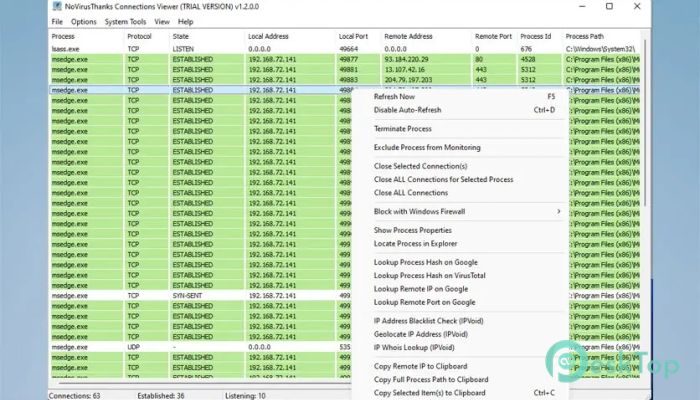
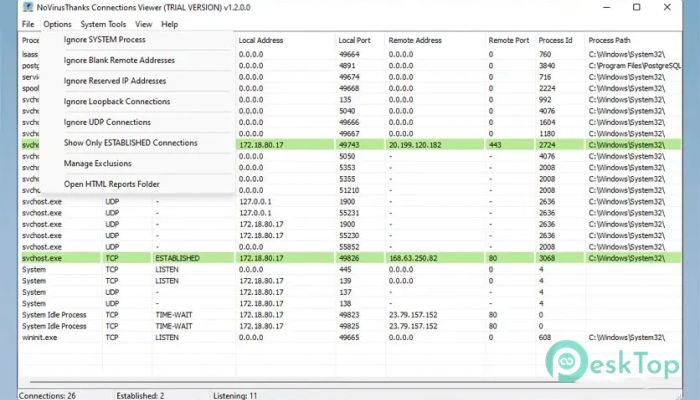
You can instantly see local and remote IP addresses, ports in use, and the current state of each connection. Established connections are highlighted, making them stand out at a glance. This is helpful when you want to quickly identify which apps are actively communicating over the network.
Detailed Connection Information
Each listed entry includes useful technical details to help you understand what is happening. These details include protocol type, local and remote ports, connection status, and associated process information.
The tool also displays the process ID and the application name for each connection. This makes it much easier to trace network activity back to a specific program, especially when troubleshooting unusual or unwanted traffic.
Real-Time Monitoring Without Manual Refresh
Network conditions change constantly, and this software keeps up automatically with no user intervention. Connections update in real time, so what you see on screen always reflects the current state of the system.
This live-updating behavior makes it feel like watching traffic through a glass window rather than taking snapshots. It is especially useful for monitoring downloads, online apps, or background services as they start and stop.
Manage and Close Connections Easily
Beyond viewing information, the software also allows you to take action. You can close active connections directly from the interface when needed. This gives you more control over network usage and security.
There is also an option to terminate processes linked to suspicious or unnecessary connections. With just a right-click, you can access all available actions, making management fast and straightforward.
Connection States Highlighted for Easy Reading
Different connection states, such as Listening, Established, and Time-Wait, are clearly shown. This helps you understand how each connection behaves at a given moment.
By visually separating these states, the tool reduces confusion and makes large lists easier to scan. Even when many connections are active, the layout stays readable and organized.
Export Reports for Later Review
For users who need to keep records, the software supports saving reports as HTML files. These reports capture all visible connection data in a structured format.
This feature is useful for system audits, troubleshooting sessions, or sharing network activity details with others. You can open the saved report in any browser without additional tools.
User-Friendly Interface and Simple Controls
The interface is designed for simplicity. Everything is accessible through menus and right-click options, so you do not need to remember commands or shortcuts.
Even first-time users can start exploring connections within seconds. The layout is practical and focused, minimizing distractions.
System Requirements and Technical Details
Operating System: Windows 11 / 10 / 8.1 / 7
Processor: Minimum 1 GHz Processor (2.4 GHz recommended)
RAM: 2GB (4GB or more recommended)
Free Hard Disk Space: 200MB or more is recommended

-
Program size42.73 MB
-
Version1.0
-
Program languagemultilanguage
-
Last updatedBefore 8 Month
-
Downloads28
 RealVNC VNC Server Enterprise
 CrushFTP
 Reqable
 AnyDesk
 AmneziaVPN
 CurrPorts