
 Arabic
  English
  Turkish
  Chinese
  Japanese
  Russian
  Spanish
  German
  French
  Hindi
Hindi Download Appsvoid MAC Address Changer 1.0 for Windows
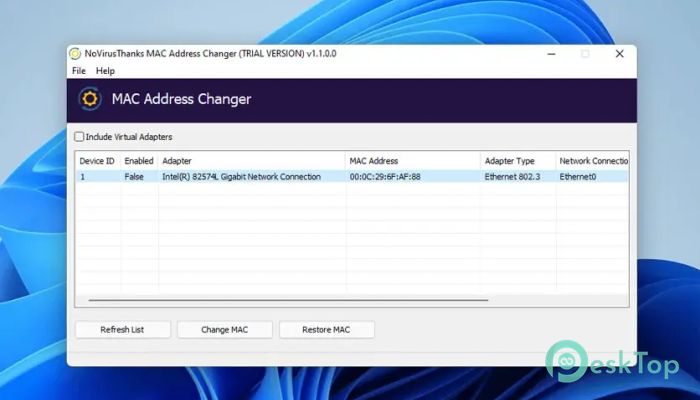
Download Appsvoid MAC Address Changer 1.0 for Windows.
Appsvoid MAC Address Changer Overview
It is designed for users who want a quick, clean way to adjust their network identity without dealing with complex settings. The layout is simple, the actions are clear, and the process flows smoothly. You select an adapter, enter a new value or generate one automatically, and apply the change. No confusing menus or technical clutter get in the way.Features of Appsvoid MAC Address Changer
Simple and Clean Interface
The software opens with a minimalist design that focuses on what matters. All available network adapters are clearly listed, making selection easy for first-time users. Buttons are labeled in plain language, so you always know what will happen next. This simplicity makes the experience feel smooth and stress-free.
Quick Adapter Selection
It allows you to choose from all detected network adapters on your system. Whether you use Ethernet or wireless connections, everything is in one place. This saves time and avoids the hassle of digging through system settings. The clear listing helps prevent mistakes and keeps control in your hands.
Manual and Random Address Options
The tool gives you two flexible ways to proceed. You can type a custom value if you already have one in mind, or you can let the software generate a random one for you. This option is useful when you want something fast and unique without overthinking it. Both methods are equally simple and reliable.
Fast Changes with Minimal Effort
Once a new value is entered or generated, applying it takes just a single click. In most cases, there is no need for system restarts or long wait times. The process feels almost instant, making it ideal for users who want quick results without interruption.
Useful for Privacy and Testing
It is often used by individuals concerned about privacy or who need to test network behavior. Changing a network identifier can help reduce tracking or simulate different devices during testing. This makes the software helpful for developers, learners, and everyday users alike.
Lightweight and Resource Friendly
The software runs smoothly even on older systems. It consumes minimal memory or processing power, keeping your computer responsive. You can run it in the background or launch it only when needed without noticing any slowdown.
Safe and Controlled Operation
Every action stays focused on the selected adapter only. This controlled approach reduces the risk of unintended changes. By keeping things simple and targeted, it helps users feel confident while making adjustments.
Ideal for Beginners and Advanced Users
Beginners appreciate the clean design and step-by-step guidance, while advanced users value the speed and control. It feels like using a well-labeled switch instead of rewiring an entire system. That balance makes it suitable for a wide range of use cases.
System Requirements and Technical Details
Operating System: Windows 11 / 10 / 8.1 / 7
Processor: Minimum 1 GHz Processor (2.4 GHz recommended)
RAM: 2GB (4GB or more recommended)
Free Hard Disk Space: 200MB or more is recommended

-
Program size42.48 MB
-
Version1.0
-
Program languagemultilanguage
-
Last updatedBefore 8 Month
-
Downloads25
 RealVNC VNC Server Enterprise
 CrushFTP
 Reqable
 AnyDesk
 AmneziaVPN
 CurrPorts