
 Arabic
  English
  Turkish
  Chinese
  Japanese
  Russian
  Spanish
  German
  French
  Hindi
Hindi Download BitBroom Rescue 1.0.3 for Windows
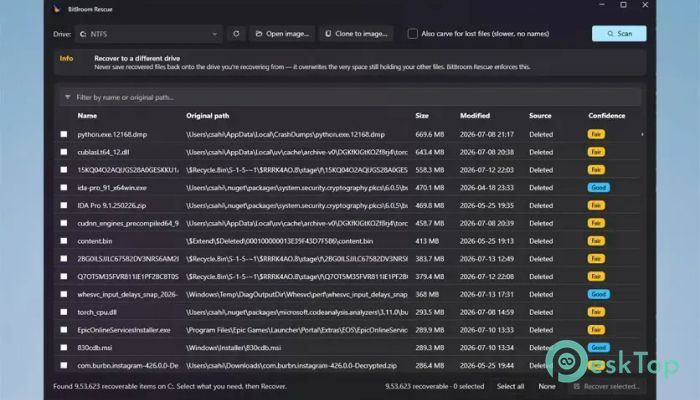
Download BitBroom Rescue 1.0.3 for Windows.
BitBroom Rescue Overview
It is designed for people who need a safe and trustworthy way to recover lost data. Whether files were accidentally deleted, a memory card was formatted, or a hard drive started failing, it focuses on protecting the original storage while recovering as much data as possible. Its biggest strength is a strict read-only recovery process, meaning the source drive is never modified during scanning or recovery. Unlike many recovery applications that promise impossible results, the software takes an honest approach. It first checks the drive's health, clearly explains recovery chances, and avoids misleading "100% recovery" claims. This makes it a dependable choice for home users, photographers, businesses, and IT professionals.Features of BitBroom Rescue
Safe Read-Only Recovery
The biggest feature of the software is its read-only recovery engine. Every scan opens the damaged or deleted drive in read-only mode, ensuring no data is written back to the source. Think of it like reading an old book with gloves instead of writing notes directly on its pages.
This approach greatly reduces the risk of worsening data loss. Whether recovering a family photo collection or important office files, users can work with confidence knowing the original drive remains untouched throughout the process.
Recover Deleted NTFS Files
The tool performs a complete scan of NTFS file systems by walking through the Master File Table (MFT). It searches deleted records, rebuilds original folder structures, and follows fragmented file data whenever possible.
Even large Windows system drives containing hundreds of thousands of deleted entries can be scanned in a short time. Original folder locations are reconstructed whenever enough information is available, making recovered files much easier to organize.
Restore Data from USB Drives and SD Cards
Accidentally deleting files from a USB flash drive or camera memory card can be stressful. The software supports the FAT32 and exFAT file systems, commonly used on removable storage devices.
It can recover deleted photos, videos, documents, and other files while rebuilding long filenames whenever possible. Original timestamps are also preserved, helping users identify files quickly after recovery.
Recycle Bin and Previous Versions Support
The software checks Windows Recycle Bin records before performing deeper recovery methods. It reads the stored deletion information to display original file locations and deletion times.
It also searches available Volume Shadow Copy snapshots. These snapshots often provide one of the safest and most confident recovery options because they contain earlier versions of files that Windows creates automatically.
Powerful Recovery from Formatted Drives
Sometimes the file system is completely missing after formatting or corruption. In those situations, the tool switches to signature-based recovery, often referred to as file carving.
It recognizes many popular file types, including JPEG, PNG, HEIC, PDF, DOCX, ZIP, MP4, MOV, MP3, RAR, SQLite, and many others. Every discovered file is validated before being listed, helping reduce false recovery results and improving overall reliability.
Drive Cloning for Failing Storage
Recovering data directly from a failing drive can cause additional damage if the hardware continues to deteriorate. The software solves this by creating a complete image of the drive first using a two-pass cloning process.
During the first pass, it copies all healthy sectors as quickly as possible. Afterward, it carefully retries unreadable areas while keeping track of damaged sections. Once imaging is complete, all recovery work is performed from the cloned image rather than the original drive, minimizing stress on failing hardware.
Honest Recovery Confidence
Instead of displaying misleading success messages, the software assigns a confidence rating to every recovered file. Files are labeled as High, Good, Fair, or Poor along with the reason for that score.
This honest reporting helps users decide which recovered files are most likely to open correctly. It saves time and prevents false expectations during the recovery process.
SMART and TRIM Health Checks
Before scanning begins, the tool examines important drive health information. SMART monitoring helps identify hardware problems that could affect recovery.
It also checks whether SSD TRIM has already erased deleted data. If TRIM has removed the information, the software notifies users immediately rather than wasting time on endless deep scans that cannot restore overwritten content.
Fast Performance with Reliable Results
The recovery engine is built for speed without sacrificing safety. It quickly scans large drives while maintaining a completely read-only workflow from beginning to end.
Because every detected file is verified before being shown, users spend less time sorting through invalid recovery results. This balance of speed and accuracy makes the recovery experience much smoother.
Simple Interface for Everyone
The software keeps the recovery process straightforward. Users simply select the affected drive, choose a scan type, review the detected files, and recover the needed data to another storage location.
Its clean interface makes advanced recovery technology accessible even to beginners while still offering the reliability that professionals expect.
System Requirements and Technical Details
Operating System: Windows 11 / 10
Processor: Minimum 1 GHz Processor (2.4 GHz recommended)
RAM: 2GB (4GB or more recommended)
Free Hard Disk Space: 200MB or more is recommended

-
Program size88.26 MB
-
Version1.0.3
-
Program languagemultilanguage
-
Last updatedBefore 2 Month
-
Downloads21
 Lazesoft Data Recovery
 Lazesoft Windows Recovery
  Lazesoft Recovery Suite
 Lazesoft Recover My Password
 Lazesoft Recovery Suite Technician
 Windows Password Recovery Tool Ultimate