
 Arabic
  English
  Turkish
  Chinese
  Japanese
  Russian
  Spanish
  German
  French
  Hindi
Hindi Download Bureausoft PDF Compress 1.0 for Windows
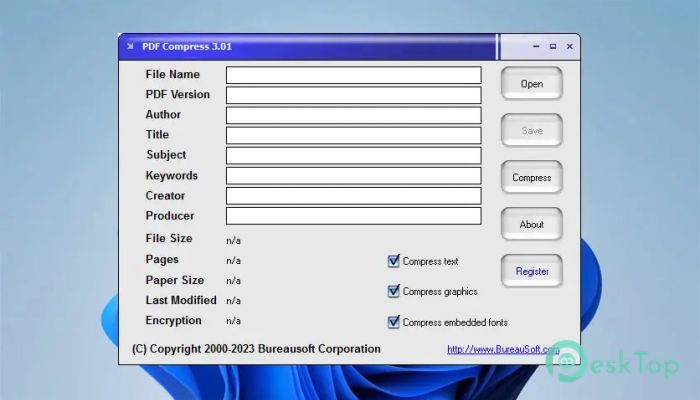
Download Bureausoft PDF Compress 1.0 for Windows.
Bureausoft PDF Compress Overview
Managing large PDF files can feel like carrying a heavy backpack when all you need is a light pouch. This software solves that problem by reducing file sizes without compromising text, font, or graphic quality. It focuses on delivering smaller PDFs that are easier to store, share, and upload. The tool is designed for everyday users who want quick results without technical complexity. Whether you are sending documents through email or saving space on your system, it works quietly in the background to make files more manageable. Compressed files remain fully compatible with all versions of Adobe Acrobat Reader, so there's no need to worry about accessibility.Features of Bureausoft PDF Compress
It offers a range of useful features that make file compression smooth and reliable. The software handles text, images, and fonts carefully to maintain readability while reducing size. It also supports quick processing, so you do not have to wait long for results.
Batch processing is another helpful feature. Instead of compressing files one by one, you can process multiple PDFs at once, saving time and effort. The tool also ensures that the output remains stable and can be opened without errors.
How It Works
The process is straightforward, almost like zipping a folder, but smarter. You simply load your PDF, choose the compression level, and let the tool handle the rest. It analyzes the file and reduces unnecessary data without affecting the core content.
Fonts are optimized, images are resized where needed, and redundant elements are removed. The result is a smaller file that looks nearly identical to the original. This makes it perfect for both personal and professional use.
User-Friendly Interface
The design is clean and easy to understand, even for beginners. You do not need any technical knowledge to use it. Everything is laid out clearly, so you can compress files with just a few clicks.
Menus are simple, and options are easy to follow. It feels like using a basic file tool rather than complex software. This simplicity makes it a great choice for anyone who wants quick results without confusion.
Performance and Speed
Speed is one of its strong points. The software processes files quickly, even when dealing with large PDFs. It uses system resources efficiently, so it does not slow down your computer.
The compression engine is optimized to deliver fast results while maintaining quality. This balance between speed and performance makes it reliable for regular use.
Compatibility and Reliability
One of the biggest concerns with compressed files is compatibility. Fortunately, this tool ensures that all compressed PDFs can be opened in any version of Adobe Acrobat Reader. This means you can share files confidently without worrying about errors.
The output files remain stable and secure. There are no formatting issues, missing fonts, or broken images. Everything stays intact, just in a smaller size.
Benefits of Using This Tool
Using this software feels like organizing a cluttered room into a neat space. It reduces file size, saves storage, and makes sharing easier. Smaller files upload faster and download quicker, which is perfect for online work.
It also helps in managing documents efficiently. Whether you are a student, professional, or casual user, the tool makes handling PDFs simple and stress-free.
System Requirements and Technical Details
Operating System: Windows 11 / 10 / 8.1 / 7
Processor: Minimum 1 GHz Processor (2.4 GHz recommended)
RAM: 2GB (4GB or more recommended)
Free Hard Disk Space: 200MB or more is recommended

-
Program size1.54 MB
-
Version1.0
-
Program languagemultilanguage
-
Last updatedBefore 3 Month
-
Downloads18
 CoolUtils PDF Combine
 NAPS2 - Not Another PDF Scanner
 FocusWriter
 Atlantis Word Processor
 AI Offline OCR Scanner Pro
 Xappex XL-Connector