
 Arabic
  English
  Turkish
  Chinese
  Japanese
  Russian
  Spanish
  German
  French
  Hindi
Hindi Download Bureausoft PDF Info 1.0 for Windows
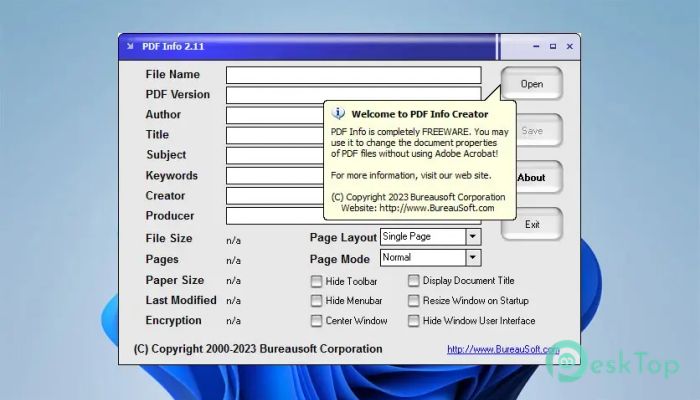
Download Bureausoft PDF Info 1.0 for Windows.
Bureausoft PDF Info Overview
This tool is designed for users who want quick control over PDF metadata without dealing with complex software. It allows you to view and modify essential document properties like author, title, subject, and keywords in just a few clicks. Whether you are organizing files or preparing documents for professional use, it provides a clean, straightforward way to handle PDFs.Features of Bureausoft PDF Info
Simple and Clean Interface
One of the best things about the tool is its user-friendly design. You don’t need any technical skills to get started. Everything is placed clearly on the screen, making it easy to find what you need. It feels like opening a notebook where everything is already organized for you.
The layout is minimal, which means there is no clutter to confuse you. You can focus only on editing the information you care about. This makes it perfect for beginners and experienced users alike.
Edit PDF Metadata Easily
The software lets you change important details within a PDF file. These details include the author's name, document title, subject, keywords, creator, and producer. Think of it like editing the label on a file folder so you can quickly understand what is inside.
You can update multiple fields in one go, saving time and effort. It ensures your documents always carry accurate, professional information, which is especially useful for business or academic work.
Improve File Organization
Managing a large number of PDF files can feel like searching for a needle in a haystack. This tool helps you organize files by properly updating their metadata. When files have correct titles and keywords, they become easier to search and sort.
It acts like a librarian, arranging books in the right sections so you can find them quickly. This is extremely helpful if you deal with many documents daily.
Support for PDF Version Information
The software also lets you view and modify PDF version details. This feature is useful when you need compatibility with specific systems or applications. Sometimes, certain tools only work with particular PDF versions, and this feature helps you adjust accordingly.
It gives you more control over how your documents behave when opened on different platforms.
Fast Performance and Lightweight
Unlike heavy programs that slow down your system, this tool is lightweight and fast. It opens quickly and processes files without delays. You won’t feel like you are waiting forever just to make a small change.
This makes it ideal for users who prefer speed and efficiency. You can edit multiple files without worrying about performance issues.
No Technical Knowledge Required
You don’t need to be a tech expert to use this software. Everything works in a straightforward way. Just open your PDF, edit the fields, and save the file. It’s as simple as editing text in a document.
This simplicity makes it accessible to everyone, from students to professionals. It removes the fear of making mistakes while handling PDF files.
Safe and Reliable Editing
When working with important documents, safety matters. This tool ensures that your files remain intact while you edit their properties. It does not affect the PDF's actual content; only its metadata.
It’s like changing the cover of a book without touching the pages inside. This gives you peace of mind while making updates.
Perfect for Professional Use
For businesses, having well-organized documents is essential. Proper metadata makes files look more professional and easier to manage. This tool helps maintain consistency across all your PDF files.
Whether you are sending documents to clients or storing them for records, it ensures everything looks neat and structured.
Batch Processing Capability
Another useful feature is the ability to handle multiple files at once. Instead of editing each file individually, you can apply changes to several documents together. This saves a lot of time, especially when dealing with large projects.
It’s like updating multiple labels in a single step, instead of doing them one by one.
Compact and Efficient Tool
The software does not take up much space on your system. It runs smoothly even on older computers. This makes it a practical choice for users who want a reliable tool without heavy system requirements.
It proves that you don’t need a big program to get the job done effectively.
System Requirements and Technical Details
Operating System: Windows 11 / 10 / 8.1 / 7
Processor: Minimum 1 GHz Processor (2.4 GHz recommended)
RAM: 2GB (4GB or more recommended)
Free Hard Disk Space: 200MB or more is recommended

-
Program size1.08 MB
-
Version1.0
-
Program languagemultilanguage
-
Last updatedBefore 4 Month
-
Downloads7
 CoolUtils PDF Combine
 NAPS2 - Not Another PDF Scanner
 FocusWriter
 Atlantis Word Processor
 AI Offline OCR Scanner Pro
 Xappex XL-Connector