
 Arabic
  English
  Turkish
  Chinese
  Japanese
  Russian
  Spanish
  German
  French
  Hindi
Hindi Download Cainey Studio HD Wallpaper Engine 1.0.0.1 for Windows
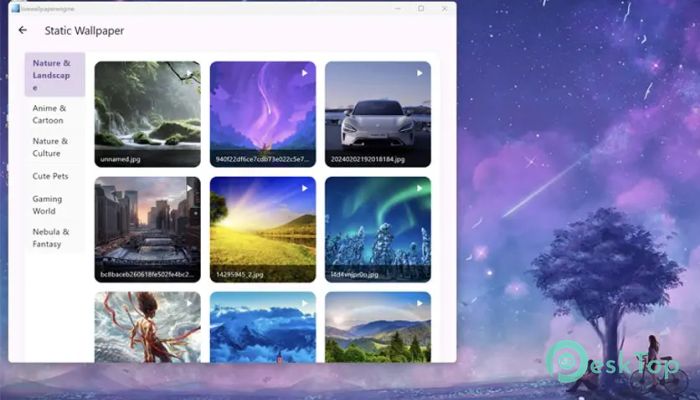

Download Cainey Studio HD Wallpaper Engine 1.0.0.1 for Windows.
Cainey Studio HD Wallpaper Engine Overview
This software focuses on making desktop personalization simple and visually pleasing. It allows users to apply crisp, high-resolution static wallpapers while keeping system usage low. The layout feels clean, and everything is placed where you expect it, so even first-time users can get started in minutes. Think of it as a digital wardrobe for your desktop, where changing the look feels effortless.Features of Cainey Studio HD Wallpaper Engine
High-Quality Wallpaper Experience
It is built with visual clarity in mind. Wallpapers retain sharp details and accurate colors, even on large or high-resolution screens. Whether you use a standard monitor or an ultra-wide display, the visuals scale properly without looking stretched or dull. This makes the desktop feel polished, like a freshly cleaned window that lets light pour in.
Multiple Categories for Easy Browsing
The tool supports organized wallpaper categories, helping users find the right background quickly. Instead of scrolling endlessly, you can jump straight to styles that match your mood. Nature scenes, abstract designs, minimalist themes, and artistic visuals are all neatly grouped. It feels like browsing playlists rather than searching for a single song.
Flexible Adaptation Modes
Different screens need different fits, and this software handles that well. It offers multiple adaptation modes so wallpapers align perfectly with your display. You can choose how images scale, stretch, or center based on your preference. This ensures that important visual elements stay visible and balanced.
Lightweight and Smooth Performance
One of the strongest points is how light it feels while running. It does not slow down daily tasks or eat up system resources. You can keep it active in the background without noticing any lag. It works quietly, like a well-oiled engine that does its job without making noise.
User-Friendly Interface
The interface is designed to be simple and welcoming. Buttons are clear, menus are easy to understand, and settings are not buried under layers of options. Even if you are not tech-savvy, you can change wallpapers, adjust modes, and manage categories without confusion.
Quick Desktop Personalization
Personalizing the desktop becomes a fast routine rather than a chore. With just a few clicks, you can refresh the entire look of your screen. This makes it perfect for users who like to change visuals often or match their desktop style with work or leisure moods.
Ideal for Static Wallpaper Lovers
If you prefer clean, static wallpapers over animated ones, this tool is a perfect fit. It focuses on stability and image quality rather than flashy effects. The result is a calm and professional desktop appearance that feels easy on the eyes during long working hours.
System Requirements and Technical Details
Operating System: Windows 11 / 10
Processor: Minimum 1 GHz Processor (2.4 GHz recommended)
RAM: 2GB (4GB or more recommended)
Free Hard Disk Space: 200MB or more is recommended

-
Program size94.01 MB
-
Version1.0.0.1
-
Program languagemultilanguage
-
Last updatedBefore 8 Month
-
Downloads46
 Reuschtools ClassicMenu
 AI Aquarium Screensaver
  Rainmeter
 Rainlendar Pro
 N-Button Pro
 Stardock DeskScapes