
 Arabic
  English
  Turkish
  Chinese
  Japanese
  Russian
  Spanish
  German
  French
  Hindi
Hindi Download Ctrl Deck 1.0 for Windows
Download Ctrl Deck 1.0 for Windows.
Ctrl Deck Overview
Managing daily tasks on Windows can sometimes feel like searching for tools in a crowded toolbox. With dozens of applications, folders, browser tabs, and files scattered across different locations, finding what you need can slow down your workflow. This software solves that problem by bringing everything together in a single, clean, and accessible workspace. The platform adds a convenient panel to the Windows environment where users can store and organize frequently used resources. Instead of digging through the Start menu, desktop shortcuts, bookmarks, or File Explorer, everything remains available in one location. The result is a faster and more efficient way to work.Features of Ctrl Deck
Quick Access to Everyday Resources
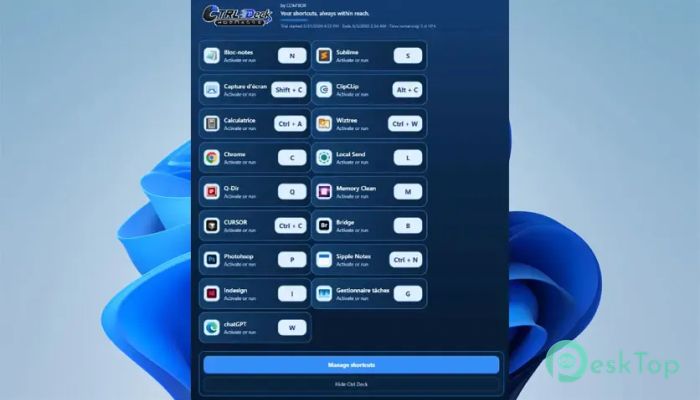
The main purpose of the tool is to provide instant access to commonly used items. Whether you need to open an application, launch a website, access a folder, or run a file, everything can be reached from a single visual interface.
This approach eliminates unnecessary searching and clicking. Think of it as a personal control center where all your favorite resources are placed within easy reach. The more shortcuts you organize, the more time you save throughout the day.
Visual Workspace Hub
Unlike traditional launchers that rely entirely on typing commands, this solution offers a clear visual panel. Users can see their resources arranged in an organized layout, making navigation simple and intuitive.
The interface is designed for both beginners and advanced users. Everything remains visible and accessible, helping users maintain focus without jumping between multiple menus and windows.
Keyboard Shortcut Support
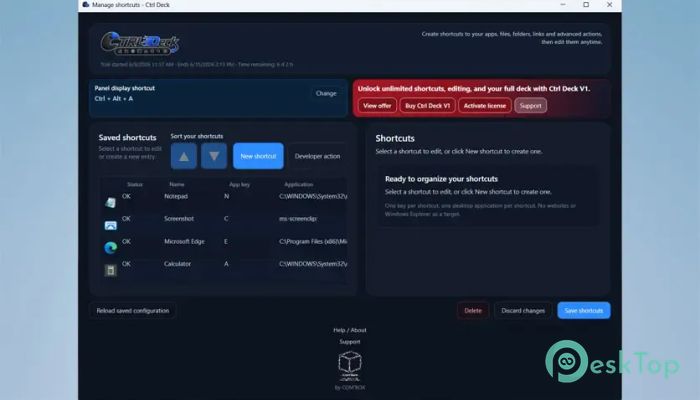
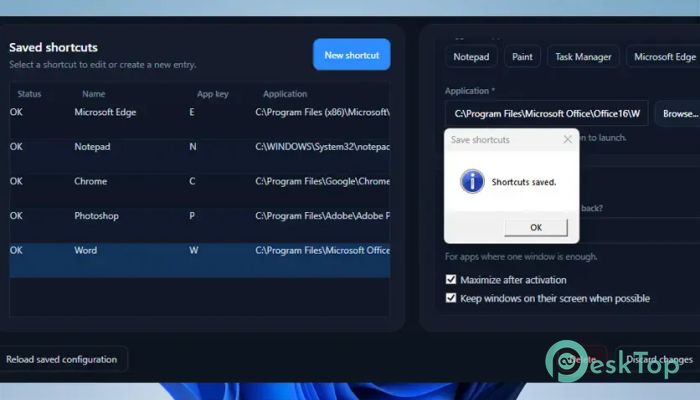
One of the strongest productivity features is the ability to assign custom keyboard shortcuts to individual items. Every shortcut can have its own hotkey, allowing users to launch resources instantly.
Power users who spend most of their time on the keyboard can create personalized workflows that reduce repetitive actions. A single key combination can open applications, launch folders, or start specific tasks in seconds.
Mouse-Friendly Navigation
Although keyboard shortcuts are available, they are not required. Once the panel is open, users can simply double-click any item to launch it.
This flexibility makes the software suitable for all types of users. Those who prefer to use a mouse can enjoy the same speed and convenience without having to memorize hotkeys. The combination of visual controls and shortcut support creates a balanced user experience.
Support for Multiple Resource Types
The platform has evolved far beyond a simple application launcher. It now supports a wide variety of resources that users interact with every day.
Applications, files, folders, websites, Windows shortcuts, Developer Actions, and Workspaces can all be managed from one location. This versatility allows users to build a centralized environment that matches their personal workflow.
Instead of managing different resource types separately, everything becomes part of a single, organized system.
Workspaces for Faster Context Switching
Modern work often requires switching between projects. Opening the same applications, folders, and websites repeatedly can become frustrating and time-consuming.
The workspace feature helps solve this challenge. Users can group related resources together and launch them as a complete working environment. This allows projects to be restored quickly whenever needed.
It's similar to reopening your desk exactly as you left it yesterday, with every document and tool already in place.
Developer Actions for Technical Users
For developers and technical professionals, the software includes support for secure Developer Actions. These actions can help automate routine tasks and streamline development workflows.
Instead of manually repeating the same operations, users can create shortcuts that execute specific actions directly from the panel. This improves efficiency while reducing repetitive work.
Clean and Organized Interface
A cluttered desktop can reduce productivity and make important resources harder to find. The tool addresses this issue by providing a structured and organized environment.
Resources can be arranged logically, helping users maintain a cleaner workflow. Whether you manage a handful of shortcuts or hundreds of resources, the interface keeps everything accessible and easy to locate.
The clean design also reduces distractions and helps users stay focused on their tasks.
Improved Productivity and Time Savings
Small delays often add up throughout the day. Searching for files, navigating folders, opening bookmarks, and locating applications can consume more time than many people realize.
By reducing these interruptions, the software helps users maintain momentum and work more efficiently. Quick access to frequently used resources means less time searching and more time getting things done.
For professionals, students, developers, and everyday users, even a few seconds saved on each task can lead to significant productivity improvements over time.
Flexible Workflow Customization
Every user works differently. Some rely heavily on keyboard shortcuts, while others prefer visual navigation. The platform accommodates both styles without forcing a specific workflow.
Users can create a setup that matches their habits and preferences. This flexibility ensures that the workspace feels natural and comfortable, regardless of experience level.
As needs change, resources can easily be reorganized and updated, allowing the system to grow alongside the user.
System Requirements and Technical Details
Operating System: Windows 11 / 10
Processor: Minimum 1 GHz Processor (2.4 GHz recommended)
RAM: 2GB (4GB or more recommended)
Free Hard Disk Space: 200MB or more is recommended

-
Program size452.05 KB
-
Version1.0
-
Program languagemultilanguage
-
Last updatedBefore 2 Month
-
Downloads10
 Reuschtools ClassicMenu
 AI Aquarium Screensaver
  Rainmeter
 Rainlendar Pro
 N-Button Pro
 Stardock DeskScapes