
 Arabic
  English
  Turkish
  Chinese
  Japanese
  Russian
  Spanish
  German
  French
  Hindi
Hindi Download Dante Virtual Soundcard 4.5.2.3 for Windows
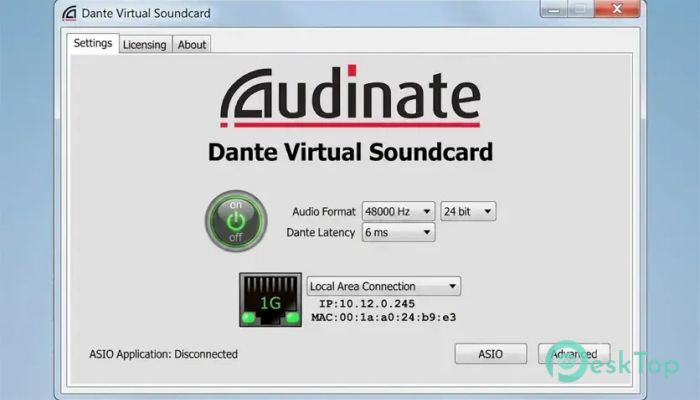
Download Dante Virtual Soundcard 4.5.2.3 for Windows.
Dante Virtual Soundcard Overview
Professional audio networking has become an essential part of modern recording studios, conference rooms, educational institutions, and live event setups. This software provides a simple way to connect your computer to a Dante audio network without requiring additional hardware. It turns your Windows PC into a fully functional Dante-enabled device capable of transmitting and receiving high-quality audio through a standard wired network connection. The tool removes the need for complicated cabling and expensive external interfaces. With only an Ethernet connection, users can send audio between computers, mixers, speakers, amplifiers, and other compatible devices. Whether you are recording music, hosting online meetings, teaching virtual classes, or managing AV installations, it provides a flexible and reliable solution.Features of Dante Virtual Soundcard
Transform Your Computer into a Dante Device
The software acts as a virtual soundcard, allowing your PC to communicate directly with Dante-enabled equipment. Instead of relying on physical audio interfaces, it uses your existing network infrastructure to transfer audio signals.
This approach simplifies audio routing and makes setup much cleaner. Think of it as replacing a bundle of audio cables with a single network cable while maintaining excellent sound quality and reliability.
Native Compatibility with Windows
One of its strongest advantages is seamless integration with Windows audio systems. The tool functions as both an ASIO and WDM audio device, making it compatible with a wide variety of professional and consumer applications.
Users can connect their favorite Digital Audio Workstations (DAWs) to record, edit, mix, and produce. Since it works like a standard audio device, many applications recognize it immediately without requiring complex configuration.
High-Quality Audio Transmission
Audio quality is critical in professional environments, and the software is designed to deliver excellent performance. It transmits audio over Ethernet while preserving clarity and accuracy, making it suitable for recording studios, live productions, and corporate environments.
The technology ensures that audio reaches its destination with minimal delay and consistent quality. This helps maintain a professional listening experience, whether the audio is being recorded, streamed, or played back.
Simple and Clean Setup
Traditional audio systems often require multiple cables, adapters, and external hardware. The software takes a different approach by using the network connection already available on most computers.
Installation is straightforward, and users can quickly become part of a Dante network. This reduces setup time and helps eliminate cable clutter, making workspaces more organized and easier to manage.
Always Running in the Background
Another useful feature is its ability to remain active in the background. Once configured, the tool stays ready whenever audio networking is required.
This means users do not need to repeatedly launch or configure settings every time they start a project. It quietly handles audio networking tasks while allowing professionals to focus on their actual work.
Ideal for Recording and Production
Music producers and audio engineers can use the software to record audio directly into their preferred DAW. Since it operates as a virtual audio interface, it can easily fit into existing production workflows.
Large recording setups become easier to manage because audio can travel over the network rather than requiring long analog cable runs. This improves flexibility and simplifies studio expansion.
Perfect for Conferencing and Online Classes
Modern communication platforms depend heavily on reliable audio. The software integrates smoothly with conferencing applications, making it useful for remote meetings, webinars, and virtual classrooms.
Organizations can connect microphones, mixers, and audio systems to online communication platforms while maintaining professional sound quality. This creates a better experience for presenters and participants alike.
Playback to Dante-Enabled AV Systems
The tool is not limited to recording. It can also send audio from media players, presentation software, and other applications directly to Dante-enabled AV systems.
This capability is especially valuable in conference centers, educational facilities, houses of worship, and entertainment venues where audio must be distributed efficiently across multiple locations.
Flexible Audio Networking Solution
Flexibility is one of the key reasons many professionals choose network-based audio systems. The software allows audio to move across the network wherever it is needed without major hardware changes.
As requirements grow, users can expand their setups more easily than with traditional point-to-point audio connections. This scalability makes it suitable for both small and large installations.
Reliable Performance for Professional Use
Stability is essential when dealing with live audio and important recordings. The software is built to provide dependable operation in demanding environments where consistent performance matters.
From recording sessions to business presentations, users can rely on the platform to handle audio networking efficiently while maintaining professional standards.
System Requirements and Technical Details
Operating System: Windows 11 / 10 / 8.1 / 7
Processor: Minimum 1 GHz Processor (2.4 GHz recommended)
RAM: 2GB (4GB or more recommended)
Free Hard Disk Space: 200MB or more is recommended

-
Program size30.71 MB
-
Version4.5.2.3
-
Program languagemultilanguage
-
Last updatedBefore 3 Month
-
Downloads39
 Teletone Audio Prism Plate
 Stryde Audio Swayed
  Electric Smudge SnappySnap
 PSPaudioware PSP Flare
 DW Soundworks Gretsch USA Custom Expansion Pack
 Sonic Academy V4lve