
 Arabic
  English
  Turkish
  Chinese
  Japanese
  Russian
  Spanish
  German
  French
  Hindi
Hindi Download DeskFrame 1.42.7 for Windows
Download DeskFrame 1.42.7 for Windows.
DeskFrame Overview
It is built for people who are tired of messy desktops. If your screen looks like a storage room with icons scattered everywhere, this software turns it into a well-organized workspace. It lets you create frames directly on your desktop to group files, folders, and shortcuts in a structured way. Think of it like placing invisible shelves on your desktop. Instead of piling everything on the floor, you neatly place items in labeled boxes. It feels simple, but once you start using it, you realize how much faster and calmer your workflow becomes.Features of DeskFrame
Smart Desktop Organization
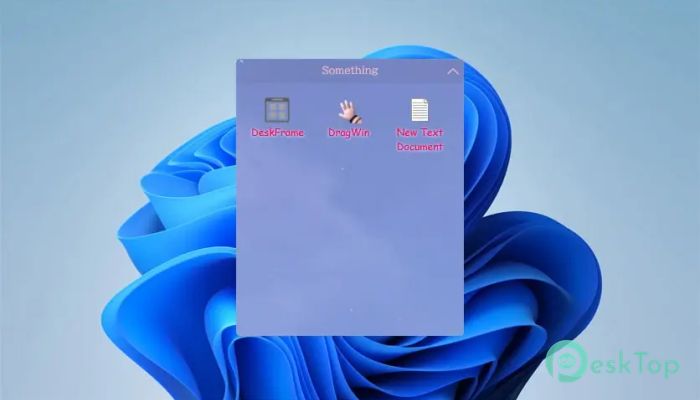
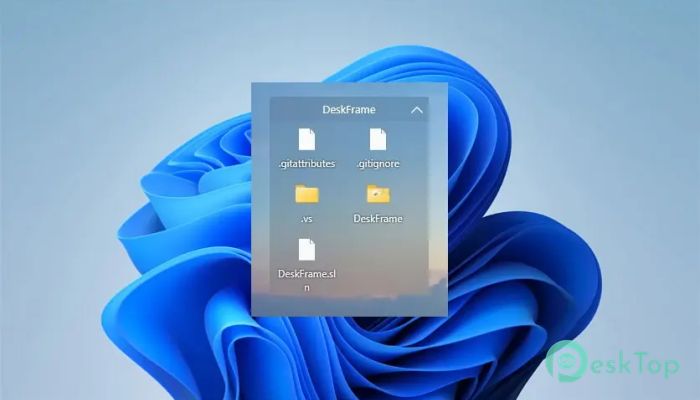
The main goal of the tool is to help you organize your desktop into frames. You can create multiple sections and assign specific files to each one. For example, one frame can hold work documents, another can store personal files, and a third can contain quick-access tools.
These frames stay exactly where you place them. You can resize, move, or even lock them in place. This means your layout stays consistent every day. No more rearranging icons after every reboot.
Instant Search and Filtering
One of the best features is instant search. Just move your cursor over a frame and start typing. There’s no need to click a search bar. The results appear instantly, saving you time.
It also supports regular expression searches and advanced item filtering. That means you can narrow down results using specific patterns. If you deal with many similar files, this feature becomes a lifesaver.
Fully Customizable Appearance
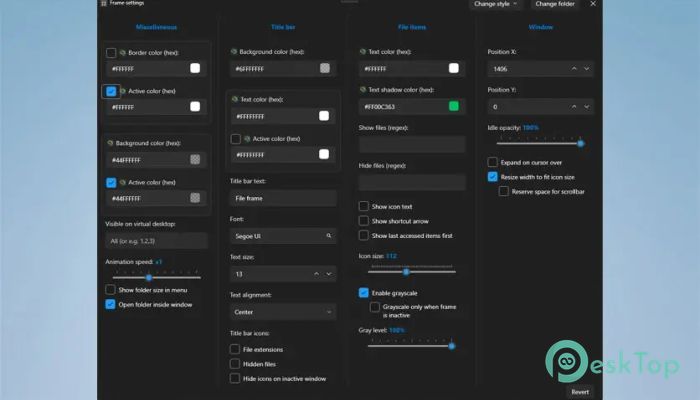
The software gives you full control over how your frames look. You can change colors, adjust transparency, and even enable grayscale mode if you prefer a softer visual style.
Background colors with transparency allow the frames to blend nicely with your wallpaper. It feels like they are part of the desktop itself, not some extra window sitting on top.
If you like switching between light and dark themes, you can easily adjust the colors to match your mood or your system theme.
Advanced File Handling Options
This tool doesn’t just organize icons; it gives you control over how they behave. You can toggle hidden files and file extensions, which is very useful if you work with system files or development projects.
You can rearrange items using ALT + drag, making movement smooth and precise. Want frames to stick together neatly? Hold ALT to create sticky and lockable frames with perfect spacing.
There’s also an open and close frame toggle. You can collapse sections when you don’t need them, keeping your desktop even cleaner.
Icon and Layout Control
If you ever felt that your desktop icons were either too small or too big, you’ll love the CTRL + scroll resize feature. Just hold CTRL and scroll the mouse wheel to instantly adjust icon size.
Sorting options are also available. You can sort items by name, date, type, or other criteria. This makes it easier to keep files in logical order.
There’s even a special first-row option for last-accessed items. It automatically places recently used files at the top. It’s like having a smart assistant that remembers what you used yesterday.
Virtual Desktop Support
If you use multiple virtual desktops in Windows, you’ll appreciate the option to display frames per virtual desktop. You can have different setups for work, gaming, or personal use.
For example, your work desktop can show project folders, while your entertainment desktop shows media and shortcuts. It keeps everything separated and organized.
Quick Hide and Minimal Resource Usage
Sometimes you just want a clean wallpaper view. Simply double-click on the desktop to hide frames instantly. Double-click again to bring them back. It’s fast and convenient.
Despite all these features, it remains lightweight and fast. It uses about 75 MB of RAM, which is very reasonable. You won’t feel any slowdown, even on older systems.
Multilingual Support
The tool supports multiple languages, including English, Spanish, Italian, Mandarin, Polish, and Korean. This makes it accessible to users worldwide.
Menus and options are clearly translated, making navigation easy no matter which language you choose.
Practical Everyday Benefits
Using this software feels like cleaning your room after months of clutter. Suddenly, everything is easier to find. You waste less time searching and more time actually working.
Students can separate study materials by subject. Office workers can group reports, spreadsheets, and tools. Designers can organize assets by project. It adapts to your workflow instead of forcing you to adapt to it.
In short, it turns chaos into structure without complicating things.
System Requirements and Technical Details
Operating System: Windows 11 / 10 / 8.1 / 7
Processor: Minimum 1 GHz Processor (2.4 GHz recommended)
RAM: 2GB (4GB or more recommended)
Free Hard Disk Space: 200MB or more is recommended

-
Program size13.51 MB
-
Version1.42.7
-
Program languagemultilanguage
-
Last updatedBefore 5 Month
-
Downloads104
 Reuschtools ClassicMenu
 AI Aquarium Screensaver
  Rainmeter
 Rainlendar Pro
 N-Button Pro
 Stardock DeskScapes