
 Arabic
  English
  Turkish
  Chinese
  Japanese
  Russian
  Spanish
  German
  French
  Hindi
Hindi Download +Desktop Fences v2.7.7.294 for Windows
Download +Desktop Fences v2.7.7.294 for Windows.
+Desktop Fences Overview
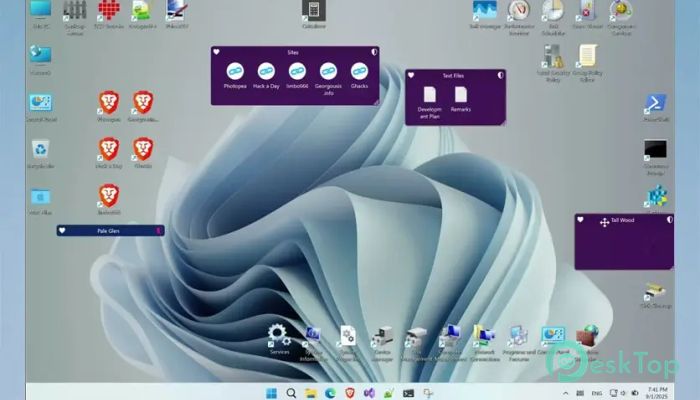
This open-source Windows utility is designed to enhance the appearance and functionality of your desktop. As an improved fork of the BirdyFences project, it serves as an alternative to commercial software, such as Stardock Fences. The tool helps you create virtual boxes or areas on your desktop, known as “fences”, where you can store specific icons, folders, or files for quick access. It also features visual enhancements, improved right-click options, and enhanced performance, providing your desktop with a fresh, modern look.Features of +Desktop Fences
Easy Customization Options
One of the best features of the software is its ease of customization. You can resize, rename, and move fences to suit your personal layout preferences. Whether you want separate fences for work files, games, or multimedia, it gives you complete control over your desktop appearance. Its flexibility makes it easy to adapt to your daily workflow and reduce clutter.
Clean and Organized Interface
The tool enhances your workspace by organizing desktop items in a structured manner. Instead of searching through random icons, you can instantly find what you need. It’s especially useful for users who frequently work with multiple files and shortcuts. By simply dragging and dropping, you can organize your workspace and keep everything tidy without any technical effort.
Enhanced Performance and Stability
Compared to older versions or similar utilities, this version delivers better stability and smoother transitions. It runs efficiently in the background without consuming heavy system resources. Even when managing multiple fences or large folders, the system remains responsive, ensuring a lag-free experience.
Folder Portals and Quick Access
Another key feature is its “folder portal” system, which allows you to create fences that directly link to specific folders. This means you can open and manage files inside a fence without having to open a separate file explorer window. It saves time and keeps your focus on the task at hand. The quick hide/show feature also helps you temporarily hide all fences when needed, keeping your desktop clean and distraction-free.
User-Friendly Controls
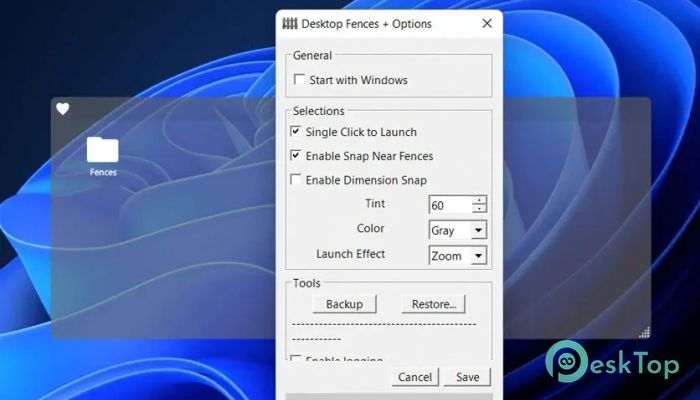
Operating the tool is simple. You can create a new fence by right-clicking on your desktop and selecting from the menu. The settings panel lets you adjust visual styles, background transparency, and layout behavior. These small but meaningful customization options ensure your desktop looks exactly the way you want it to.
Open-Source Flexibility
Being open-source, this software invites contributions from the developer community. It encourages collaboration, allowing users to report bugs, suggest improvements, and even customize their own builds. This approach ensures continuous development and security updates, keeping it a strong choice for anyone seeking a reliable, free alternative to paid desktop organization tools.
Improved Visual Effects
The interface enhancements give your desktop a more appealing and professional look. Smooth animations, shadow effects, and transitions create a sense of depth and clarity, enhancing the overall visual experience. These aesthetic improvements make daily computer use more enjoyable and visually pleasing, especially for users who value design and simplicity.
Productivity Boost
Keeping your desktop organized has a direct impact on productivity. With everything sorted and grouped, you spend less time searching for files and more time working efficiently. The tool promotes focus and organization, helping you maintain a clean digital workspace that reflects a clear state of mind.
Compatibility and Light Resource Usage
It is compatible with most Windows versions, including Windows 7, Windows 8, Windows 8.1, Windows 10, and Windows 11. Despite offering advanced visual effects, it doesn’t overload your system. You can run it alongside other applications without noticing performance drops, making it suitable for both personal and professional environments.
System Requirements and Technical Details
Operating System: Windows 11 / 10
Processor: Minimum 1 GHz Processor (2.4 GHz recommended)
RAM: 2GB (4GB or more recommended)
Free Hard Disk Space: 200MB or more is recommended

-
Program size7.39 MB
-
Versionv2.7.7.294
-
Program languagemultilanguage
-
Last updatedBefore 2 Month
-
Downloads135
 Reuschtools ClassicMenu
 AI Aquarium Screensaver
  Rainmeter
 Rainlendar Pro
 N-Button Pro
 Stardock DeskScapes