
 Arabic
  English
  Turkish
  Chinese
  Japanese
  Russian
  Spanish
  German
  French
  Hindi
Hindi Download DNS Hop 2.4 for Windows
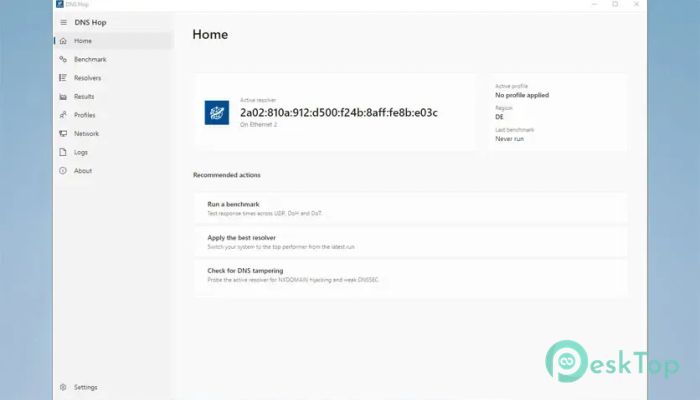
Download DNS Hop 2.4 for Windows.
DNS Hop Overview
It is designed to make choosing the best DNS server quick and effortless. Instead of manually testing different DNS providers, the software benchmarks public resolvers and shows which one performs best for your internet connection. It supports traditional UDP DNS as well as modern encrypted protocols such as DNS over HTTPS (DoH) and DNS over TLS (DoT), providing greater privacy without sacrificing speed. The software is available as a native Windows installer, a portable version that runs without installation, and a Linux AppImage. Whether you use it on your personal PC or carry it on a USB drive, the tool offers the same reliable features and easy-to-use interface.Features of DNS Hop
Fast DNS Benchmark Testing
Finding the fastest DNS server can feel like searching for the quickest route during rush hour. The software removes the guesswork by automatically benchmarking public DNS resolvers. It measures response times across UDP, DoH, and DoT, helping you identify the fastest and most reliable option for your network.
Instead of relying on advertised speeds, the tool performs real-world tests. This allows you to make informed decisions based on actual performance rather than assumptions.
One-Click DNS Switching
Changing DNS settings manually often involves opening network settings, entering IP addresses, and restarting connections. The software simplifies this process by letting you apply the best-performing resolver or one of your saved profiles with a single click.
This saves time and reduces the chance of typing errors. It also makes switching between different DNS providers easy whenever your needs change.
Reliable DNS Leak Testing
Changing a DNS server is only useful if your system actually uses it. That's why the tool performs a DNS leak test after applying new settings. It checks the active resolver using a whoami. Cloudflare probe to verify that your DNS requests are being routed correctly.
This gives you confidence that your selected DNS provider is working as expected and that your privacy settings remain effective.
Support for Modern DNS Protocols
Modern internet users expect both speed and security. The software supports classic UDP DNS, as well as encrypted DNS over HTTPS and DNS over TLS. These secure protocols help protect DNS requests from being intercepted while browsing.
By supporting multiple connection methods, the tool allows users to choose the balance of speed, compatibility, and privacy that best fits their environment.
Curated Resolver Information
Choosing a DNS provider is easier when useful information is displayed clearly. The software includes curated metadata for each resolver, including details such as the operator, hosting country, no-log policy, and whether content filtering is available.
These details appear as easy-to-read badges inside the resolver list and recommendation cards. Instead of researching every provider yourself, you can compare important features at a glance.
Simple Settings Interface
The settings section follows the familiar design style used in Windows 11. It uses FluentAvalonia SettingsExpander rows, making navigation clean, organized, and comfortable for users familiar with modern Windows applications.
Each option is grouped logically, reducing clutter and making it easier to adjust preferences without digging through complicated menus.
Readable Logs and Diagnostics
Troubleshooting network problems becomes much easier when logs are easy to understand. The software displays messages using INFO, WARN, and ERROR severity colors, allowing important events to stand out immediately.
Built-in filtering helps you focus on relevant entries, while the one-click export feature lets you save logs for future reference or for technical support.
Modern Theme Support
The software blends naturally into Windows by supporting both Light and Dark themes. Its title bar automatically follows your selected appearance using Desktop Window Manager integration, creating a polished experience.
When configured to follow the operating system, the attractive Mica effect stays enabled, giving the interface a modern and consistent look throughout daily use.
Accessible Without Premium Restrictions
Many utilities limit useful features behind expensive subscriptions. This software takes a different approach by presenting itself as a complete and accessible solution rather than a limited trial.
Users can benchmark DNS servers, apply settings, verify connections, and manage profiles without constantly being reminded about paid upgrades. This makes it a practical choice for home users and professionals alike.
Portable and Cross-Platform Availability
Flexibility is another strong point of the software. In addition to the standard Windows installer, it offers a portable edition that requires no installation. You can carry it on removable storage and use it on different computers whenever needed.
A Linux AppImage is also available in the same release, allowing users across multiple operating systems to enjoy a similar experience without complicated installation procedures.
System Requirements and Technical Details
Operating System: Windows 11 / 10 / 8.1 / 7
Processor: Minimum 1 GHz Processor (2.4 GHz recommended)
RAM: 2GB (4GB or more recommended)
Free Hard Disk Space: 200MB or more is recommended

-
Program size14.63 MB
-
Version2.4
-
Program languagemultilanguage
-
Last updatedBefore 3 Month
-
Downloads24
 RealVNC VNC Server Enterprise
 CrushFTP
 Reqable
 AnyDesk
 AmneziaVPN
 CurrPorts