
 Arabic
  English
  Turkish
  Chinese
  Japanese
  Russian
  Spanish
  German
  French
  Hindi
Hindi Download Dolphin DVR Recovery 3.85.7 for Windows

Download Dolphin DVR Recovery 3.85.7 for Windows.
Dolphin DVR Recovery Overview
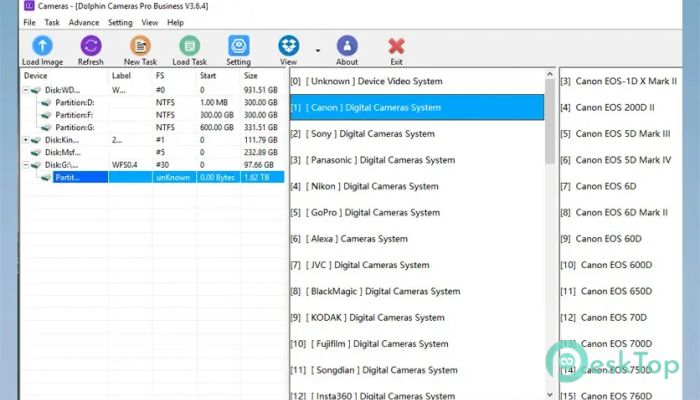
This software is designed to handle complex video loss scenarios where standard tools fail. It focuses on rebuilding video files from damaged storage and incomplete recordings. The tool works with footage from CCTV, DVR, NVR, HVR, digital cameras, car driving recorders, police body-worn cameras, UAVs, and other video recorders. Think of it like a skilled mechanic who can rebuild an engine even when parts are scattered.Features of Dolphin DVR Recovery
Purpose and Core Functionality
It is designed to resolve failed recovery cases and restore videos that appear lost permanently. The software scans storage media deeply, analyzes file structures, and reconstructs playable video files. This helps security teams, investigators, and everyday users who need their recordings back quickly.
Wide Device Compatibility
The software supports a broad range of recording devices. It can recover footage from CCTV systems, DVRs, NVRs, and HVRs, as well as digital cameras and dash cams. Police body cameras and UAV recording systems are also supported. This wide reach means users do not need separate tools for different devices.
Support for Major DVR Brands
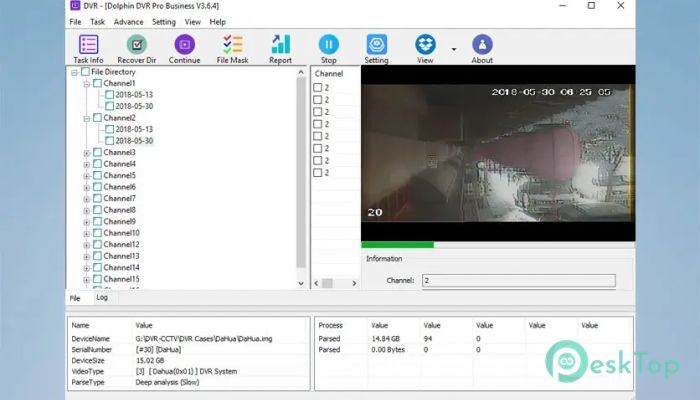
It works with many DVR brands used worldwide. These include Hikvision, Dahua, WFS, Uniview, TP-LINK, Samsung, SXCCTV, Wbox, FIL-ASFM, XiaoMi, HUAWEI, SONY, NKED, VSTARCAM, CloudSee, Lenovo, Panasonic, ONSEE, Kedacom, and Kt Telecops. This broad brand support helps users recover footage without worrying about brand limitations.
Recovery from Deleted and Formatted Storage
The tool can restore videos that were deleted by mistake or lost after device initialization or formatting. Even if the storage was reset, it can still detect video fragments and rebuild them. It is like finding torn pages of a book and putting the story back together.
Advanced Video Reconstruction
Instead of relying only on file names or indexes, the software analyzes raw data to rebuild video streams. This approach allows it to recover files that other tools cannot open. The result is playable footage with proper timing and structure.
Simple and User-Friendly Workflow
The interface keeps things simple. Users select the storage device, start a scan, preview recoverable videos, and save the restored files. No advanced technical knowledge is required. The process feels guided, like following a clear roadmap.
Preview Before Saving
Previewing recovered footage helps confirm quality before saving. This saves time and storage space. Users can quickly check if the recovered video meets their needs before finalizing the recovery.
Fast and Efficient Scanning
The software balances deep scanning with performance. It searches thoroughly while keeping scan times reasonable. This is useful when working with large storage drives or long recording periods.
Use Cases and Practical Value
Security professionals use it to recover critical surveillance footage. Law enforcement teams rely on it for body camera and vehicle recorder data. Businesses use it to restore CCTV evidence after system failures. Even personal users benefit when dash cam or camera footage goes missing.
Data Safety and Read-Only Recovery
Recovery operations are performed in read-only mode. This means the original data remains untouched during scanning. It reduces the risk of further damage and keeps the recovery process safe.
System Requirements and Technical Details
Operating System: Windows 11 / 10 / 8.1 / 7
Processor: Minimum 1 GHz Processor (2.4 GHz recommended)
RAM: 2GB (4GB or more recommended)
Free Hard Disk Space: 200MB or more is recommended

-
Program size21.83 MB
-
Version3.85.7
-
Program languagemultilanguage
-
Last updatedBefore 7 Month
-
Downloads267
 Lazesoft Data Recovery
 Lazesoft Windows Recovery
  Lazesoft Recovery Suite
 Lazesoft Recover My Password
 Lazesoft Recovery Suite Technician
 Windows Password Recovery Tool Ultimate