
 Arabic
  English
  Turkish
  Chinese
  Japanese
  Russian
  Spanish
  German
  French
  Hindi
Hindi Download Eagle PDF Editor 1.5.3 for Windows
Download Eagle PDF Editor 1.5.3 for Windows.
Eagle PDF Editor Overview
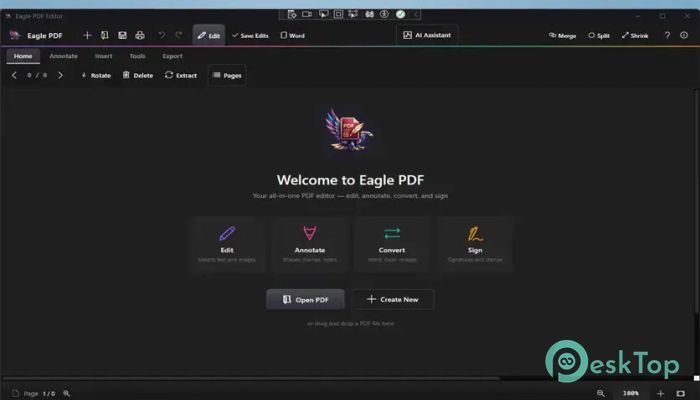
Managing PDF documents can sometimes feel like carrying a heavy toolbox just to fix one small thing. This software changes that by bringing all the essential features into a single, clean, modern workspace. Whether you need to read files, sign contracts, merge reports, or convert documents, the tool makes the process quick and smooth. The interface is designed with a dark theme that feels modern and comfortable during long working hours. Everything is organized, so even beginners can understand the controls without confusion. From business users to students, anyone can use it to handle daily PDF tasks efficiently.Features of Eagle PDF Editor
PDF Viewing Experience
The built-in viewer delivers fast, smooth PDF rendering. Large files open quickly, and navigation feels fluid as you scroll through pages. Zoom controls, page thumbnails, and quick search options make reading documents much easier.
The dark-themed interface also helps reduce eye strain, especially during long editing sessions. It feels clean and distraction-free, almost like reading a digital book in a quiet room.
Annotations And Markup Tools
Editing and reviewing documents becomes simple with the annotation features. You can highlight important lines, add sticky notes, insert comments, or draw directly on pages. Shapes like arrows, circles, rectangles, and lines help explain ideas visually.
These tools are useful for teachers, office workers, and teams reviewing reports or presentations. Instead of printing papers and using pens, everything can be done digitally within seconds.
Merge And Split PDF Files
Combining multiple documents into one file is very easy. You can drag and drop PDFs into the merge section and create a single, organized document in moments. This is perfect for combining contracts, assignments, invoices, or project files.
The split feature is equally powerful. It allows you to extract specific pages or divide a large document into smaller sections. You can choose custom page ranges or split files after every few pages for easier sharing.
Encryption And Security Features
Privacy matters when handling sensitive information. The software includes strong AES encryption that protects files with passwords. You can also limit permissions for editing, copying, or printing.
This feature works like a digital lock on a safe. Only people with the correct password can access the protected content. It is ideal for legal files, financial reports, and confidential business documents.
Digital Signature Support
Signing documents no longer requires printers or scanners. You can sign your name with a mouse, type it digitally, or upload a scanned signature. After that, simply place it anywhere on the page.
This makes online agreements and approvals much faster. Contracts, forms, and official papers can be signed instantly without leaving your desk.
Create PDFs From Scratch
The software allows users to create brand-new PDF documents using custom page sizes and layouts. You can choose from formats such as A4, Letter, Legal, portrait, or landscape orientation.
Starting a document from scratch feels simple and flexible. It works well for reports, letters, notes, and professional forms.
Professional Templates Included
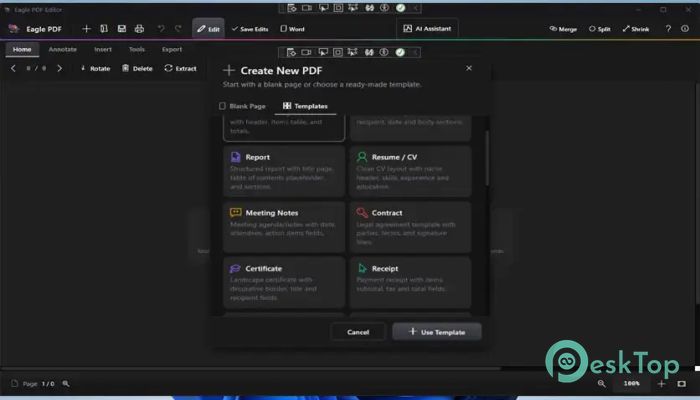
More than 20 ready-made templates are included for quick document creation. These templates cover invoices, resumes, reports, business forms, contracts, and letters.
Instead of building everything from scratch, you can start with a polished design and customize it to fit your needs. It saves time while keeping documents professional.
Built-In AI Assistant
The integrated AI assistant adds smart functionality to document management. It can summarize long files, answer questions about the content, and extract important details quickly.
Imagine having a personal helper sitting beside you as you read a large report. The assistant reduces manual work and helps users understand documents faster.
OCR Text Recognition
OCR technology converts scanned documents and image-based PDFs into searchable and selectable text. This means old printed pages can become editable digital content.
The feature is extremely useful for offices and archives where scanned paperwork needs to be searchable. Instead of typing everything again manually, the software extracts text automatically.
Page Management Options
Handling pages becomes easy with the thumbnail sidebar. You can reorder pages, rotate them, insert new pages, or remove unwanted sections.
Everything works through simple controls, making document organization smooth and stress-free. Even large reports can be arranged quickly without technical skills.
Images, Watermarks, And Stamps
You can insert logos, images, and custom stamps directly into documents. Watermarks can also be added for branding or copyright protection.
This feature helps businesses create professional-looking files while keeping ownership clear and visible.
Convert And Export Features
The software supports exporting PDF pages as high-quality images in formats such as PNG and JPEG. It also helps convert documents into different formats for better compatibility.
This flexibility makes sharing content much easier across different platforms and devices.
Form Filling Tools
Interactive PDF forms can be completed digitally using text fields, dropdowns, and checkboxes. Applications, surveys, and tax forms can be filled out without printing anything.
The process feels quick and modern, helping users save both time and paper.
Search And Navigation
Finding text inside long documents becomes simple with the instant search tool. You can search for words or phrases and jump directly to matching sections.
Keyboard shortcuts make navigation even faster, especially when working with large manuals or reports.
Printing And Batch Printing
Printing options give full control over page size, scaling, orientation, and page ranges. Multiple documents can also be printed together using the batch printing feature.
This saves time in offices where many files need to be printed regularly.
Bookmarks And Hyperlinks
Bookmarks help organize large documents into sections for quick access. Hyperlinks can also be inserted to connect webpages or internal document pages.
This improves navigation and makes lengthy files easier to read and understand.
Side-By-Side Document Comparison
The comparison mode opens two PDF files side by side. This is useful when checking revisions, edits, or updates between documents.
It works like comparing two pages of a book at once, making differences easier to notice.
Dark Mode Interface
The modern dark interface gives the workspace a stylish and professional appearance. Long editing sessions feel more comfortable because the darker colors reduce eye fatigue.
The clean layout keeps attention focused on the document instead of cluttered menus or unnecessary distractions.
System Requirements and Technical Details
Operating System: Windows 11 / 10
Processor: Minimum 1 GHz Processor (2.4 GHz recommended)
RAM: 4GB (8GB or more recommended)
Free Hard Disk Space: 2GB or more is recommended

-
Program size626.91 MB
-
Version1.5.3
-
Program languagemultilanguage
-
Last updatedBefore 2 Month
-
Downloads112
 CoolUtils PDF Combine
 NAPS2 - Not Another PDF Scanner
 FocusWriter
 Atlantis Word Processor
 AI Offline OCR Scanner Pro
 Xappex XL-Connector