
 Arabic
  English
  Turkish
  Chinese
  Japanese
  Russian
  Spanish
  German
  French
  Hindi
Hindi Download Egle Audio Suite 1.1.0 for Windows
Download Egle Audio Suite 1.1.0 for Windows.
Egle Audio Suite Overview
It is designed for music lovers who want more control over their audio libraries. Instead of installing several different applications for tagging, playback, artwork management, and audio analysis, it brings everything together in a single desktop program. The software is fast, lightweight, and built specifically for Windows users who care about maintaining a clean and organized music collection. Whether you have a few hundred songs or a massive library with thousands of tracks, the tool simplifies management tasks. It can automatically correct tags, organize albums, detect duplicate files, improve metadata, and provide a high-quality listening experience through its advanced music player.Features of Egle Audio Suite
All-in-One Music Management Platform
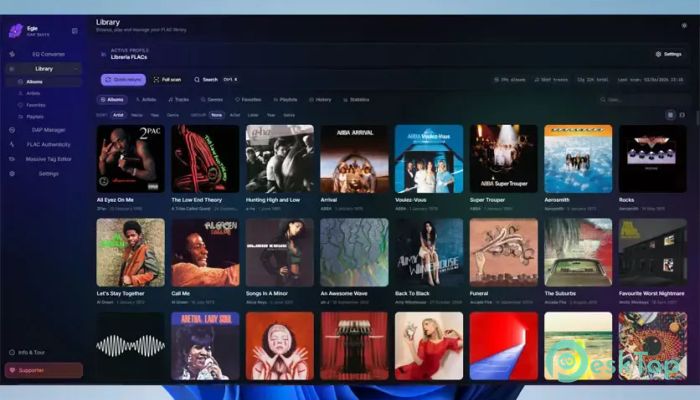
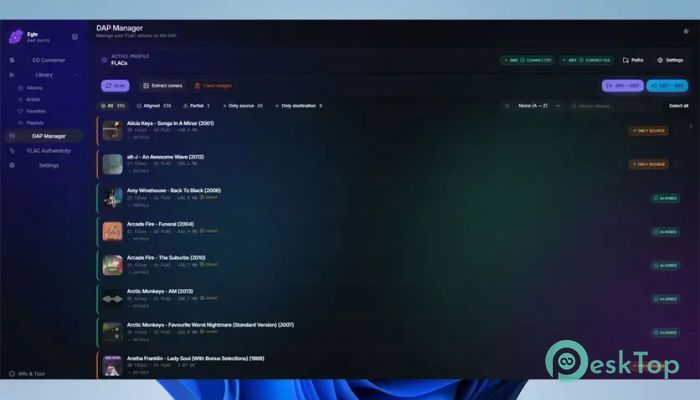
Managing a music collection often feels like maintaining a large library where books are constantly out of place. The software solves this problem by combining multiple music tools into one convenient package. Users can organize tracks, edit metadata, manage cover art, verify audio quality, and play music without switching between different applications.
This integrated approach saves time and creates a smoother workflow. Instead of juggling several programs, everything is available through a single, user-friendly interface.
Powerful Batch Tag Editing
One of the most valuable features is its mass tag editor. Large music collections often contain missing artist names, incorrect genres, inconsistent album titles, and unwanted metadata. The tool can automatically clean and fix these issues across thousands of files at once.
Users can remove unwanted tags, tidy artist separators, renumber tracks, standardize genres, and eliminate junk information. It also supports automatic ReplayGain calculation, helping maintain consistent volume levels throughout the library.
Bit-Perfect HiFi Music Playback
The software includes a high-quality audio player built for serious listeners. It supports bit-perfect playback, ensuring audio is delivered exactly as stored in the original file without unnecessary processing.
Features such as gapless playback make albums flow naturally between tracks. Automatic sample-rate switching helps preserve audio quality, while ReplayGain support prevents sudden volume jumps between songs. The result is a cleaner and more enjoyable listening experience.
Smart Music Library Organization
Keeping a music collection organized becomes much easier with its built-in library management tools. Users can browse content by albums, artists, genres, playlists, favorites, and listening history.
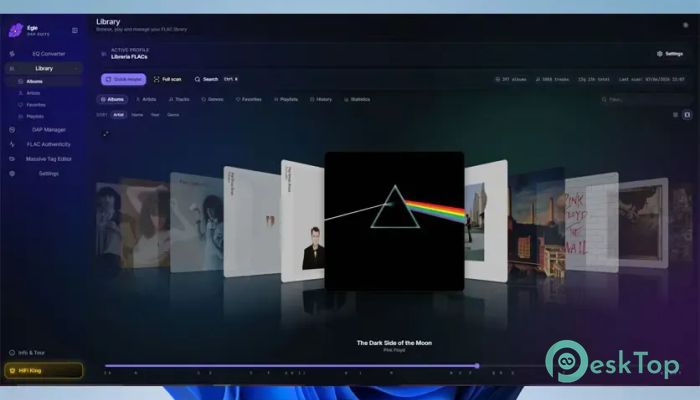
The software also includes a duplicate finder that helps remove repeated files that waste storage space. A visually appealing 3D cover-flow view adds a modern touch, making it easy to explore albums just like flipping through a physical music collection.
FLAC Authenticity Verification
Not all FLAC files are created equally. Some files may appear lossless but are actually converted from lower-quality sources. The software helps identify these cases using a real-time spectrogram analysis tool.
This feature allows users to verify the authenticity of their audio files before adding them to a collection. For audiophiles, this can be extremely useful when building a high-quality music library.
Advanced Cover Art Management
Album artwork plays a major role in creating a polished music library. Missing or inconsistent cover images can make collections look incomplete and disorganized.
The software provides batch artwork management capabilities that allow users to embed, resize, replace, and clean cover images across multiple files simultaneously. This helps create a consistent appearance throughout the entire collection.
ReplayGain Support for Consistent Volume
One common frustration when listening to music is sudden volume differences between tracks. Some songs may be significantly louder than others, requiring constant manual adjustments.
The tool solves this issue through ReplayGain analysis. It calculates optimal playback levels so tracks maintain a more balanced volume. This creates a smoother listening experience, especially when using playlists containing music from different albums and artists.
AutoEQ to Rockbox Conversion Tools
Portable audio devices often require specific equalizer settings to achieve the best sound quality. The software includes an AutoEQ-to-Rockbox EQ converter designed for digital audio players.
This feature allows users to quickly and efficiently convert AutoEQ profiles into Rockbox-compatible settings. As a result, music enthusiasts can optimize audio performance on supported portable devices with minimal effort.
Duplicate Detection and Cleanup
Over time, music collections often accumulate duplicate files through downloads, backups, and library imports. These duplicates waste storage space and create unnecessary clutter.
The built-in duplicate finder helps identify repeated tracks so users can review and remove them safely. This keeps libraries cleaner and improves overall organization.
Simple Interface with Fast Performance
The software is developed as a native Windows application, which means it feels responsive and efficient. Navigation is straightforward, and common tasks can be completed without complicated menus or settings.
Even when handling large collections, performance remains smooth. This makes it suitable for casual listeners as well as advanced music collectors who manage extensive audio libraries.
System Requirements and Technical Details
Operating System: Windows 11 / 10 / 8.1 / 7
Processor: Minimum 1 GHz Processor (2.4 GHz recommended)
RAM: 2GB (4GB or more recommended)
Free Hard Disk Space: 200MB or more is recommended

-
Program size16.58 MB
-
Version1.1.0
-
Program languagemultilanguage
-
Last updatedBefore 3 Month
-
Downloads5
 Teletone Audio Prism Plate
 Stryde Audio Swayed
  Electric Smudge SnappySnap
 PSPaudioware PSP Flare
 DW Soundworks Gretsch USA Custom Expansion Pack
 Sonic Academy V4lve