
 Arabic
  English
  Turkish
  Chinese
  Japanese
  Russian
  Spanish
  German
  French
  Hindi
Hindi Download Esko LinkEdge 1.0 for Windows
Download Esko LinkEdge 1.0 for Windows.
Esko LinkEdge Overview
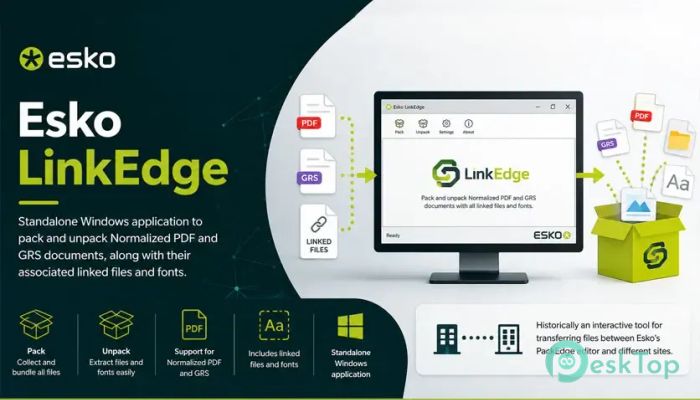
It is a practical, stand-alone application designed to simplify the management of Esko project files. It allows users to collect normalized PDF and GRS documents along with all linked resources, making it much easier to move, archive, or share complete projects. Instead of worrying about missing fonts or broken links, everything stays neatly packed in one place. The software is especially useful for professionals working in packaging, prepress, and print production. Keeping all required files together reduces errors and ensures projects can be opened correctly on different computers without missing important resources.Features of Esko LinkEdge
Simple Packing and Unpacking
The software makes packing project files incredibly easy. With just a few steps, users can gather normalized PDF files, GRS documents, linked graphics, and fonts into a single package. This process is similar to placing every tool you need into one organized toolbox before leaving for a job.
When it's time to continue working, the tool can unpack everything while keeping the original folder structure intact. This saves valuable time and eliminates the frustration of searching for missing assets.
Reliable File Management
Managing multiple project files can quickly become confusing, especially when many linked resources are involved. The tool keeps everything organized by ensuring that all required elements remain connected throughout the workflow.
This organized approach reduces the chance of broken links or incomplete projects. Whether you are moving files between departments or backing them up, every important resource stays together.
Supports Normalized PDF and GRS Documents
One of the biggest strengths of the software is its support for Esko normalized PDF and GRS document formats. These formats are commonly used in professional packaging and print production because they preserve important production information.
By handling these specialized documents correctly, the application enables teams to exchange projects with confidence, without worrying about damaged or incomplete files.
Automatically Includes Linked Files
Linked graphics are often stored in different folders, making them easy to forget when copying projects manually. The software automatically detects and includes these linked resources during the packing process.
This feature saves users from manually searching through folders. All required images, graphics, and external resources are automatically collected, making project sharing much smoother.
Built-In Font Collection
Fonts play an important role in maintaining the appearance of documents. If a required font is missing, text can change unexpectedly, creating layout problems and production delays.
The tool solves this issue by collecting the necessary fonts together with the project. This helps ensure that documents appear exactly as intended when opened on another computer.
Standalone Application
Unlike many utilities that require large software suites to run, the application works as a stand-alone program. Users can perform packing and unpacking tasks without launching complex design software.
This lightweight approach makes everyday file management much faster. It also allows support staff and production teams to handle project files without needing access to the complete editing environment.
Improves Team Collaboration
Modern production workflows often involve designers, prepress operators, printers, and quality control teams working together. The software helps everyone stay on the same page by ensuring complete project packages are shared between departments.
Since every linked resource travels with the project, recipients can immediately continue working without requesting missing files or correcting broken references.
Perfect for Archiving Projects
Keeping completed projects for future use is just as important as creating them. The tool allows users to archive complete jobs with confidence because every linked file and font remains included in the package.
Months or even years later, archived projects can be unpacked and restored without worrying about missing resources. This makes long-term storage much more reliable.
Easy-to-Use Interface
The software focuses on simplicity. Its clean interface allows both experienced professionals and new users to pack or unpack projects without a steep learning curve.
Most tasks require only a few clicks, helping users complete file management quickly while reducing the possibility of mistakes.
Faster Workflow and Greater Efficiency
Every minute spent searching for missing files slows down production. The software removes this problem by automatically gathering everything required for a project. It helps reduce delays, improve consistency, and increase overall productivity.
Whether the project is being transferred to another workstation, sent to a client, or stored for future reference, the entire process becomes faster and far more dependable.
System Requirements and Technical Details
Operating System: Windows 11 / 10 / 8.1 / 7
Processor: Minimum 1 GHz Processor (2.4 GHz recommended)
RAM: 2GB (4GB or more recommended)
Free Hard Disk Space: 200MB or more is recommended

-
Program size121.43 MB
-
Version1.0
-
Program languagemultilanguage
-
Last updatedBefore 3 Month
-
Downloads9
 CoolUtils PDF Combine
 NAPS2 - Not Another PDF Scanner
 FocusWriter
 Atlantis Word Processor
 AI Offline OCR Scanner Pro
 Xappex XL-Connector