
 Arabic
  English
  Turkish
  Chinese
  Japanese
  Russian
  Spanish
  German
  French
  Hindi
Hindi Download Folio On-Device Document OCR 1.0.0 for Windows
Download Folio On-Device Document OCR 1.0.0 for Windows.
Folio On-Device Document OCR Overview
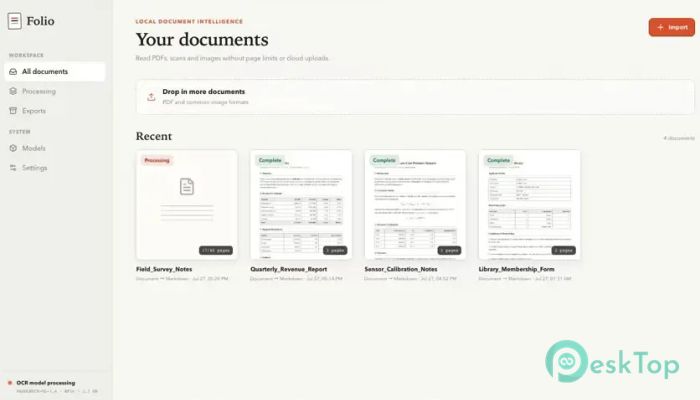
It is designed for users who want to extract text from documents without uploading private files to an online service. It processes everything locally on the computer, giving you greater control over contracts, research papers, receipts, forms, book pages, and other important records. The software converts scanned content into structured Markdown while preserving useful details from the original page. Instead of producing a messy wall of words, it tries to retain headings, paragraphs, tables, columns, formulas, charts, and other document elements.Features of Folio On-Device Document OCR
Private On-Device Recognition
Privacy is one of the strongest features of the tool. All recognition work takes place on your own Windows computer. Your documents are not uploaded to a remote server, placed in an online queue, or shared with another service.
This local approach is helpful when working with confidential information. Business agreements, financial records, personal documents, academic research, and internal reports can remain on your device throughout the recognition process.
Once the required components are set up, the software can also operate without an internet connection. This makes it useful in restricted offices, secure environments, remote locations, or any situation where online processing is not suitable.
Designed for Real Documents
Simple text recognition tools often work well with plain pages but struggle when a document contains a complex structure. This software is designed to handle the practical files people use every day.
You can process contracts, receipts, reports, forms, book chapters, research papers, and photographed pages. Each page is recognized individually, allowing the tool to preserve the natural order and layout of the source material.
It works like a careful digital reader rather than a basic copy-and-paste machine. The result is easier to review, edit, organize, and reuse in other applications.
Structured Markdown Output
The software produces editable Markdown, which is a lightweight format commonly used for notes, documentation, websites, and content management systems. Markdown is easy to read in its original form and can be converted into many other formats.
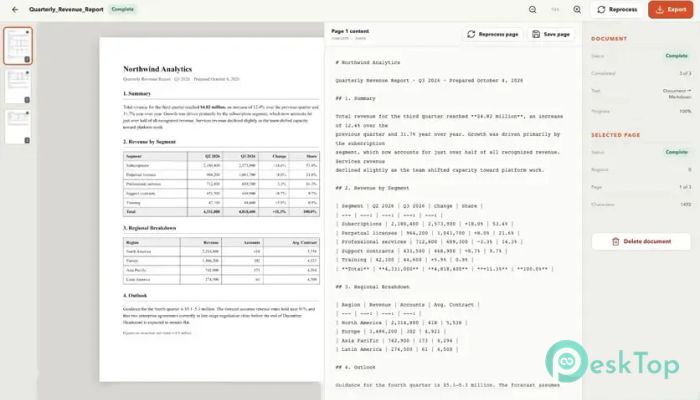
Recognized headings can remain headings, lists can remain lists, and separate sections can stay properly organized. This makes the final output much cleaner than plain text created by traditional OCR programs.
The structured result is especially helpful for writers, researchers, developers, students, office workers, and anyone who needs to repurpose printed or scanned information.
Tables, Formulas, and Complex Layouts
Many documents contain more than ordinary paragraphs. They may include multi-column pages, financial tables, mathematical expressions, diagrams, stamps, or charts. The tool is designed to reproduce these elements as structured content instead of flattening everything into a single line.
Tables remain easier to understand, while formulas and technical details are preserved in a more useful form. Multi-column layouts are also handled page by page, reducing the risk of mixed sentences and broken reading order.
This feature makes the software suitable for technical reports, scientific documents, invoices, manuals, academic papers, and other content with detailed page designs.
Side-by-Side Review and Editing
No OCR system is perfect, especially when a scan is blurry, tilted, handwritten, damaged, or photographed in poor lighting. For that reason, the application includes a practical review workspace.
You can view the original page alongside the recognized text and navigate the document one page at a time. This arrangement makes it easy to compare the source with the converted result.
Any incorrect word, missing symbol, or formatting issue can be edited directly. Your corrections are saved, so you do not have to repeat the same work later. It feels like proofreading with the original page always open beside your notes.
No Page Limits
Cloud-based recognition platforms often limit the number of pages you can process or require payment after a certain amount of use. This tool runs on your own hardware, so it does not meter documents by page count.
You can import a short one-page form, a large report, or a book containing hundreds of pages. The main limits depend on your computer’s available resources rather than an online subscription allowance.
This can be valuable for users who regularly digitize archives, records, books, research collections, or large office documents.
Automatic Progress Saving
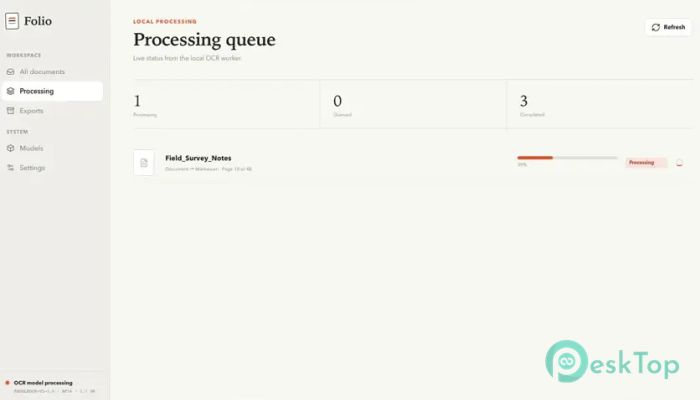
Large document conversions may take time, especially when a file contains hundreds of pages. The software protects your progress by saving every completed page immediately.
You can close the application, restart the computer, or pause work in the middle of a document. When you return, the tool can resume processing from the point where it left off.
This feature reduces frustration and prevents completed work from disappearing because of an interruption. It is like placing a bookmark after every page instead of waiting until the entire book is finished.
Flexible Export Options
After reviewing the recognized content, you can export it in several useful formats. Supported choices include Markdown, plain text, HTML, and JSON.
Markdown is useful for documentation and publishing workflows. Plain text is suitable for simple editing, while HTML can be used for web pages and content systems. JSON is helpful when information needs to be processed by scripts, applications, or databases.
You can export one document at a time or process files in batches. Results can be saved in any folder you choose, giving you full control over file organization.
Useful for Different Types of Users
Students can digitize study materials and turn scanned notes into editable content. Researchers can process papers and book chapters while keeping document structure intact.
Businesses can convert contracts, forms, reports, and archived records without sending sensitive files to third-party servers. Writers and publishers can transform printed pages into clean digital drafts.
The tool is also useful for developers who need structured JSON or Markdown output for automation, indexing, search systems, and document management projects.
Simple and Reliable Workflow
The general workflow is straightforward. You import a PDF, scan, or page photograph, allow the application to recognize each page, review the result, make corrections, and export the final document.
The clear process makes advanced OCR technology easier to use. You do not need to manage remote uploads, page credits, processing queues, or download links.
Because everything stays on the computer, the workflow feels more direct. Your files enter the application, are processed locally, and leave as editable documents in the folder you selected.
System Requirements and Technical Details
Operating System: Windows 11 / 10
Processor: Minimum 1 GHz Processor (2.4 GHz recommended)
RAM: 2GB (4GB or more recommended)
Free Hard Disk Space: 2GB or more is recommended

-
Program size365.78 MB
-
Version1.0.0
-
Program languagemultilanguage
-
Last updatedBefore 2 Month
-
Downloads16
 CoolUtils PDF Combine
 NAPS2 - Not Another PDF Scanner
 FocusWriter
 Atlantis Word Processor
 AI Offline OCR Scanner Pro
 Xappex XL-Connector