
 Arabic
  English
  Turkish
  Chinese
  Japanese
  Russian
  Spanish
  German
  French
  Hindi
Hindi Download IP Camera Adapter 1.0 for Windows
Download IP Camera Adapter 1.0 for Windows.
IP Camera Adapter Overview
This software acts like a bridge between your network cameras and your Windows system. It allows you to use IP cameras just like a normal webcam in different applications. Instead of being limited to hardware webcams, you can stream video from phones, WiFi cameras, or even static image sources. It supports multiple protocols, making it flexible for various setups. Whether you want to use a mobile device as a camera or connect an existing network camera, the tool makes the process smooth and accessible. It works well with apps that rely on DirectShow, so compatibility is not an issue. How It Works Think of this tool like a translator between devices. Network cameras speak one language, while Windows apps expect another. This software converts the camera stream into a format that Windows applications understand. Once installed, it creates a virtual webcam on your system. Any supported application can detect this virtual camera and use it just as if it were a physical one. This means you can plug your camera into video calls, streaming apps, or recording tools without hassle.Features of IP Camera Adapter
Wide Compatibility
One of the tool's strongest points is its compatibility. It works with a wide range of IP cameras, including those that provide MJPG output or even static image feeds. You are not tied to a specific brand or model.
It also supports many Windows applications. Programs like Skype, messaging tools, and browser-based video platforms can all use the virtual camera. This makes it useful for both personal and professional use.
Turn Your Phone Into a Camera
You can easily use your smartphone as a network camera. Apps like IP Webcam let your phone stream video over Wi-Fi. The software then picks up that stream and turns it into a usable webcam.
This is a great solution if you do not have a dedicated webcam. Your phone camera is often much higher quality, and with this setup, you can take advantage of that without spending extra money.
Works Without Internet
The software does not require an internet connection to function. As long as your devices are connected to the same WiFi network, everything works smoothly. This is perfect for private setups or secure environments.
You can stream video locally using tools like VLC player or even a web browser. It keeps things simple and avoids unnecessary delays caused by online connections.
Multiple Viewing Options
Flexibility is another major benefit. You can view your camera feed in different ways depending on your needs. It supports viewing through media players, browsers, and compatible software.
This makes it useful for monitoring, streaming, or recording. Whether you are setting up a home security system or just experimenting with video feeds, you have full control over how you watch and use your stream.
Easy Setup Process
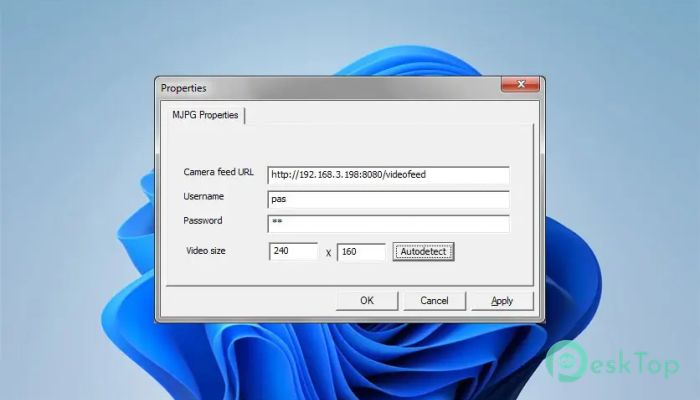
Getting started is straightforward. You just need to install the software, connect your camera or phone, and select the stream source. Within minutes, your virtual webcam is ready to go.
The interface is simple and does not overwhelm users with complex settings. Even beginners can set it up with little effort, while advanced users can tweak configurations as needed.
Use Cases
This tool can be used in many ways. You can turn it into a home monitoring system, use it for video calls, or even create content for streaming platforms. It adapts to different needs without requiring expensive hardware.
It is also useful for testing camera setups or building custom solutions. Developers and hobbyists can experiment with different camera sources and integrate them into their projects.
Performance and Reliability
The software is lightweight and runs smoothly on most systems. It does not consume too many resources, so you can use it alongside other applications without slowing down your computer.
Video streams remain stable, especially on a strong local network. This ensures a consistent experience whether you are recording or streaming live.
Security and Privacy
Since everything runs on a local network, your data stays private. There is no need to send your video feed over the internet unless you choose to. This adds an extra layer of security.
You control how and where your camera feed is used. This makes it a safe option for both personal and professional environments.
System Requirements and Technical Details
Operating System: Windows 11 / 10 / 8.1 / 7
Processor: Minimum 1 GHz Processor (2.4 GHz recommended)
RAM: 2GB (4GB or more recommended)
Free Hard Disk Space: 200MB or more is recommended

-
Program size5.73 MB
-
Version1.0
-
Program languagemultilanguage
-
Last updatedBefore 6 Month
-
Downloads85
 RealVNC VNC Server Enterprise
 CrushFTP
 Reqable
 AnyDesk
 AmneziaVPN
 CurrPorts