
 Arabic
  English
  Turkish
  Chinese
  Japanese
  Russian
  Spanish
  German
  French
  Hindi
Hindi Download MiniTool PDF Editor 1.0 for Windows
Download MiniTool PDF Editor 1.0 for Windows.
MiniTool PDF Editor Overview
Managing PDF documents can sometimes feel like trying to solve a puzzle with missing pieces. The software brings everything together in one place, making it easy to edit, convert, merge, split, compress, and secure PDF files. Whether you work with business documents, study materials, contracts, or reports, it provides all the tools needed to handle them efficiently. The tool is designed for users who want a fast and reliable way to work with PDFs. Instead of switching between multiple applications, you can complete nearly every PDF-related task from a single interface. This saves time and makes document management much more convenient.Features of MiniTool PDF Editor
Powerful PDF Editing Features
The software includes a wide range of editing tools that allow you to customize PDF documents exactly the way you want. You can add or remove text, insert images, create links, and modify pages without hassle. It also allows users to create PDF files from blank pages, images, and existing documents.
Like a digital toolbox, it gives you everything needed to refine and improve documents. Users can crop pages, adjust layouts, rotate pages, correct page alignment, and even reverse page order to achieve the desired result.
Create and Customize PDF Documents
Creating professional-looking PDF files is simple and straightforward. The tool enables users to generate documents from different sources while maintaining quality and formatting. This flexibility makes it suitable for both personal and professional use.
In addition, users can add themes and backgrounds to enhance the document's appearance. These customization options help create visually appealing files that stand out while remaining easy to read.
Advanced PDF Conversion Capabilities
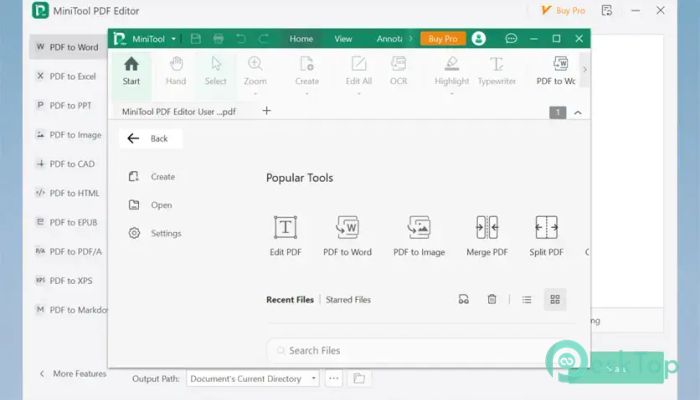
One of the strongest features is its powerful conversion engine. It supports converting PDF files into multiple popular formats, including Word, Excel, PowerPoint, images, TXT, HTML, EPUB, CAD, PDF/A, XPS, and Markdown. It also supports converting these formats back into PDF.
This functionality acts like a bridge between different file types. Instead of manually recreating documents, users can quickly transform files while preserving important content and formatting.
OCR Technology for Scanned Documents
Working with scanned PDFs is often challenging because the content cannot be edited directly. The software solves this problem through Optical Character Recognition (OCR) technology. OCR converts scanned pages into editable and searchable documents.
This feature is especially useful for businesses, students, and researchers who frequently work with printed materials. It reduces manual typing and makes information easier to access and modify.
Easy PDF Merging and Splitting
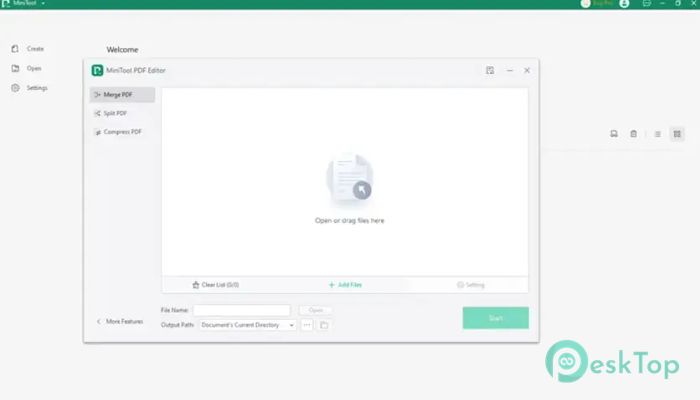
Handling multiple PDF files becomes much easier with built-in merge and split tools. Users can combine several documents into a single, organized file or split a large document into smaller sections.
This flexibility is ideal for organizing reports, presentations, contracts, and educational materials. Instead of managing numerous files, everything can be arranged according to specific needs.
Secure Documents with Digital Signatures
Security is an important part of document management. The tool allows users to digitally sign PDF files using standard or transparent signatures. This helps verify authenticity and confirms document ownership.
Users can manage digital IDs, validate signatures, and remove signatures when needed. These capabilities provide an additional layer of trust when sharing important documents.
Protect Sensitive Information with Redaction
Confidential information should never fall into the wrong hands. The software includes a powerful redaction feature that permanently removes sensitive content from PDF files.
Users can redact individual sections or process multiple files in batches. Customizable redaction colors offer additional flexibility while ensuring that removed information cannot be recovered.
Comprehensive Annotation Tools
Reviewing and collaborating on documents becomes easier with the extensive annotation features. Users can highlight text, underline important sections, add notes, insert stamps, create bookmarks, and draw shapes directly on PDF pages.
Additional tools such as arrows, lines, pencils, attachments, stickers, and typewriter functions make document reviews more interactive. It is like having a digital marker set ready whenever needed.
Image and File Conversion Support
Beyond PDF conversion, the software also supports image conversion. Users can convert images between JPG, PNG, BMP, and ICO formats. It also supports converting HEIC images and Office files into image formats.
This extra functionality makes the tool more versatile and reduces the need for additional conversion applications.
User-Friendly Interface and Productivity
The software is designed with simplicity in mind. Its clean layout makes navigation easy, even for beginners. Important tools are organized logically, allowing users to find functions quickly and complete tasks efficiently.
By combining editing, conversion, annotation, security, and document management features into a single platform, it improves productivity and streamlines daily workflows.
System Requirements and Technical Details
Operating System: Windows 11 / 10 / 8.1 / 7
Processor: Minimum 1 GHz Processor (2.4 GHz recommended)
RAM: 2GB (4GB or more recommended)
Free Hard Disk Space: 200MB or more is recommended

-
Program size24.66 MB
-
Version1.0
-
Program languagemultilanguage
-
Last updatedBefore 3 Month
-
Downloads37
 CoolUtils PDF Combine
 NAPS2 - Not Another PDF Scanner
 FocusWriter
 Atlantis Word Processor
 AI Offline OCR Scanner Pro
 Xappex XL-Connector