
 Arabic
  English
  Turkish
  Chinese
  Japanese
  Russian
  Spanish
  German
  French
  Hindi
Hindi Download MiniTool Photo Recovery 1.0 for Windows
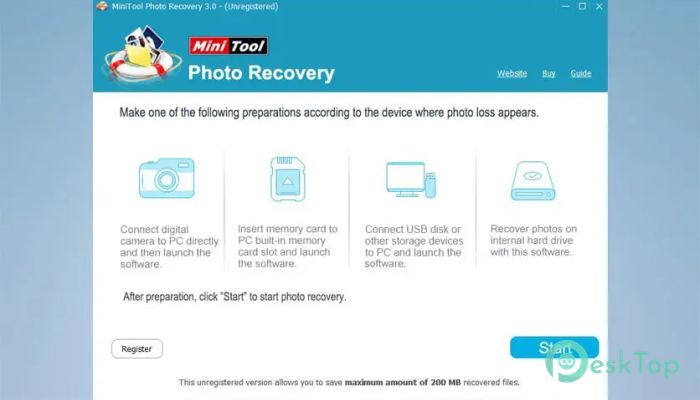
Download MiniTool Photo Recovery 1.0 for Windows.
MiniTool Photo Recovery Overview
Losing precious photos can feel like watching your favorite memories disappear into thin air. Fortunately, this software is designed to bring those lost moments back. It offers a simple and secure way to recover deleted photos, videos, and audio files from different storage devices without risking further damage to your data. The tool operates in read-only mode, meaning it never modifies the original data during recovery. This makes the recovery process safer and more reliable. Whether files were deleted accidentally, lost after formatting, or corrupted by disk errors, it provides an effective solution for recovering them.Features of MiniTool Photo Recovery
Simple and User-Friendly Interface
One of the biggest strengths of the software is its clean and straightforward interface. You do not need advanced technical knowledge to recover files successfully. Everything is organized simply, allowing users to start scanning drives and recovering data within minutes.
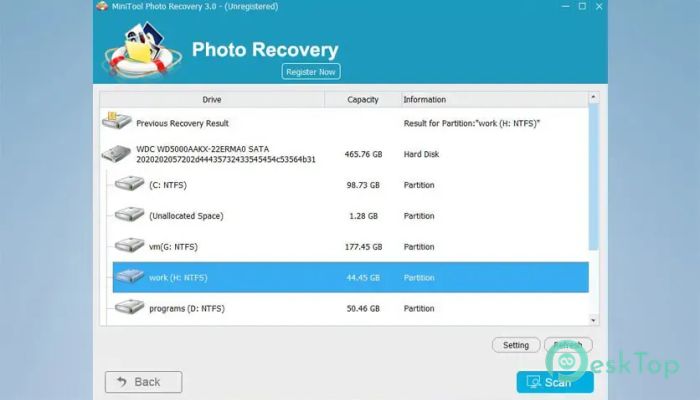
The recovery process is completed in just a few steps. Select the drive, scan for lost files, preview the results, and save the recovered data. This simplicity makes it suitable for both beginners and experienced users.
Reliable Read-Only Recovery Technology
Safety is often the biggest concern when recovering lost data. The software addresses this concern by operating in a read-only mode. Instead of writing new information to the storage device, it only reads the existing data and extracts recoverable files.
This approach minimizes the risk of overwriting valuable information. Think of it as carefully picking up scattered puzzle pieces without disturbing the rest of the picture. As a result, users can recover files with greater confidence and peace of mind.
Recover Photos from Digital Cameras
Digital cameras store thousands of valuable memories. Unfortunately, accidental deletion, formatting, or memory card corruption can make those files inaccessible. The software specializes in recovering photos from different types of digital cameras and their storage media.
Whether the images were captured during a family vacation, a wedding, or a professional photoshoot, the tool can help restore them quickly. It supports common image formats and works with a wide variety of camera brands and memory cards.
Support for Multiple Storage Devices
Modern users store files on many different devices. The software supports recovery from hard drives, SSDs, SD cards, memory cards, USB flash drives, external storage devices, and other digital media.
This broad compatibility ensures that users are not limited to a single recovery source. No matter where the files were stored, the tool provides a convenient way to scan and recover lost content.
Recover Videos and Audio Files
Photos are not the only valuable files people lose. Videos often capture important moments, while audio recordings may contain interviews, lectures, or personal memories. The software can recover these files alongside images.
Its advanced scanning engine searches storage devices thoroughly to locate recoverable multimedia content. This all-in-one capability eliminates the need to install separate recovery programs for different file types.
Recover Data from Formatted Drives
Formatting a drive can instantly make files disappear. Many users assume their data is gone forever after formatting a memory card or storage device. However, the information often remains until it is overwritten.
The software can scan formatted partitions and locate recoverable files. This feature is particularly useful for photographers, content creators, and everyday users who accidentally format the wrong storage device.
Works with Damaged and Corrupted Storage Media
Storage devices can be damaged by improper removal, power failures, file system errors, or virus attacks. These issues may prevent files from being accessed normally.
The recovery engine is designed to work with damaged and corrupted storage media whenever possible. By scanning deeply into the device, it can locate files that remain hidden from standard operating system tools.
Fast Three-Step Recovery Process
Recovering lost data does not need to be complicated. The software follows a simple three-step workflow that saves time and reduces confusion.
First, choose the storage device you want to scan. Second, allow the software to search for lost files. Third, preview and save the recoverable content to a safe location. This streamlined process makes data recovery accessible to everyone.
Efficient Scanning Performance
The software is designed to deliver quick, accurate scanning results. It intelligently searches storage devices to identify deleted and lost files while maintaining excellent recovery performance.
Users can locate important files faster and spend less time waiting. This efficiency becomes especially valuable when scanning larger hard drives or memory cards filled with thousands of files.
Preview Before Recovery
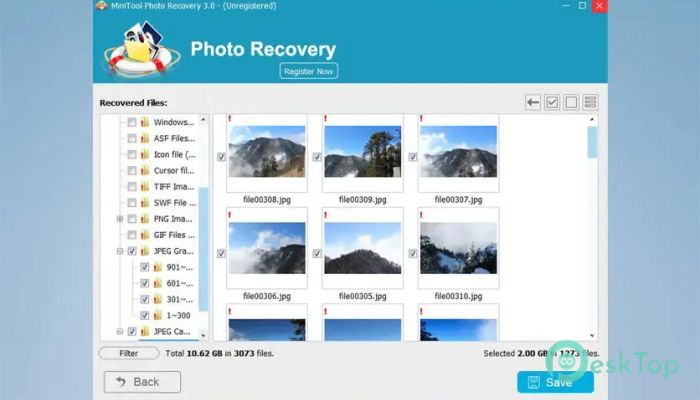
Recovering unnecessary files can waste both time and storage space. The preview feature allows users to examine recoverable content before saving it.
This helps confirm that the desired files are available and reduces the effort required to sort through large recovery results. It also improves overall recovery efficiency by focusing only on important files.
System Requirements and Technical Details
Operating System: Windows 11 / 10 / 8.1 / 7
Processor: Minimum 1 GHz Processor (2.4 GHz recommended)
RAM: 2GB (4GB or more recommended)
Free Hard Disk Space: 200MB or more is recommended

-
Program size16.47 MB
-
Version1.0
-
Program languagemultilanguage
-
Last updatedBefore 2 Month
-
Downloads29
 Lazesoft Data Recovery
 Lazesoft Windows Recovery
  Lazesoft Recovery Suite
 Lazesoft Recover My Password
 Lazesoft Recovery Suite Technician
 Windows Password Recovery Tool Ultimate