
 Arabic
  English
  Turkish
  Chinese
  Japanese
  Russian
  Spanish
  German
  French
  Hindi
Hindi Download MurGeeMon Dual Monitor 1.0 for Windows
Download MurGeeMon Dual Monitor 1.0 for Windows.
MurGeeMon Dual Monitor Overview
Managing two or more monitors does not have to be difficult. The software gives you a simple way to control your display setup without digging through Windows settings every time. Whether you want to switch your primary monitor, disable a secondary display, or change screen layouts, you can do it with just a few clicks. It is designed for users who work with laptops, desktops, external monitors, projectors, or TVs. By offering quick shortcuts and hotkeys, the tool saves time and makes switching between display modes almost effortless.Features of MurGeeMon Dual Monitor
Easy Multi-Monitor Management
The software makes handling multiple monitors as easy as flipping a light switch. Instead of opening several Windows menus, you can instantly change your monitor settings from one place. This is especially useful for professionals, gamers, and anyone who regularly connects external displays.
You can easily change the primary monitor, enable or disable a secondary display, and manage your desktop layout without restarting your computer.
Quickly Switch Primary Monitor
Changing the primary display is one of its most useful features. If you connect an external monitor to your laptop, you can instantly make it your main display. Likewise, you can switch back to your laptop screen whenever needed.
This simple feature is perfect for office presentations, home workstations, and entertainment setups where display preferences often change.
Clone and Extend Display Modes
The tool allows you to switch between Clone Mode and Extended Mode in seconds. Clone Mode displays the same content on every connected monitor, making it ideal for presentations or connecting your computer to a television.
Extended Mode creates one large workspace across multiple screens. You can move windows freely between monitors, giving you more room to work and improving productivity.
Desktop Shortcuts for Display Settings
Instead of manually changing display options every time, the software lets you create desktop shortcuts for your favorite monitor configurations. A single click can activate Clone Mode, Extended Mode, or other display arrangements.
This saves valuable time and makes everyday monitor management much more convenient.
Global Hotkey Support
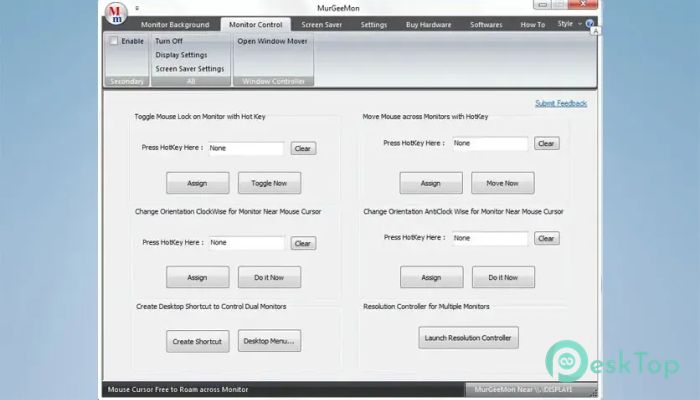
Keyboard shortcuts make everything faster, and this utility fully embraces that idea. You can assign system-wide hotkeys to instantly perform different monitor actions.
With one key combination, you can switch display modes, change monitor layouts, or activate your preferred screen configuration without opening the application.
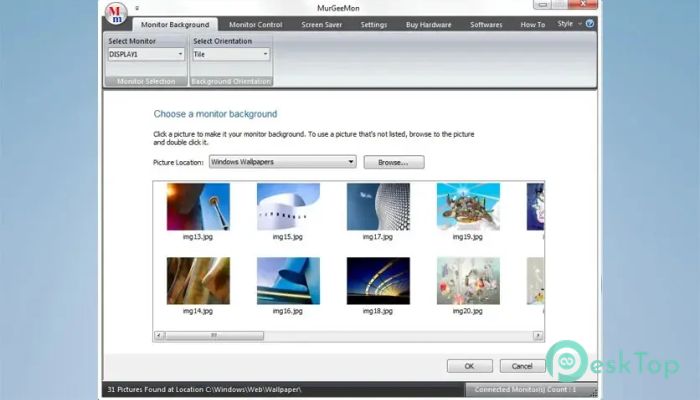
Wallpaper Control for Individual Monitors
Unlike the default Windows behavior, which often stretches a wallpaper across multiple displays, the software allows you to assign different backgrounds to individual monitors.
This gives your desktop a cleaner and more personalized appearance. Every connected display can have its own wallpaper, making your workspace look more organized.
Simple Resolution Management
Changing screen resolution becomes much easier with built-in resolution controls. Instead of navigating through Windows settings, you can switch monitor resolutions using shortcuts or a single click.
This is particularly useful when moving between office monitors, projectors, televisions, and high-resolution displays that require different settings.
Works with TVs and Projectors
The tool works well with external televisions and projectors connected through HDMI or other display ports. Clone Mode lets everyone see the same content on every screen, making meetings, presentations, and movie watching much easier.
Its flexible display controls help users adapt to different devices without repeatedly changing Windows display settings.
Improves Productivity
Working with multiple monitors is like having a larger desk. You gain extra space to organize documents, browse the web, edit videos, write code, or monitor multiple applications at once.
By simplifying monitor management, the software helps you stay focused on your work instead of spending time adjusting display settings.
User-Friendly Interface
Everything is presented through a clean and straightforward interface. Even users with little technical knowledge can configure multiple monitors without confusion.
The software focuses on speed and simplicity, making everyday display management comfortable for beginners as well as experienced users.
System Requirements and Technical Details
Operating System: Windows 11 / 10 / 8.1 / 7
Processor: Minimum 1 GHz Processor (2.4 GHz recommended)
RAM: 2GB (4GB or more recommended)
Free Hard Disk Space: 200MB or more is recommended

-
Program size885.45 KB
-
Version1.0
-
Program languagemultilanguage
-
Last updatedBefore 2 Month
-
Downloads10
 Reuschtools ClassicMenu
 AI Aquarium Screensaver
  Rainmeter
 Rainlendar Pro
 N-Button Pro
 Stardock DeskScapes