
 Arabic
  English
  Turkish
  Chinese
  Japanese
  Russian
  Spanish
  German
  French
  Hindi
Hindi Download MurGeeMon Screensaver 1.0 for Windows
Download MurGeeMon Screensaver 1.0 for Windows.
MurGeeMon Screensaver Overview
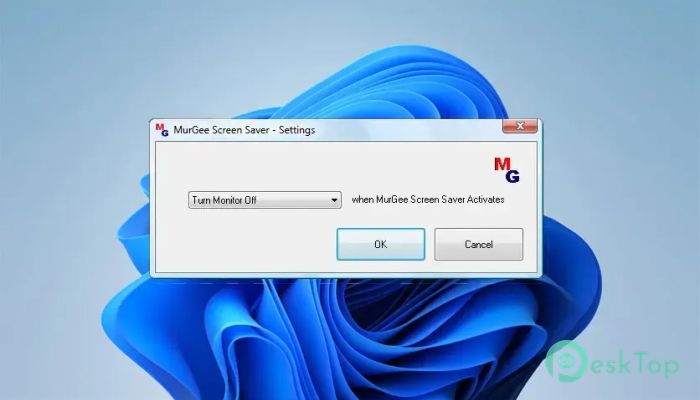
The software is much more than a traditional screen saver. Instead of only displaying animations, it can perform practical tasks that help reduce electricity usage and improve computer security. Once the selected idle time is reached, it automatically carries out the action you have configured. It works through the standard Windows Screen Saver settings, making setup familiar and straightforward. You only need to choose an action from its settings, define the inactivity period in Windows, and let the tool handle everything automatically.Features of MurGeeMon Screensaver
Easy to Configure
The tool is designed with simplicity in mind. Installation takes only a few moments, and configuring it is just as easy. After installing it, open the settings window, choose your preferred action, and specify how long the computer should remain idle before the screen saver starts.
Since everything works through the built-in Screen Saver Properties window, you don't have to learn a new interface. It feels just like configuring any other Windows screen saver.
Save Electricity Without Extra Software
One of the biggest advantages is its ability to reduce unnecessary power consumption. Instead of leaving your monitor running for hours, it can automatically turn off the display after a period of inactivity.
Think of it as a smart light switch for your monitor. When you're away, it quietly saves electricity while your applications continue running in the background without interruption.
Multiple Automatic Actions
The software offers much more than simply turning off the monitor. Depending on your needs, it can perform several useful actions whenever the system remains inactive.
Available actions include shutting down the computer, hibernating the system, locking the computer, logging off the current user, displaying a blank screen, or simply switching off the monitor. This flexibility allows you to choose the option that best fits your daily workflow.
Works with Windows Screen Saver Settings
The software integrates directly with Windows instead of running continuously in the background. Once you set the idle time in the Screen Saver Properties dialog, Windows automatically launches it when the selected inactivity period is reached.
This approach keeps resource usage low while ensuring that the selected action runs exactly when it should.
Useful for Computer Security
Leaving a computer unattended can expose important files or personal information. The tool helps protect your privacy by automatically locking or logging you off the system after inactivity.
Whether you're working in an office or at home, this feature adds an extra layer of security without requiring any manual effort.
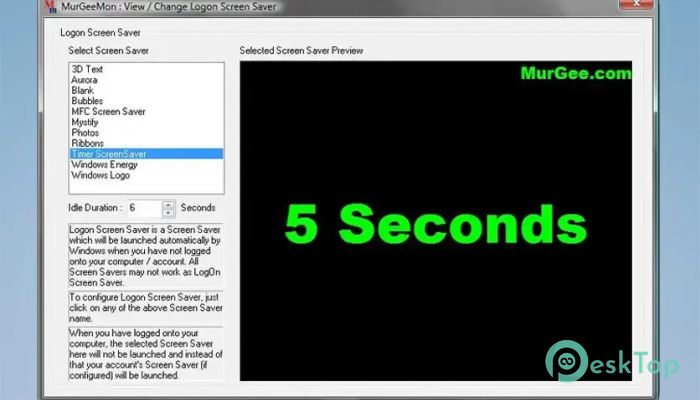
Supports LogOn Screen Saver
Another helpful feature is its ability to work as a Logon Screen Saver. Even when no user is currently logged in to Windows, it can automatically turn off the monitor to reduce unnecessary power consumption.
This makes it useful for offices, shared workstations, libraries, and public computers where systems often remain powered on throughout the day.
Runs Only When Needed
Unlike many utility programs that constantly stay active, this software starts only after Windows detects inactivity. This means it does not unnecessarily consume system resources during normal computer use.
It quietly waits for the configured idle time and performs the selected action only when required.
Free Trial Without Annoying Restrictions
The software is available as a free trial, allowing users to experience all features before purchasing. During the trial period, there are no advertisements, no locked functions, and no annoying pop-up messages interrupting your work.
It works fully for up to twenty activations. After that, it simply informs you that the trial period has ended.
Perfect for Home and Office Use
The software fits a variety of situations. Home users can reduce electricity bills by automatically turning off the monitor, while businesses can improve both energy efficiency and workplace security.
Because everything happens automatically after inactivity, you never have to remember to shut down or lock your computer before stepping away.
System Requirements and Technical Details
Operating System: Windows 11 / 10 / 8.1 / 7
Processor: Minimum 1 GHz Processor (2.4 GHz recommended)
RAM: 2GB (4GB or more recommended)
Free Hard Disk Space: 200MB or more is recommended

-
Program size305.78 KB
-
Version1.0
-
Program languagemultilanguage
-
Last updatedBefore 2 Month
-
Downloads6
 Reuschtools ClassicMenu
 AI Aquarium Screensaver
  Rainmeter
 Rainlendar Pro
 N-Button Pro
 Stardock DeskScapes