
 Arabic
  English
  Turkish
  Chinese
  Japanese
  Russian
  Spanish
  German
  French
  Hindi
Hindi Download MyLanViewer Business 6.6.5 for Windows
Download MyLanViewer Business 6.6.5 for Windows.
MyLanViewer Business Overview
The software is a powerful LAN and IP scanner that simplifies network management for both home and business users. Developed for Windows, it offers advanced tools for discovering all connected devices, viewing their details, and managing network activities. With its intuitive interface and extensive range of features, it offers a user-friendly solution for monitoring both wired and wireless networks.Features of MyLanViewer Business
Network Scanning and Device Detection
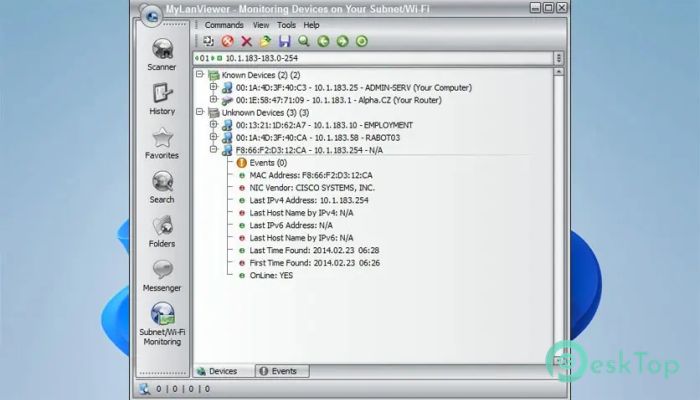
One of the main strengths of this tool is its ability to scan accurately. It can detect all devices connected to a network, including those that are hidden. The scanner displays each device’s IP address, MAC address, computer name, and other technical details in an easy-to-read list format. This makes it ideal for users who want complete visibility of their network environment.
Access and Manage Shared Resources
The software allows users to view and access shared folders and files across the network. It can also terminate user sessions, disable shared folders, and identify unauthorized or rogue devices. This ensures better security and control over what resources are available within the network.
Remote Management Features
Another valuable aspect of the tool is its remote management capability. It supports remote shutdown, restart, hibernate, sleep, and wake-on-LAN commands. Users can easily manage multiple computers without needing physical access. This functionality makes it especially useful for administrators handling office or school networks.
Real-Time Monitoring and Alerts
In addition to scanning, the software continuously monitors the network for changes. It provides real-time alerts when a device connects or disconnects, helping users stay informed about their network’s activity. Whether it’s someone connecting to your Wi-Fi or a new device appearing in the subnet, the program instantly notifies you.
User-Friendly Interface
The tool stands out for its simple and visually appealing interface. Even beginners can easily navigate through its features. The main window presents all detected devices in a buddy-list style layout, making it easy to understand and operate. Its clean design and responsive performance enhance the overall user experience.
Security and Network Control
Security is a core part of this software’s design. It can detect rogue DHCP servers and prevent unwanted network changes. Administrators can track active user sessions, monitor bandwidth, and review network statistics. This helps maintain a stable and secure environment for both private and business networks.
Additional Utilities and Tools
Beyond basic scanning, the software includes extra utilities such as WHOIS, traceroute, and Netstat information. These tools give detailed insights into network activity and device origins. They are particularly helpful for diagnosing connectivity problems and identifying unauthorized access points.
Ease of Installation and Compatibility
The installation process is straightforward and requires no complex setup. Once installed, it automatically detects available networks and starts scanning. It works smoothly on most Windows versions and doesn’t demand heavy system resources, ensuring reliability and speed even on older computers.
System Requirements and Technical Details
Operating System: Windows 11 / 10 / 8.1 / 7
Processor: Minimum 1 GHz Processor (2.4 GHz recommended)
RAM: 2GB (4GB or more recommended)
Free Hard Disk Space: 200MB or more is recommended

-
Program size5.12 MB
-
Version6.6.5
-
Program languagemultilanguage
-
Last updatedBefore 10 Month
-
Downloads38
 RealVNC VNC Server Enterprise
 CrushFTP
 Reqable
 AnyDesk
 AmneziaVPN
 CurrPorts