
 Arabic
  English
  Turkish
  Chinese
  Japanese
  Russian
  Spanish
  German
  French
  Hindi
Hindi Download NCH VideoPad Video Editor Free 1.0 for Windows

Download NCH VideoPad Video Editor Free 1.0 for Windows.
NCH VideoPad Video Editor Free Overview
This application is designed for people who want professional-looking results without spending weeks learning advanced tools. It balances speed, control, and flexibility in a way that feels natural from the first launch. Whether you are trimming short clips or assembling a full-length project, the workflow stays smooth and predictable.Features of NCH VideoPad Video Editor Free
User-Friendly Editing Experience
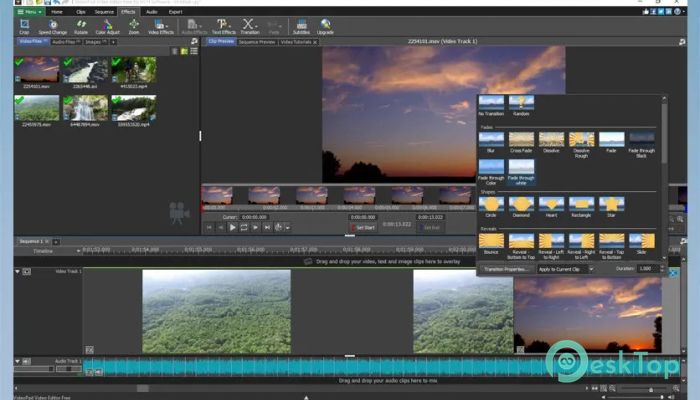
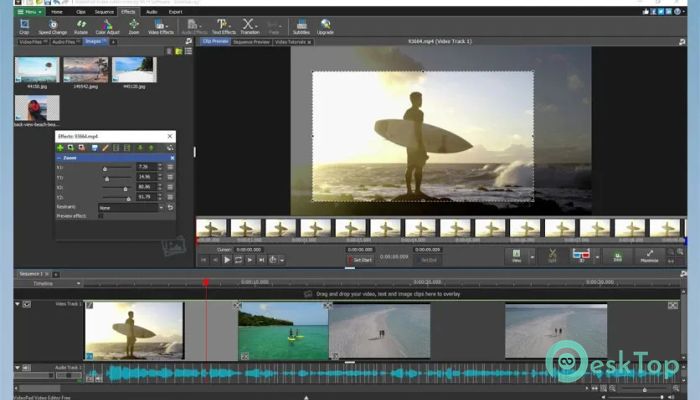
Everything feels straightforward. Clips can be dropped directly onto the timeline like placing puzzle pieces on a table. Trimming, splitting, and rearranging footage happen with simple mouse actions. The layout is clean, so your focus stays on storytelling rather than hunting for buttons.
Wide Format Compatibility
The software works well with most common video formats. Footage from action cameras, webcams, old VHS transfers, or screen recordings can all sit together in one project. This flexibility saves time by eliminating the need to convert files before you start your work.
Professional Transitions and Effects
Visual polish matters, and this tool delivers it with ease. More than fifty transitions and effects are available to enhance scenes. Adding them feels like seasoning a dish: a small touch can completely change the flavor without overpowering the content.
Fast Video Processing Performance
Speed is one of its strongest qualities. Rendering and previewing happen quickly, even on modest systems. This means fewer interruptions and more creative momentum. You spend time shaping your video instead of waiting for progress bars to crawl forward.
Flexible Export and Sharing Options
Once editing is complete, sharing becomes effortless. Projects can be prepared for online platforms, high-definition playback, or physical media. Export presets help match the right quality and resolution without technical guesswork, making final delivery stress-free.
Creative Control Made Simple
Despite its simplicity, creative control remains strong. Playback speed can be adjusted for dramatic slow motion or energetic fast cuts. Color and visual adjustments help balance lighting and mood. Each change feels responsive, like adjusting a camera lens rather than wrestling with software.
Reliable for Beginners and Regular Users
This editor is ideal for beginners who want quick results and for regular users who value efficiency. The learning curve is gentle, but the depth is enough to support repeated projects. It feels like a dependable tool you can return to again and again.
System Requirements and Technical Details
Operating System: Windows 11 / 10 / 8.1 / 7
Processor: Minimum 1 GHz Processor (2.4 GHz recommended)
RAM: 2GB (4GB or more recommended)
Free Hard Disk Space: 200MB or more is recommended

-
Program size8.39 MB
-
Version1.0
-
Program languagemultilanguage
-
Last updatedBefore 3 Month
-
Downloads66
 Aescripts Autokroma AfterCodecs
 Boris FX Silhouette
 RE:VisionFX ARRI Film Lab
 Gilisoft Video UniReel
 iFunia Video Editor
 Innovision MaxPRO