
 Arabic
  English
  Turkish
  Chinese
  Japanese
  Russian
  Spanish
  German
  French
  Hindi
Hindi Download NetIPManager 1.0 for Windows
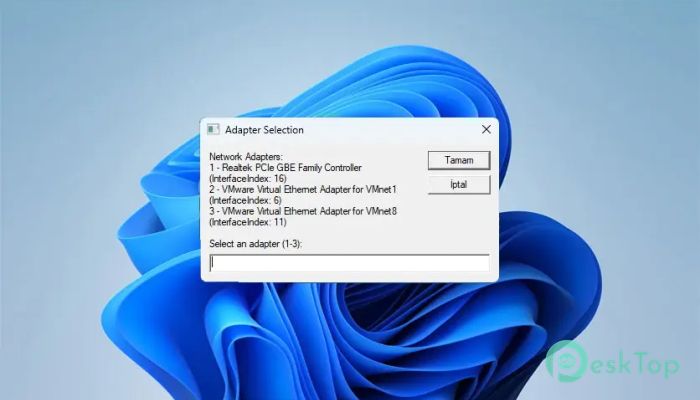
Download NetIPManager 1.0 for Windows.
NetIPManager Overview
Managing network settings on Windows can feel like walking through a maze. You click through multiple windows just to change an IP address. This tool simplifies that entire journey into a single step. Instead of going through the Control Panel and deep system options, it gives you a direct path to quickly and safely configure your network. The software is built using VBScript and focuses on automation. It helps users assign static IPv4 addresses or switch back to DHCP without confusion. Whether you are a beginner or someone managing multiple systems, network configuration becomes faster and easier.Features of NetIPManager
Easy One-Step Network Configuration
Imagine having to unlock five doors just to reach a single room. That is what traditional network configuration feels like. This tool removes all those doors, giving you instant access. With just one run, you can change your IP settings without opening multiple windows.
The process is straightforward. Instead of manually navigating through network settings, the tool handles everything behind the scenes. It saves time and reduces the chances of making mistakes.
Smart Adapter Discovery
One standout feature is its ability to automatically detect all available network adapters. You do not need to guess which adapter is active. The tool lists all IP-enabled adapters and allows you to choose the correct one.
This selection process runs in a loop, preventing you from accidentally selecting the wrong option. It keeps prompting until a valid choice is made, which adds an extra layer of safety.
Flexible Mode Selection
The software gives you two simple options. You can either set a static IP or switch to DHCP. It uses clear input commands, such as S for static and “D” for DHCP, making it easy for anyone to understand.
The input is validated in a loop, so incorrect entries are not accepted. This ensures that the process continues only when the correct option is selected.
Accurate IPv4 Validation
Entering wrong IP details can break your internet connection. That is why this tool includes built-in validation for IPv4 addresses. It checks the format of each input, including IP addresses, subnet masks, gateways, and DNS servers.
This feature acts like a safety net. It prevents invalid entries and ensures that all configurations follow proper IPv4 standards. As a result, users can confidently apply settings without worrying about errors.
Automatic DHCP Switching
Switching back to DHCP usually requires manual steps. This tool makes it automatic. When you choose DHCP mode, it clears all manual IP and DNS settings instantly.
It also restarts the network adapter by disabling and enabling it. This ensures that the new settings are applied correctly. Think of it as refreshing your connection with a single click.
Efficient Static IP Setup
Setting a static IP address is straightforward. The tool first removes any existing configuration. Then it applies the new IP address, subnet mask, gateway, and DNS servers.
All of this is done using WMI, which is a reliable Windows management interface. The process is fast and ensures that the network settings are updated without conflicts.
Reliable Error Handling
Errors can happen during system operations, but this tool is prepared for them. It includes detailed error handling that catches issues at every step. If something goes wrong, it reports the problem clearly and stops the process.
This prevents partial configurations and keeps your system safe. It ensures that changes are only applied when everything is working correctly.
Time-Saving Automation
Time is valuable, especially when managing multiple devices. This tool acts as a shortcut, skipping unnecessary steps. Instead of spending minutes navigating settings, you can complete the task in seconds.
It is especially useful for IT professionals, students, and anyone who frequently changes network configurations. The automation reduces effort and increases efficiency.
User-Friendly Design
The design focuses on simplicity. There are no complicated interfaces or confusing options. Everything is presented clearly, making it easy to follow.
Even if you are not tech-savvy, you can use it without difficulty. It feels like having a guide that walks you through each step.
Safe and Controlled Operations
Safety is a key aspect of this tool. Every action is controlled and validated. From adapter selection to IP entry, each step ensures accuracy.
This controlled approach minimizes risks and prevents incorrect configurations. It gives users peace of mind while making changes to network settings.
System Requirements and Technical Details
Operating System: Windows 11 / 10 / 8.1 / 7
Processor: Minimum 1 GHz Processor (2.4 GHz recommended)
RAM: 2GB (4GB or more recommended)
Free Hard Disk Space: 200MB or more is recommended

-
Program size26.78 KB
-
Version1.0
-
Program languagemultilanguage
-
Last updatedBefore 3 Month
-
Downloads45
 RealVNC VNC Server Enterprise
 CrushFTP
 Reqable
 AnyDesk
 AmneziaVPN
 CurrPorts