
 Arabic
  English
  Turkish
  Chinese
  Japanese
  Russian
  Spanish
  German
  French
  Hindi
Hindi Download NetScan - Network Inventory Scanner 1.0 for Windows
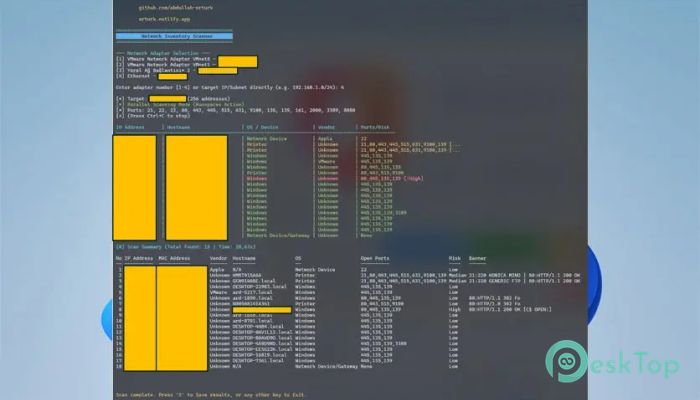
Download NetScan - Network Inventory Scanner 1.0 for Windows.
NetScan - Network Inventory Scanner Overview
Managing a network without visibility is like driving in the dark without headlights. This powerful scanning solution helps you quickly identify every device connected to your network and provides detailed insights about each one. It performs fast parallel scans, allowing administrators to gather data from large networks within minutes rather than hours. The software focuses on network asset discovery, making it especially useful for IT professionals, system administrators, and businesses seeking greater control over their infrastructure. It automatically identifies manufacturers, operating systems, IP addresses, and other key information. This means less manual work and more accurate results. Another standout aspect is its risk analysis feature. The tool doesn't just list devices; it also highlights potential vulnerabilities and outdated systems. This makes it easier to secure networks before problems occur. Whether you're managing a small office or a large enterprise, it delivers reliable results quickly and efficiently.Features of NetScan - Network Inventory Scanner
Fast Parallel Network Scanning
Speed matters when scanning a network, especially in large environments. This solution uses parallel-scanning technology, enabling multiple devices to be scanned simultaneously. Instead of checking one device at a time, it scans hundreds at once. Think of it like using multiple lanes on a highway instead of a single road. The process becomes much faster and more efficient.
This approach reduces waiting time and improves productivity. Administrators can perform frequent scans without disrupting workflows. It also helps in identifying new devices instantly, ensuring better control over network activity.
Comprehensive Network Asset Discovery
Understanding what exists on your network is essential. The software automatically detects all connected devices, including computers, servers, routers, printers, and IoT devices. It gathers detailed information, including IP addresses, MAC addresses, hostnames, and device types.
This level of discovery provides a clear picture of your infrastructure. It helps organizations maintain accurate records of their assets. In addition, it simplifies troubleshooting by showing exactly what is connected and where.
Manufacturer Detection and Device Identification
One of the most useful features is manufacturer detection. The tool identifies hardware vendors using MAC address lookup technology. This means you can instantly see whether a device belongs to Cisco, HP, Dell, or another vendor.
This capability is helpful when managing mixed hardware environments. It allows administrators to categorize devices and plan upgrades more effectively. Instead of guessing, you get precise information in seconds.
Operating System Detection
Knowing which operating systems are running on your network is critical. The software detects operating systems automatically and provides accurate results. Whether devices run Windows or other platforms, the information is displayed clearly.
This helps administrators ensure compatibility and security. It also allows teams to identify outdated systems that may require updates. With this information, maintaining a secure environment becomes easier.
Built-In Risk Analysis
Security risks often hide in plain sight. This solution performs risk analysis to identify potential vulnerabilities. It highlights outdated systems, unsecured devices, and suspicious configurations.
Think of it like a health checkup for your network. The tool scans everything and points out areas that need attention. This proactive approach helps prevent downtime, data breaches, and security incidents.
Detailed HTML Report Generation
Reports play a vital role in network management. The software generates detailed HTML reports that are easy to read and share. These reports include device lists, operating system details, manufacturer information, and risk analysis results.
This feature simplifies documentation and auditing. Administrators can export results and share them with team members or management. It also helps maintain historical records for future reference.
User-Friendly Interface
Complex tools often slow down productivity. This solution focuses on simplicity and ease of use. The interface is clean and intuitive, allowing users to start scanning quickly without complicated setup.
Even beginners can perform scans with minimal effort. At the same time, advanced users benefit from powerful features and customization options. This balance makes it suitable for a range of skill levels.
Reliable Performance and Accuracy
Accuracy is essential in network scanning. The software delivers consistent and reliable results. It minimizes false positives and ensures data accuracy.
This reliability helps administrators make informed decisions. When information is trustworthy, managing networks becomes much easier.
Ideal for Businesses and IT Professionals
This scanning solution is well-suited to a wide range of environments. Small businesses benefit from quick setup and easy monitoring. Large enterprises appreciate the scalability and performance.
IT professionals use it for troubleshooting, auditing, and security analysis. The flexibility makes it a valuable addition to any network management toolkit.
Lightweight and Efficient
Heavy software can slow down systems. This tool is lightweight and optimized for performance. It runs smoothly even on modest hardware.
This ensures minimal system impact during scanning. Users can continue working while scans run in the background.
System Requirements and Technical Details
Operating System: Windows 11 / 10 / 8.1 / 7
Processor: Minimum 1 GHz Processor (2.4 GHz recommended)
RAM: 2GB (4GB or more recommended)
Free Hard Disk Space: 200MB or more is recommended

-
Program size700.61 KB
-
Version1.0
-
Program languagemultilanguage
-
Last updatedBefore 3 Month
-
Downloads60
 RealVNC VNC Server Enterprise
 CrushFTP
 Reqable
 AnyDesk
 AmneziaVPN
 CurrPorts