
 Arabic
  English
  Turkish
  Chinese
  Japanese
  Russian
  Spanish
  German
  French
  Hindi
Hindi Download O-K Print Watch 4.19.0.5296 for Windows
Download O-K Print Watch 4.19.0.5296 for Windows.
O-K Print Watch Overview
Managing printing across an organization can sometimes feel like trying to control water flowing through dozens of pipes. Without proper visibility, printing costs can quickly rise, waste increases, and tracking activity becomes difficult. This software solves that problem by giving administrators complete insight into printing operations. The tool is designed for businesses, schools, government offices, and other organizations that rely on multiple printers. It tracks every print job, records important details, and provides valuable reports that help decision-makers understand how printing resources are being used. Making printing transparent and measurable helps organizations reduce waste, improve accountability, and keep printing expenses under control.Features of O-K Print Watch
Comprehensive Print Monitoring
One of the most useful features is its ability to monitor all printing activities across local and network printers. Every print job is recorded with detailed information, making it easy to understand exactly what is happening within the printing environment.
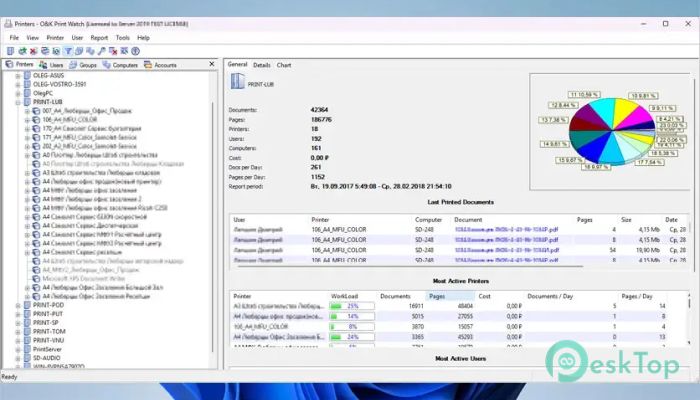
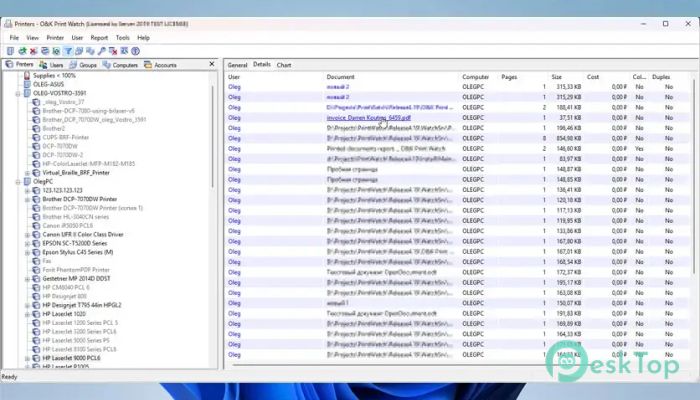
Administrators can see who printed a document, when it was printed, which printer was used, and how many pages were produced. This level of visibility eliminates guesswork and provides accurate data for better management decisions.
Instead of relying on estimates, businesses gain access to real-time information that highlights usage patterns and printing behavior.
Reduce Printing Costs Effectively
Printing expenses often go unnoticed until they become a significant part of the company budget. The software helps identify where money is being spent and where savings can be achieved.
Detailed reports allow managers to analyze printing by user, department, printer, or selected time period. This makes it easier to identify excessive printing, unnecessary color printing, and devices that incur higher operating costs.
With clear usage statistics available, organizations can implement smarter printing strategies and reduce unnecessary expenses.
Advanced Print Policy Control
Controlling printing behavior is essential for maintaining efficiency. The tool allows administrators to create customized rules and restrictions for users, groups, and departments.
Policies can limit color printing, restrict large print jobs, control page counts, or block printing under specific conditions. These rules help prevent waste while ensuring that printing resources are used responsibly.
Think of it as having a traffic control system for your printers, guiding every job through predefined rules to keep operations smooth and efficient.
User Quotas and Permissions
Different departments often have different printing needs. Some teams may require frequent printing, while others only print occasionally. The software makes it easy to assign quotas and permissions based on organizational requirements.
Managers can define limits for individual users, departments, or groups. This encourages responsible usage and helps ensure that printing resources are distributed fairly throughout the organization.
By setting clear boundaries, businesses can avoid excessive printing while maintaining productivity.
Archive Printed Documents Automatically
Keeping a record of printed documents can be extremely valuable for auditing, compliance, and troubleshooting purposes. The software automatically saves print jobs as PDF files for future reference.
This feature creates a complete archive of printed documents without requiring additional effort from employees. When questions arise about a particular print job, administrators can quickly access the stored copy and review its contents.
The result is improved accountability, better record keeping, and easier incident investigation.
Detailed Reporting and Analytics
Raw data becomes much more useful when it is transformed into meaningful reports. The software provides comprehensive reporting tools that help organizations understand printing trends and usage patterns.
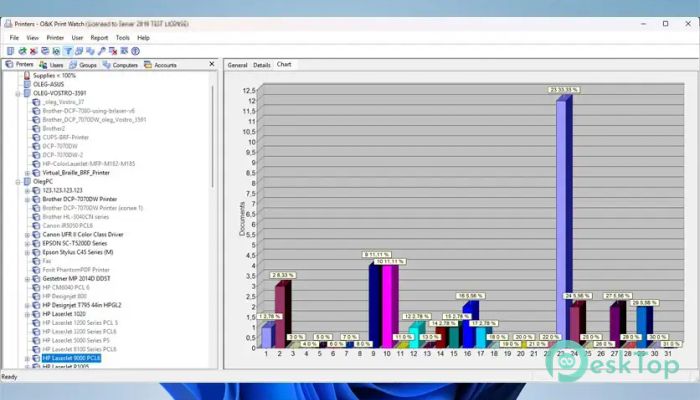
Reports can highlight the most active users, busiest printers, highest-cost departments, and periods of heavy printing activity. These insights help management make informed decisions regarding printer deployment and resource allocation.
By identifying problem areas early, organizations can take corrective action before costs become excessive.
Monitor Toner and Supplies
Running out of toner or supplies at the wrong time can disrupt productivity. The tool helps prevent this problem by monitoring consumables such as toner, ink cartridges, drums, and other printer components.
Network printer status information allows administrators to keep track of supply levels and plan replacements before shortages occur. This proactive approach minimizes downtime and ensures that printers remain available when needed.
It also helps organizations avoid emergency purchases that often cost more than planned replacements.
Fair Cost Allocation
Many organizations struggle to distribute printing expenses fairly among departments. Without accurate tracking, budgeting can become complicated and sometimes inaccurate.
The software simplifies this process by precisely measuring usage. Each department's printing volume and associated costs can be calculated automatically, creating a transparent chargeback system.
This ensures that every team contributes its fair share of the printing budget while promoting responsible resource usage.
Easy Administration and Management
Even though it provides advanced monitoring capabilities, the software remains straightforward to manage. Administrators can configure policies, review reports, and monitor activity through a centralized interface.
The organized dashboard presents information in a clear and understandable format. This reduces administrative workload and allows IT teams to manage printing infrastructure more efficiently.
Whether overseeing a small office or a large enterprise environment, the management tools help maintain full control over printing operations.
Benefits for Modern Organizations
Modern businesses require accurate information to make smart decisions. The software delivers the visibility needed to control costs, improve security, and increase accountability across the organization.
By combining monitoring, reporting, policy enforcement, and document archiving in a single solution, it creates a complete printing management system. Organizations can reduce waste, improve efficiency, and maintain better oversight of their printing resources.
The result is a more organized, cost-effective, and transparent printing environment.
System Requirements and Technical Details
Operating System: Windows 11 / 10 / 8.1 / 7
Processor: Minimum 1 GHz Processor (2.4 GHz recommended)
RAM: 2GB (4GB or more recommended)
Free Hard Disk Space: 200MB or more is recommended

-
Program size14.29 MB
-
Version4.19.0.5296
-
Program languagemultilanguage
-
Last updatedBefore 3 Month
-
Downloads27
 CoolUtils PDF Combine
 NAPS2 - Not Another PDF Scanner
 FocusWriter
 Atlantis Word Processor
 AI Offline OCR Scanner Pro
 Xappex XL-Connector