
 Arabic
  English
  Turkish
  Chinese
  Japanese
  Russian
  Spanish
  German
  French
  Hindi
Hindi Download Playnite 10.44 for Windows
Download Playnite 10.44 for Windows.
Playnite Overview
This tool gives you a single place to organize, launch, and personalize your entire game collection. Whether your titles come from digital stores or emulators, it helps you keep everything neat and easily accessible. With its smooth interface and flexible setup, it turns scattered game libraries into a unified dashboard.Features of Playnite
Supports importing games from multiple PC clients
Works with emulators for classic console titles
Offers a customizable appearance with add-ons and themes
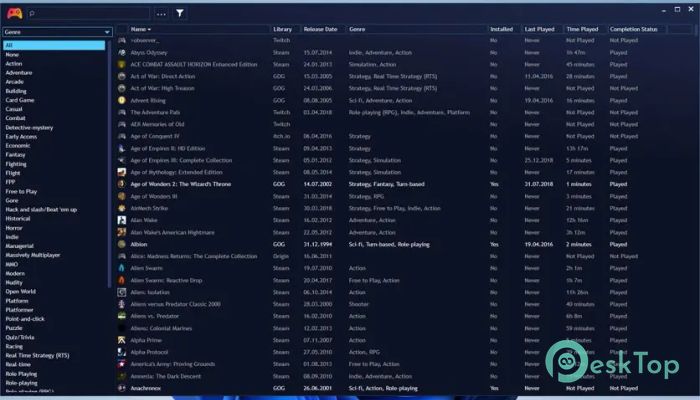
Let's you organize and filter your library easily
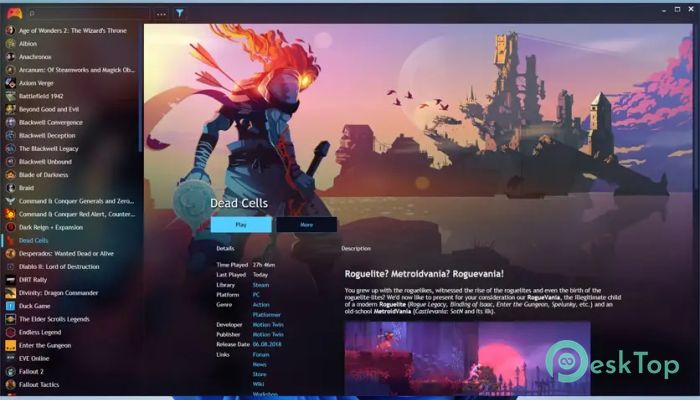
Provides automatic metadata import for better visuals
Includes both Desktop Mode and Fullscreen Mode
Allows plugin integration for advanced users
Keeps track of your playtime and installed titles
Supports manual addition of local or portable games
Works completely for free and is open-source
Tool Library Management
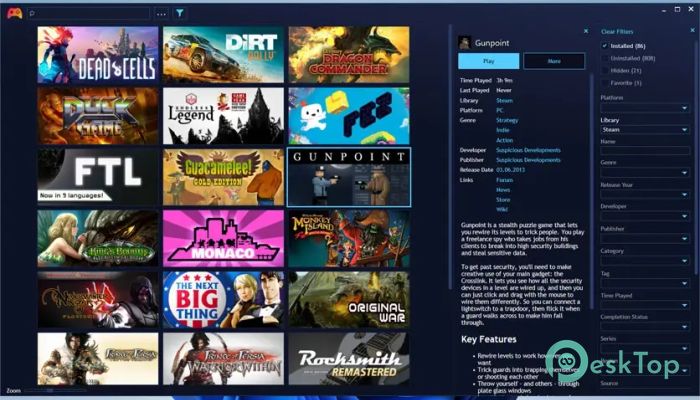
The software shines when it comes to library organization. It gathers titles from various services and consolidates them into a single dashboard. Digital store games, downloaded titles, and even handheld console games can all be added. This makes browsing feel smoother and eliminates the need to open multiple launchers.
Filters also play a significant role. You can sort by genre, platform, status, or tags. Think of it as turning a messy shelf into a perfectly arranged collection where everything is easy to find.
Customization Options
The tool supports a wide range of themes, layouts, and skins. You can choose from minimal designs or fully animated themes created by the community. Add-ons extend its capabilities even further, enabling specialized integrations such as game stats, system monitoring, and more.
This flexibility makes the experience feel personal. It’s like decorating your own digital game room exactly the way you want.
Desktop and Fullscreen Modes
The launcher has two modes to suit different needs. Desktop Mode is ideal for browsing casually, editing metadata, or launching shortcuts. Fullscreen Mode, on the other hand, gives a controller-friendly interface similar to a gaming console. This mode is perfect for living room setups or big-screen displays.
Switching between these modes is quick and smooth, letting you choose the style that fits the moment.
Metadata and Organization
When you import your games, the software automatically fetches details like cover art, descriptions, release dates, screenshots, and tags. This gives your library a polished look without manual effort. You can still edit anything you want — perfect for those who like complete control.
It also supports batch editing, making it easy to manage large libraries with a single click.
Integration and Plugins
One of its strongest features is plugin support. The community has created hundreds of useful add-ons. These plugins add new features such as:
Syncing playtime with external platforms
Improving metadata accuracy
Connecting with cloud services
Adding new import options for obscure platforms
Performance and User Experience
The tool is lightweight and fast. It loads large libraries without lag and works smoothly even on older systems. The interface is clean, making navigation simple for new users. It’s designed to give you quick access without unnecessary steps.
System Requirements and Technical Details
Operating System: Windows 11 / 10 / 8.1 / 7
Processor: Minimum 1 GHz Processor (2.4 GHz recommended)
RAM: 2GB (4GB or more recommended)
Free Hard Disk Space: 200MB or more is recommended

-
Program size133.55 MB
-
Version10.44
-
Program languagemultilanguage
-
Last updatedBefore 10 Month
-
Downloads49
 ExtraMAME
 ChessBase Fritz
 ChessBase
 Dragonrise Games YoloX
 Vortex
 NCSOFT PURPLE