
 Arabic
  English
  Turkish
  Chinese
  Japanese
  Russian
  Spanish
  German
  French
  Hindi
Hindi Download Pointdev Ideal Remote 26.8 for Windows
Download Pointdev Ideal Remote 26.8 for Windows.
Pointdev Ideal Remote Overview
The software is made for IT administrators, support teams, and technical users who need quick access to different computers without wasting time on complicated setup steps. It brings remote control, system management, and daily administration tools into one clean workspace. It helps you connect to computers across domains, workgroups, and VLANs with a smooth multi-tab interface. Instead of opening many different tools for different tasks, you can handle remote support, troubleshooting, system checks, and maintenance from one place. The tool is especially useful for busy IT environments where every minute matters. It uses existing administrative rights, so remote administration features do not require a prior agent installation on servers or workstations. This makes it easier to start working quickly and reduces deployment stress.Features of Pointdev Ideal Remote
Fast and Secure Remote Control
It offers reliable remote access for Windows systems. Whether you are helping a user, checking a server, or managing an off-site device, the connection process is designed to stay simple and stable.
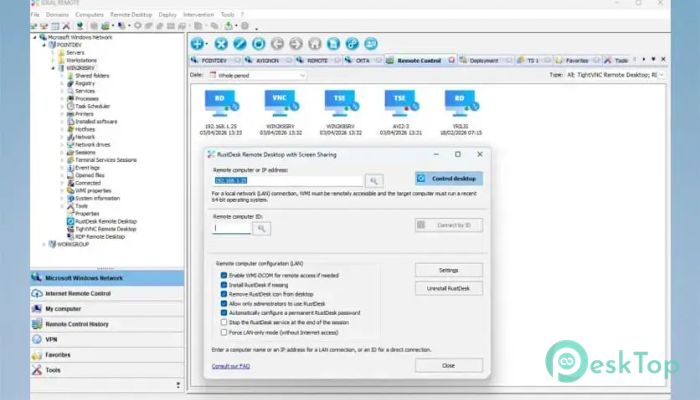
The software includes RustDesk remote desktop support, which provides secure, automated remote control. This gives administrators a practical way to access systems while keeping remote sessions easier to manage.
It also supports remote access through the Internet, making it helpful for systems outside the office network. This is useful when employees work from home, branches are located in different places, or machines are not connected to the local network.
Simple Setup and Easy Deployment
The setup process is built to be quick. A simple wizard helps users get started in just a few minutes. You do not need to spend hours setting up complex configurations before using the main features.
For remote administration, the software can work with your current administrator permissions. This means you can access many management tools without first manually installing an agent. When an agent is needed for remote-control tasks, automatic deployment helps reduce manual effort.
This approach saves time for IT teams by allowing them to focus on resolving issues rather than preparing each machine individually.
Advanced Administration Tools
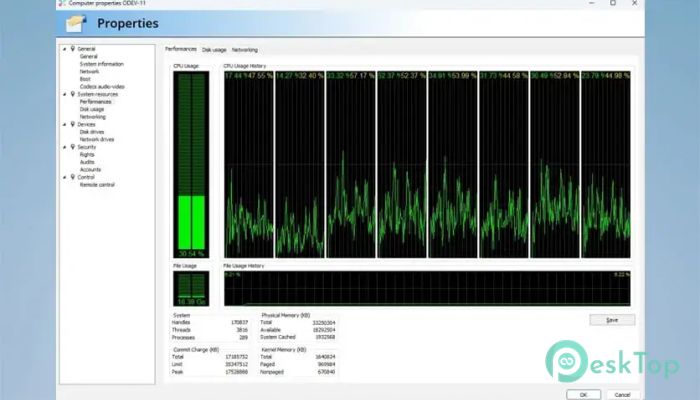
The tool provides access to many Windows administration features through a single interface. You can manage registry entries, view events, check printers, monitor processes, inspect user sessions, and review open files.
It also supports WMI management and viewing system information. These options are helpful when diagnosing computer problems, checking hardware details, reviewing services, or identifying the cause of slow performance.
Remote command execution is another useful feature. It lets administrators run commands on remote machines without physically accessing them. This is like having a technician sitting in front of the computer, even when the device is miles away.
Remote Support Features
It includes practical tools for real support situations. Users can chat, share screens, transfer files, and capture screenshots during remote sessions. These features make troubleshooting more direct and less confusing.
File transfer is helpful when you need to send patches, tools, scripts, or documents to another system. Screenshots can be useful for recording issues or explaining steps to another team member.
Screen sharing also improves communication because both sides can see what is happening. This makes technical help feel smoother and more personal.
Network and System Management
The software supports Wake On LAN, allowing administrators to remotely power on compatible computers. This is useful for maintenance, updates, or emergency access when a system is powered off.
Remote configuration tools allow changes to hostname, IP settings, and firewall options. These features help manage machines without having to walk to each desk or server room.
For larger environments, role and task delegation can help divide responsibilities. Teams can assign specific duties to different administrators while keeping control organized.
Active Directory and Cloud AI Support
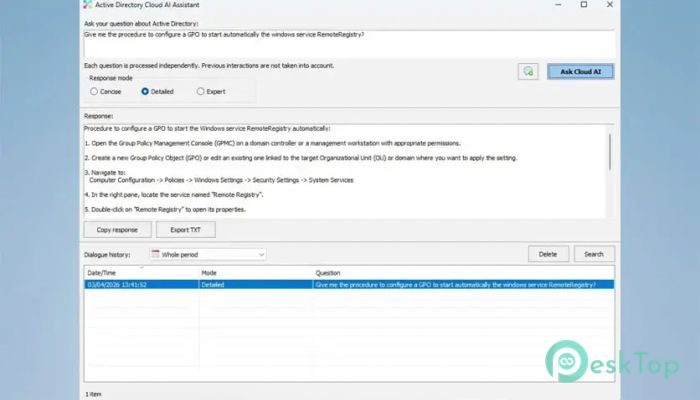
The tool includes Active Directory Q&A through Cloud AI. This can help administrators get quick answers related to directory management and daily network questions.
For teams that manage users, groups, computers, and permissions, this can make routine work easier. It works like a smart helper that supports technical decisions and saves time during common admin tasks.
Cross-Platform Access
It is not limited to Windows systems only. The software also supports remote control, making it useful for mixed IT environments.
Support from smartphones and tablets is also available through iOS and Android. This means administrators can respond to urgent issues even when they are away from their desks.
This flexibility makes the tool suitable for modern teams that manage different devices, platforms, and locations.
Licensing Benefits
One major benefit is its license model. It uses one license per administrator for unlimited systems. This is useful for companies that manage many computers, as they do not need to purchase a separate license for each machine.
This setup can reduce costs and simplify planning. It also gives IT staff the freedom to manage all required systems without worrying about device limits.
System Requirements and Technical Details
Operating System: Windows 11 / 10 / 8 Windows Server: 2025, 2022, 2019, 2016, 2012, 2008
Processor: Minimum 1 GHz Processor (2.4 GHz recommended)
RAM: 2GB (4GB or more recommended)
Free Hard Disk Space: 200MB or more is recommended

-
Program size154.12 MB
-
Version26.8
-
Program languagemultilanguage
-
Last updatedBefore 2 Month
-
Downloads49
 RealVNC VNC Server Enterprise
 CrushFTP
 Reqable
 AnyDesk
 AmneziaVPN
 CurrPorts