
 Arabic
  English
  Turkish
  Chinese
  Japanese
  Russian
  Spanish
  German
  French
  Hindi
Hindi Download PrintHarbor Printer Manager 1.0.0 for Windows
Download PrintHarbor Printer Manager 1.0.0 for Windows.
PrintHarbor Printer Manager Overview
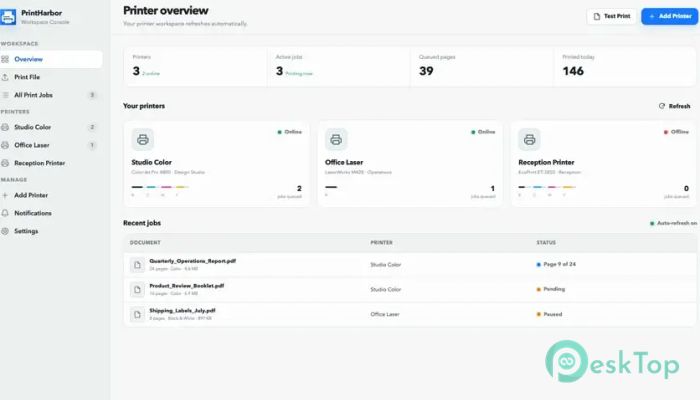
Printing on Windows can sometimes feel like walking through a maze of different menus and settings. The software changes that by bringing everything together into one clean, easy-to-use interface. Instead of opening several Windows screens, you can manage printers, monitor jobs, and print files from a single place. Whether you print occasionally at home or handle dozens of documents at work every day, the tool helps keep everything organized. It gives you a clear view of your printers, active jobs, and queue status so you always know what's happening.Features of PrintHarbor Printer Manager
Simple Printer Discovery
Finding available printers should never be difficult. The software automatically displays printers already installed on your Windows computer and searches for compatible devices connected to your local network.
This makes adding and selecting printers much easier. Whether you're using a USB printer or a network printer shared across the office, everything appears in one convenient list.
Live Printer Status Monitoring
One of the biggest advantages of the tool is its live status display. Instead of wondering why a document hasn't printed yet, you can instantly check whether the printer is online, offline, busy, or waiting.
It also shows queue activity, connection details, and recently completed jobs. Think of it as a dashboard for your printers that keeps you informed without any guesswork.
Complete Queue Control
Sometimes you need to temporarily stop printing, especially when replacing paper, fixing a paper jam, or checking printer settings. The software allows you to pause and resume entire print queues with just a click.
This level of control prevents unnecessary printing mistakes and helps you release documents only when everything is ready. It keeps work flowing smoothly without interrupting your entire workflow.
Easy Print Job Management
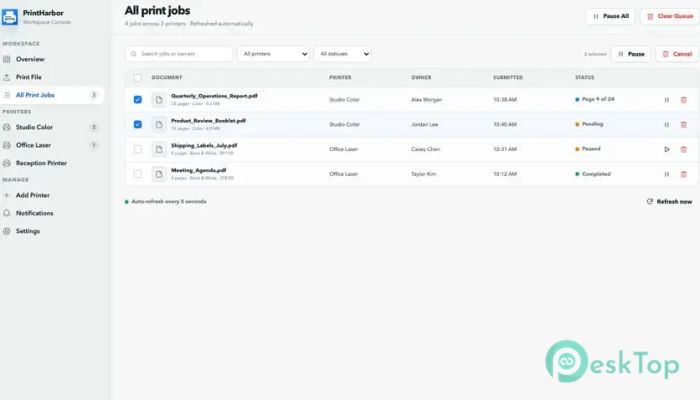
Managing print jobs becomes much easier when all tasks are visible in a single window. The tool lets you pause, resume, cancel, filter, and organize print jobs without switching between different system dialogs.
You can even perform bulk actions on multiple jobs at once. This saves valuable time, especially in busy offices where many documents are waiting to be printed.
Convenient Document Printing
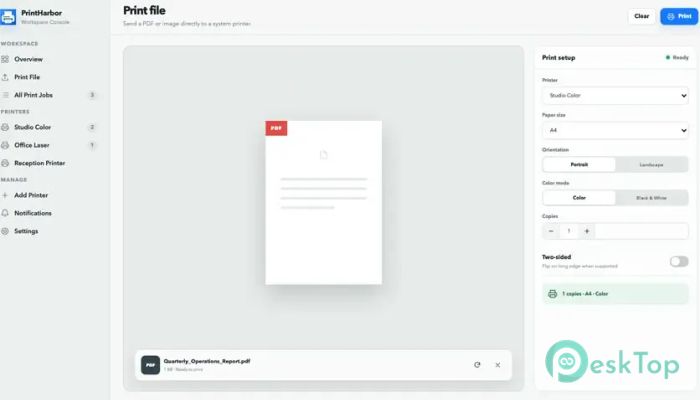
The software supports printing several common file formats, making everyday printing simple. It can send PDF files as well as PNG, JPG, and JPEG images directly to your selected printer.
Before printing, you can choose useful settings like paper size, number of copies, color or grayscale printing, and duplex (double-sided) printing. These practical options help produce exactly the output you need.
Built-In Diagnostic Pages
Printer problems can waste time when you don't know where the issue begins. The software includes built-in diagnostic test pages that quickly help identify common printing problems.
Printing a test page allows you to check printer connectivity, page alignment, margins, and color quality. It's an easy way to verify that everything is working correctly before printing important documents.
Clean and User-Friendly Interface
The interface is designed to stay simple and uncluttered. Every important function is placed where users expect to find it, making navigation easy even for beginners.
You don't need technical knowledge to understand printer status or manage queues. The organized layout helps reduce confusion while making daily printing faster and more comfortable.
Ideal for Home and Office Use
Whether you're printing family photos, school assignments, invoices, contracts, or business reports, the tool adapts to different environments with ease. Home users enjoy its straightforward controls, while offices benefit from its centralized management features.
Reducing the time spent searching through Windows settings improves productivity and makes printing a much smoother experience.
Improved Productivity
Managing printers doesn't have to interrupt your work. With live monitoring, simple queue management, printer discovery, and flexible printing options, the software helps you complete printing tasks faster and with fewer interruptions.
Instead of reacting to printing problems after they happen, you can monitor everything in real time and stay in complete control of every print job.
System Requirements and Technical Details
Operating System: Windows 11 / 10
Processor: Minimum 1 GHz Processor (2.4 GHz recommended)
RAM: 2GB (4GB or more recommended)
Free Hard Disk Space: 2GB or more is recommended

-
Program size331.81 MB
-
Version1.0.0
-
Program languagemultilanguage
-
Last updatedBefore 2 Month
-
Downloads15
 CoolUtils PDF Combine
 NAPS2 - Not Another PDF Scanner
 FocusWriter
 Atlantis Word Processor
 AI Offline OCR Scanner Pro
 Xappex XL-Connector