
 Arabic
  English
  Turkish
  Chinese
  Japanese
  Russian
  Spanish
  German
  French
  Hindi
Hindi Download QuickWallpaper Pro 1.0.0 for Windows
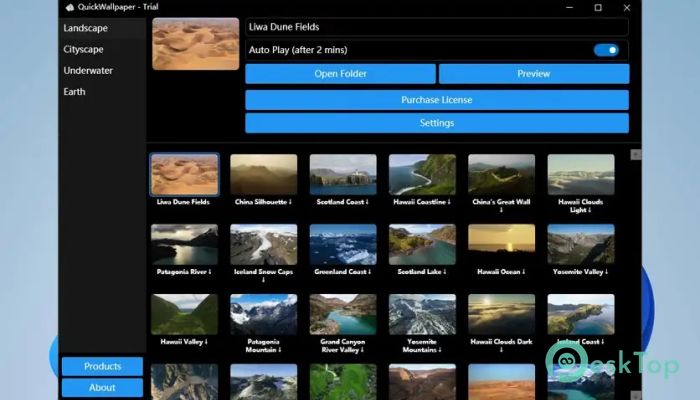
Download QuickWallpaper Pro 1.0.0 for Windows.
QuickWallpaper Pro Overview
This software is designed to enhance your desktop experience with dynamic wallpapers that react seamlessly to your system. With ultra-high-quality visuals and smooth 240fps video playback, it transforms your screen into a living, breathing piece of art. Whether you prefer nature, cities, or oceans, it delivers a visually rich environment that adds life to your workspace.Features of QuickWallpaper Pro
Immersive Visual Experience
The tool offers stunning wallpaper animations in true 4K resolution. Each frame is crisp, detailed, and fluid—creating a mesmerizing effect on your screen. It’s like having a live window into breathtaking sceneries right on your desktop, perfect for anyone who loves visual aesthetics and creativity.
Multiple Dynamic Themes
You can choose from four captivating themes: Natural Landscapes, Urban Landscapes, Underwater Scenes, and Earth. Each theme provides its own mood and atmosphere. Whether you want the calm of oceans, the beauty of mountains, or the energy of city life, there’s a theme that matches your style perfectly.
Simple Setup and Usage
Getting started with the software is incredibly easy. Just download your favorite video wallpaper and let it process. Once downloaded, you can preview it directly before setting it as your background. For convenience, the auto-play mode activates automatically when your keyboard or mouse remains idle for 2 minutes, turning your screen into a stunning screensaver display.
Optimized for Windows 11
This application is specifically designed to work seamlessly on Windows 11 systems. Both the preview and auto-play functions are fully compatible with the latest Windows environment, ensuring users get the most stable and smooth performance possible.
Ultra-Smooth 4K 240fps Playback
Thanks to its advanced optimization, the software supports up to 240 frames per second, delivering incredibly smooth motion. It ensures your wallpapers look fluid, lifelike, and lag-free—something you can truly appreciate on high-refresh-rate displays. The clarity and detail make it a joy to use every day.
High DPI and Dark Mode Support
Modern systems demand adaptable designs, and this tool delivers just that. With full High DPI support, wallpapers maintain perfect clarity across all display sizes and resolutions. It also supports Dark Mode, blending naturally with your system theme to provide a more immersive experience, especially at night or in low-light settings.
Efficient Multi-Task Downloading
The software includes a multi-task downloading feature that allows users to grab multiple wallpaper videos simultaneously. This saves time and makes it easier to explore different styles without having to wait. You can queue up several videos and let them download in the background while you continue working or browsing.
Lightweight and Non-Disruptive
Despite its powerful visuals, the program runs quietly in the background without slowing down your system. It is optimized to consume minimal resources, making it suitable even for laptops or mid-range PCs. You can enjoy high-quality dynamic wallpapers without sacrificing system performance.
System Tray Convenience
The software conveniently sits in your system tray, giving you quick access to controls and settings. From there, you can easily switch wallpapers, enable or disable auto-play, and adjust preferences on the go. It’s simple, intuitive, and doesn’t clutter your desktop workspace.
Personalized Aesthetic Touch
With the ability to select themes and customize playback options, users can create a desktop environment that reflects their personality. Whether you want a calm, relaxing background or an energetic cityscape, this tool offers complete flexibility to set the mood that inspires you every day.
Perfect for Creative Professionals
Designers, artists, and visual enthusiasts will find this tool especially enjoyable. It can serve as both a source of inspiration and a visual break during work sessions. Watching the beautiful scenes flow across the screen feels like taking a momentary escape from the everyday routine.
System Requirements and Technical Details
Operating System: Windows 11
Processor: Minimum 1 GHz Processor (2.4 GHz recommended)
RAM: 2GB (4GB or more recommended)
Free Hard Disk Space: 200MB or more is recommended

-
Program size9.69 MB
-
Version1.0.0
-
Program languagemultilanguage
-
Last updatedBefore 10 Month
-
Downloads75
 Reuschtools ClassicMenu
 AI Aquarium Screensaver
  Rainmeter
 Rainlendar Pro
 N-Button Pro
 Stardock DeskScapes