
 Arabic
  English
  Turkish
  Chinese
  Japanese
  Russian
  Spanish
  German
  French
  Hindi
Hindi Download Quobi 0.1.0 for Windows
Download Quobi 0.1.0 for Windows.
Quobi Overview
It is designed for people who want to type faster without touching the keyboard. Instead of manually entering text, you simply hold a hotkey, speak naturally, and release the key when you are done. The tool listens, transcribes your voice, cleans up the text, and places the final result directly under your cursor. Think of it as having a personal assistant sitting inside your computer. You talk, it organizes your words, fixes mistakes, removes fillers, and delivers polished text in seconds. The best part is that everything runs locally on your machine, helping keep your information private and secure.Features of Quobi
Simple Push-to-Talk Workflow
The software follows an incredibly simple process. Hold the assigned hotkey, the tilde (~) key to the left of the number 1 key, and start speaking. It continues listening for as long as the key remains pressed.
Once you release the key, the recorded speech is immediately processed. The result appears wherever your text cursor is active, whether you are writing an email, filling out a form, chatting online, or creating documents.
Accurate Speech Recognition
At the heart of the tool is advanced on-device speech recognition technology. It captures spoken words with impressive accuracy, even when speech is informal or unstructured.
You do not need to speak like a news presenter. You can pause, restart sentences, or think aloud. The system is built to understand natural conversations and convert them into readable text without requiring perfect pronunciation.
Automatic Text Cleanup
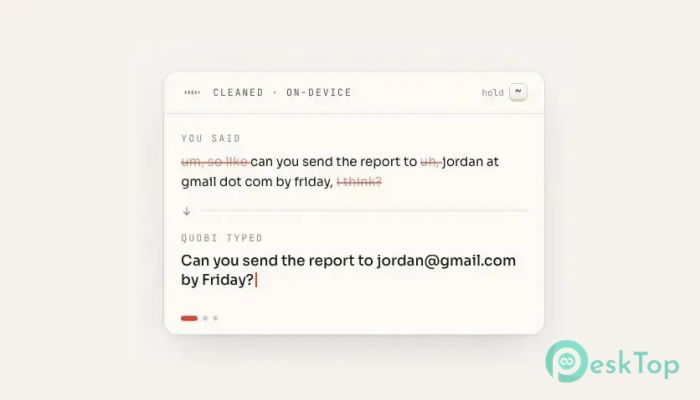
Speaking and writing are very different. Most people use filler words such as "um," "uh," or repeat themselves while talking. The software automatically removes these distractions during processing.
The result feels less like a raw transcript and more like a professionally written text. It smooths out rough edges and makes your ideas easier to read and understand.
Smart Punctuation Handling
Punctuation is often one of the biggest challenges in voice typing. The tool solves this problem by intelligently adding commas, periods, question marks, and other punctuation marks where needed.
Instead of producing a single long block of text, it creates well-structured sentences. This makes emails, reports, notes, and messages look polished without requiring additional editing.
Converts Spoken Information into Real Text
One of the most useful features is its ability to understand spoken formatting. For example, if you say "john at gmail dot com," it can convert those words into a proper email address.
This capability saves time when sharing contact information, website addresses, and other details that would normally require manual corrections after transcription.
Works Across Almost Any Application
The software is not limited to a specific program. It works wherever a text cursor is available. You can use it in word processors, browsers, messaging apps, note-taking tools, and many other programs.
Because the cleaned text is inserted directly at the cursor position, the experience feels natural and seamless. There is no need to copy and paste content between applications.
Support for Natural Speech Patterns
Many voice recognition tools expect users to speak carefully and slowly. This solution takes a different approach. It allows you to speak naturally, even when your thoughts come out messy or disorganized.
You can ramble, change direction mid-sentence, or correct yourself while speaking. The processing model helps transform those spoken thoughts into something much more readable.
Voice Commands for Better Formatting
The tool understands useful phrases that help structure text. For example, you can say "new paragraph" while dictating to create better formatting in your document.
This feature makes long-form writing much easier. Instead of stopping to use the keyboard, you can continue speaking and let the software handle formatting tasks for you.
Privacy-Focused Local Processing
Privacy is one of the strongest advantages of this solution. Everything happens directly on your computer rather than being sent to external servers.
This local-first approach reduces privacy concerns and gives users more control over sensitive information. Whether you are writing personal notes or business content, your data stays on your device.
Boosts Productivity Every Day
Typing can sometimes feel like driving through traffic during rush hour. Speaking, on the other hand, is like taking an open highway. By converting speech into polished text almost instantly, the tool helps users complete tasks faster.
Writers, students, professionals, developers, and casual users can all benefit from the ability to capture ideas the moment they appear. Less time spent typing means more time spent thinking and creating.
Lightweight and Easy to Learn
The software does not require a complicated setup process or extensive training. Most users can start using it within minutes. The simple hold-to-talk workflow feels natural from the very beginning.
Its clean design and focused feature set make it suitable for beginners while still offering enough power for advanced users who rely heavily on voice input.
System Requirements and Technical Details
Operating System: Windows 11 / 10 / 8.1 / 7
Processor: Minimum 1 GHz Processor (2.4 GHz recommended)
RAM: 2GB (4GB or more recommended)
Free Hard Disk Space: 200MB or more is recommended

-
Program size54.12 MB
-
Version0.1.0
-
Program languagemultilanguage
-
Last updatedBefore 3 Month
-
Downloads5
 Teletone Audio Prism Plate
 Stryde Audio Swayed
  Electric Smudge SnappySnap
 PSPaudioware PSP Flare
 DW Soundworks Gretsch USA Custom Expansion Pack
 Sonic Academy V4lve