
 Arabic
  English
  Turkish
  Chinese
  Japanese
  Russian
  Spanish
  German
  French
  Hindi
Hindi Download RL Office NSF Tool 1.0 for Windows
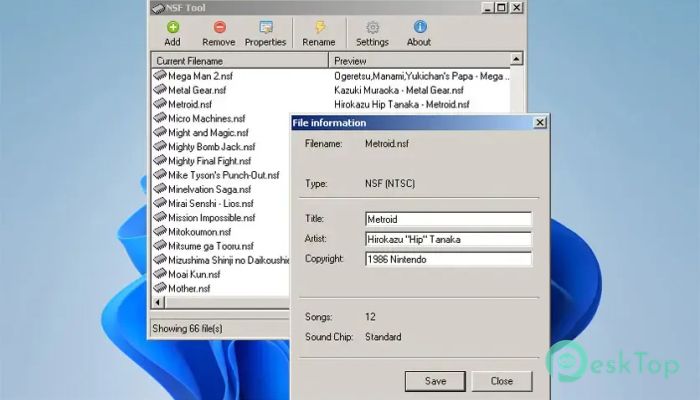
Download RL Office NSF Tool 1.0 for Windows.
RL Office NSF Tool Overview
It is a simple yet practical application designed for users who enjoy classic Nintendo Entertainment System music. It allows you to manage metadata stored inside NSF and NSFe audio files without any complicated setup. Whether you have a handful of files or a huge retro music collection, the software makes organizing everything easier. The tool focuses on editing key information, such as song titles and composers' names. Instead of manually sorting every file, you can quickly update metadata and automatically rename files. Its clean interface keeps things straightforward, making it suitable for both beginners and experienced users.Features of RL Office NSF Tool
Edit NSF Metadata with Ease
The software lets you modify metadata stored inside NSF files in just a few clicks. You can change details such as the music title, composer, copyright information, and other embedded fields without affecting the audio itself.
This feature is especially useful when your music library contains incomplete or incorrect information. After editing, your collection becomes cleaner and much easier to browse.
Support for NSF and NSFe Formats
One of the tool's biggest strengths is its compatibility with both NSF and NSFe file formats. While NSF has been the standard format for NES music for years, NSFe provides additional features and improved metadata support.
Because both formats are supported, you can manage different collections without switching between multiple applications. Everything stays in one convenient workspace.
Batch File Renaming
Renaming dozens or even hundreds of files one by one can feel like organizing a giant bookshelf by hand. Thankfully, the software removes that burden with batch renaming.
Using the metadata stored in each file, it can automatically rename your NSF files to match your preferred naming style. This keeps every album and soundtrack neat, consistent, and easy to locate.
Perfect for Retro Gaming Fans
If you enjoy classic NES games, this utility is a great companion for your music collection. It helps preserve the original soundtrack information while making every file easier to identify.
Collectors, music enthusiasts, and retro gamers can organize thousands of tracks without spending hours manually editing filenames.
Simple and Lightweight Interface
The software is built with simplicity in mind. It launches quickly, uses very little system memory, and provides only the tools you actually need. There are no unnecessary menus or complex options to learn.
Its lightweight design also makes it an excellent choice for older computers that still need reliable file management utilities.
Fast Workflow
Everything is designed to save time. Open your files, edit the metadata, preview the changes, and rename them within minutes. The straightforward layout reduces confusion and lets you focus on organizing your collection instead of learning the software.
Whether you update a single file or process an entire folder, the workflow remains smooth and efficient.
Ideal for Music Archives
Large music libraries often contain files gathered from different sources, resulting in inconsistent names and metadata. The tool helps standardize everything so your archive looks professional and stays organized.
Once your files follow a consistent naming pattern, searching, sorting, and managing them becomes much more convenient.
Reliable Metadata Management
Accurate metadata makes every music collection more useful. Instead of guessing which soundtrack belongs to which game, you can rely on properly labeled information.
The software provides an easy way to maintain consistency, helping media players and music libraries display correct details every time.
Great Companion for NSF Players
Many desktop applications and plugins can play NSF music files, but keeping those files properly organized is equally important. This utility works seamlessly with your favorite NSF player, ensuring every track contains accurate information before playback.
It offers an easy solution for anyone who wants a well-maintained retro music collection without unnecessary effort.
System Requirements and Technical Details
Operating System: Windows 11 / 10 / 8.1 / 7
Processor: Minimum 1 GHz Processor (2.4 GHz recommended)
RAM: 2GB (4GB or more recommended)
Free Hard Disk Space: 200MB or more is recommended

-
Program size447.91 KB
-
Version1.0
-
Program languagemultilanguage
-
Last updatedBefore 3 Month
-
Downloads5
 Teletone Audio Prism Plate
 Stryde Audio Swayed
  Electric Smudge SnappySnap
 PSPaudioware PSP Flare
 DW Soundworks Gretsch USA Custom Expansion Pack
 Sonic Academy V4lve