
 Arabic
  English
  Turkish
  Chinese
  Japanese
  Russian
  Spanish
  German
  French
  Hindi
Hindi Download Samurai Sharpen Video for After Effects & Premiere Pro 1.3.2 for Windows

Download Samurai Sharpen Video for After Effects & Premiere Pro 1.3.2 for Windows.
Samurai Sharpen Video for After Effects & Premiere Pro Overview
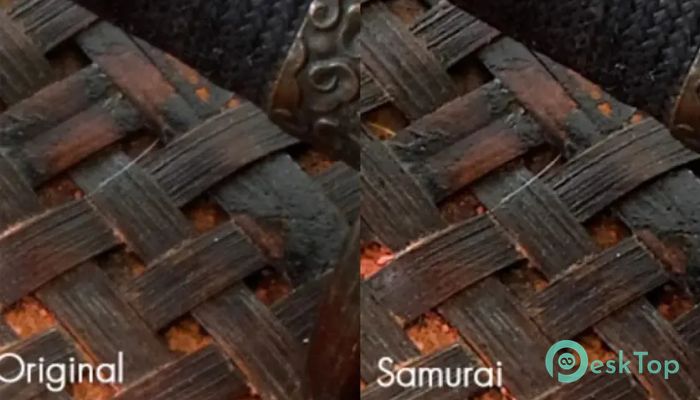
This plugin is designed to make video sharpening fast, accurate, and easy to control. Created by Digital Anarchy, it enhances the sharpness of essential elements in your footage without introducing unwanted artifacts. Whether you’re polishing a professional project or improving home videos, this plugin ensures you maintain the natural look of your visuals while enhancing definition where it truly matters. Its intelligent sharpening system focuses on edges and fine details while preventing over-sharpening in flat areas like skin or backgrounds. It’s an essential add-on for Adobe After Effects and Premiere Pro users who want complete control over how sharpness is applied in their video edits.Features of Samurai Sharpen Video for After Effects & Premiere Pro
Edge-Aware Sharpening Technology
One of the best things about this tool is its edge-aware algorithm. Unlike basic sharpen filters that affect the whole image, it intelligently identifies the areas that need enhancement — such as facial features, objects, or text — while leaving other regions untouched. This creates a natural-looking result that enhances quality without creating harsh outlines or visible noise.
Selective Control for Maximum Precision
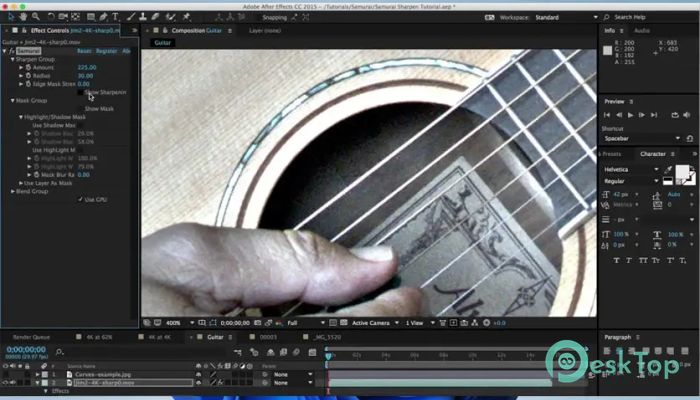
The software gives you complete flexibility to adjust sharpening intensity in different parts of the frame. You can control the amount of sharpening on edges, midtones, and highlights independently. This selective approach helps you emphasize the most essential details, such as eyes or architectural lines, while keeping other regions smooth and balanced.
Noise Protection and Masking Tools
One challenge in sharpening is avoiding noise enhancement. With built-in masking tools, this plugin ensures that noise in shadows or low-detail areas remains untouched. You can apply masks to exclude unwanted areas and only enhance the zones that add value to the final image. This keeps your footage clean, detailed, and professional.
Real-Time Previews and Smooth Performance
The tool is optimized for modern hardware acceleration, ensuring smooth previews and fast rendering. Real-time updates let you see exactly how your adjustments affect the footage before final export. This makes the editing process efficient and interactive, giving editors the confidence to experiment without slowing down their workflow.
Perfect for Various Video Styles
Whether you’re working on cinematic content, music videos, advertisements, or documentaries, the plugin adapts to all production needs. It works equally well for high-resolution projects, including 4K and 8K footage, where precise sharpening can significantly improve visual clarity. The results are crisp and natural, ideal for both broadcast and online platforms.
Easy Integration with Adobe Software
Installation and integration are seamless. Once added, the filter appears directly within your effects panel in After Effects or Premiere Pro. You can apply it to any clip, adjust settings with sliders, and fine-tune results in real-time. No complicated setup or extra configuration is required, making it accessible for both professionals and beginners.
Why Use This Tool
This sharpening plugin eliminates the trial-and-error frustration of traditional tools. It’s specifically engineered for video rather than still images, ensuring that motion and detail are handled delicately. From skin tones to moving objects, everything maintains a balanced, cinematic look without artificial sharpness or halos.
Key Advantages
Edge-aware sharpening that enhances detail intelligently.
Masking options to protect sensitive areas, such as shadows and highlights.
Adjustable sliders for fine-tuning sharpness intensity.
Real-time preview for faster workflow and accurate results.
Optimized for both After Effects and Premiere Pro environments.
Maintains a natural look without introducing artifacts.
System Requirements and Technical Details
Operating System: Windows 11 / 10 / 8.1 / 7
Processor: Minimum 1 GHz Processor (2.4 GHz recommended)
RAM: 2GB (4GB or more recommended)
Free Hard Disk Space: 200MB or more is recommended

-
Program size36.28 MB
-
Version1.3.2
-
Program languagemultilanguage
-
Last updatedBefore 3 Month
-
Downloads59
 Aescripts Autokroma AfterCodecs
 Boris FX Silhouette
 RE:VisionFX ARRI Film Lab
 Gilisoft Video UniReel
 iFunia Video Editor
 Innovision MaxPRO