
 Arabic
  English
  Turkish
  Chinese
  Japanese
  Russian
  Spanish
  German
  French
  Hindi
Hindi Download Schaefer Informatik Case Relation 1.0.0 for Windows
Download Schaefer Informatik Case Relation 1.0.0 for Windows.
Schaefer Informatik Case Relation Overview
It is a purpose-built solution for legal professionals who regularly handle lengthy, complex PDF files. It focuses on clarity, comparison, and structured review, helping lawyers stay organized when working with demanding case material. Instead of jumping back and forth between pages, it brings everything into a single, focused workspace.Features of Schaefer Informatik Case Relation
Designed for Legal Document Efficiency
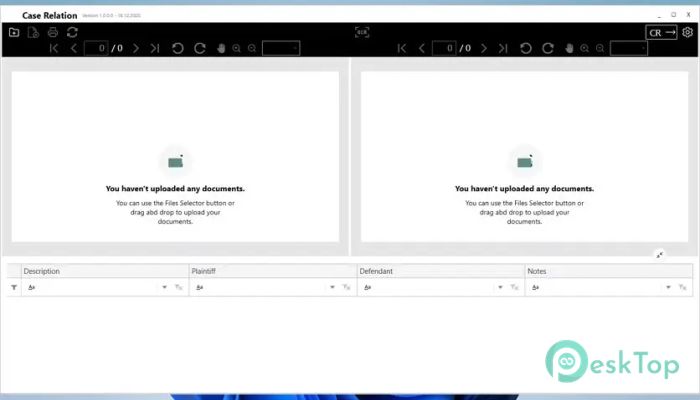
Working with legal PDFs often feels like navigating a maze. This tool turns that maze into a straight road. Allowing documents to be viewed in two columns makes side-by-side comparison smooth and intuitive. One side can represent the plaintiff’s perspective, while the other can show the defendant’s view, creating balance and clarity during analysis.
Dual-Column PDF Viewing Experience
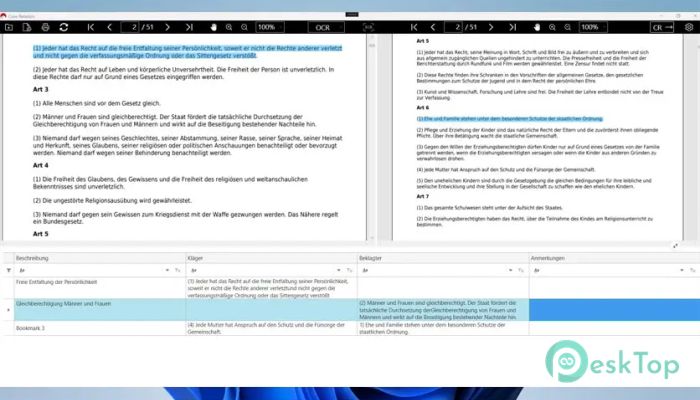
It offers a dual-column layout that feels like placing two documents on a desk and reading them side by side. Each column includes its own navigation bar, so scrolling, jumping between pages, and finding references are effortless. Even when related points are far apart in the document, both sides stay connected and easy to reach.
Smart Highlighting and Linking Tools
Highlighting is central to this software. It allows users to mark important text clearly and link it to either side of the case. Think of it as using color-coded sticky notes, but in a digital, more organized format. Highlights can be edited, removed, or linked without disrupting workflow.
Instant Navigation to Marked Content
One of the most time-saving features is instant navigation. Clicking on any highlighted section takes you directly to its exact location in the PDF. This eliminates endless scrolling and searching, allowing you to stay focused on analysis rather than navigation.
Notes and Descriptions Made Simple
Below the open document, all highlighted sections appear in an organized list. This space allows you to add descriptions and notes that explain why each section matters. It feels like keeping a clean notebook alongside the document, with each marked point accompanied by its own explanation.
Customization for Better Readability
Every professional works differently, and this tool respects that. It allows language changes and color customization for highlighted text. Different colors can represent various types of information, making long sessions easier on the eyes and improving at-a-glance understanding.
Structured Review with Summary Tables
Once markings and notes are complete, the software generates a table view that displays all highlighted content together. This reflection stage helps users see the full picture of the case, much like laying out all the evidence on a table before concluding.
Automatic Table of Contents Creation
After saving, a new PDF file is generated with a built-in table of contents based on your markings. The first pages serve as a roadmap, allowing you to jump directly to relevant sections. This feature is especially valuable when revisiting cases or sharing documents with colleagues.
Continue Work Without Losing Progress
Large legal files often cannot be reviewed in one sitting. This software lets you upload the newly generated PDF later and resume exactly where you left off. All previous highlights and notes remain intact, ensuring continuity and saving valuable time.
Built for Long and Complex Case Files
Handling large volumes of documents can feel overwhelming, but this tool breaks them into manageable parts. By combining navigation, highlighting, notes, and summaries, it transforms heavy PDFs into structured, approachable resources that support better legal decision-making.
System Requirements and Technical Details
Operating System: Windows 11 / 10
Processor: Minimum 1 GHz Processor (2.4 GHz recommended)
RAM: 2GB (4GB or more recommended)
Free Hard Disk Space: 200MB or more is recommended

-
Program size178.88 MB
-
Version1.0.0
-
Program languagemultilanguage
-
Last updatedBefore 9 Month
-
Downloads8
 CoolUtils PDF Combine
 NAPS2 - Not Another PDF Scanner
 FocusWriter
 Atlantis Word Processor
 AI Offline OCR Scanner Pro
 Xappex XL-Connector