
 Arabic
  English
  Turkish
  Chinese
  Japanese
  Russian
  Spanish
  German
  French
  Hindi
Hindi Download SLTDU Widget 1.4.0 for Windows

Download SLTDU Widget 1.4.0 for Windows.
SLTDU Widget Overview
Keeping track of broadband usage shouldn't feel like solving a puzzle. This desktop utility places all your important internet statistics right on your Windows desktop, making it quick and easy to check your remaining data at any time. Whether you use the internet for work, online classes, streaming, or gaming, it helps you stay informed without interrupting your daily routine. The software combines real-time data tracking, live speed monitoring, daily device usage reports, and smart notifications into one modern interface. Its stylish glass-like appearance blends naturally with Windows while providing all the information you need at a glance.Features of SLTDU Widget
Real-Time Broadband Data Tracking
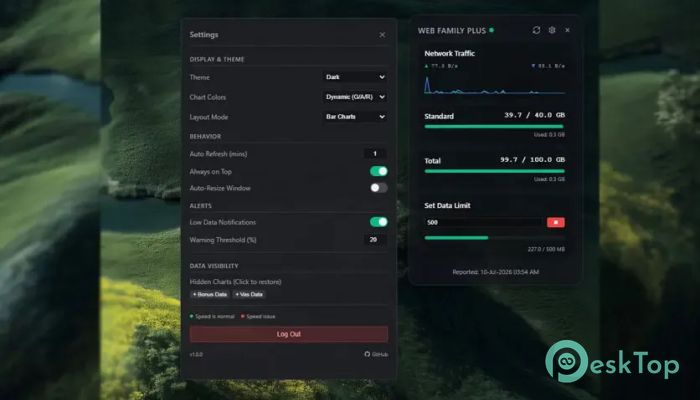
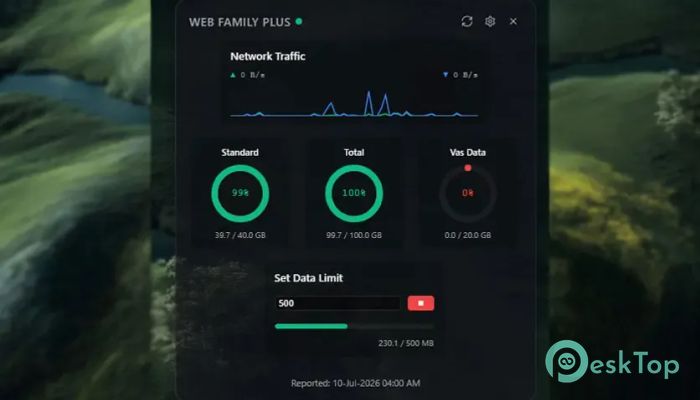
The biggest strength of the software is its ability to display your Sri Lanka Telecom broadband usage instantly. Instead of logging in to your account every time, you can simply glance at the desktop widget to see your latest usage details.
It displays multiple data categories, including standard data, bonus data, free data, extra GB allocations, and value-added service (VAS) limits. Everything stays organized, so you always know how much data remains before reaching your limit.
Daily Internet Usage Monitor
Knowing your monthly balance is useful, but understanding your daily internet habits is even better. The tool automatically tracks your PC's exact daily download, upload, and total network usage.
The built-in 24-hour tracker resets itself based on your preferred schedule, making it easy to compare your daily internet consumption. Think of it as your personal fitness tracker—but instead of counting steps, it measures every byte your computer uses.
Live Network Speed Display
Slow internet can be frustrating, especially when downloading large files or joining online meetings. The software continuously shows your current download and upload speeds in real time.
Its intelligent network engine automatically detects your active Wi-Fi connection while ignoring virtual adapters created by VPN software or virtual machines. This means you only see the network information that actually matters.
Modern Glassmorphism Interface
Good software should not only work well but also look great. The widget features a beautiful Glassmorphism design that gives your desktop a clean, elegant, and modern appearance.
The transparent visual effects allow the widget to blend naturally with your wallpaper without becoming distracting. It feels like a native part of Windows instead of another bulky application running in the background.
Smart Notifications and Data Alerts
Unexpectedly running out of internet data can interrupt downloads, meetings, or entertainment. To help avoid surprises, the software provides intelligent notifications whenever your remaining data reaches low or critical levels.
These alerts appear as Windows system notifications, giving you enough time to reduce heavy internet usage or purchase additional data before your connection becomes limited.
System Tray Integration
Not every application needs to stay open on the taskbar all day. The tool quietly minimizes to the Windows system tray, allowing it to run in the background while using minimal system resources.
You can launch it automatically when Windows starts, ensuring your broadband information is always available the moment your computer powers on.
Always-On-Top Desktop Widget
Sometimes you need quick access to your internet statistics without switching between windows. The built-in Always On Top feature keeps the widget floating above other applications.
Whether you're watching videos, attending meetings, browsing the web, or working on documents, your latest usage and speed information remains only a quick glance away.
Lightweight Performance
The software is designed to stay fast and responsive throughout the day. It consumes very little system memory while continuously updating your internet statistics in real time.
Since it operates quietly in the background, you can leave it running all day without noticing any slowdown in your computer's overall performance.
Simple Customization Options
Everyone likes a desktop that matches their personal style. The widget offers several customization options that let you adjust its appearance and behavior according to your preferences.
You can position it anywhere on the desktop, configure automatic startup, customize daily reset timing, and choose settings that best fit your workflow. This flexibility allows the widget to feel like your own personalized internet dashboard.
System Requirements and Technical Details
Operating System: Windows 11 / 10 / 8.1 / 7
Processor: Minimum 1 GHz Processor (2.4 GHz recommended)
RAM: 2GB (4GB or more recommended)
Free Hard Disk Space: 200MB or more is recommended

-
Program size82.54 MB
-
Version1.4.0
-
Program languagemultilanguage
-
Last updatedBefore 3 Month
-
Downloads9
 RealVNC VNC Server Enterprise
 CrushFTP
 Reqable
 AnyDesk
 AmneziaVPN
 CurrPorts