
 Arabic
  English
  Turkish
  Chinese
  Japanese
  Russian
  Spanish
  German
  French
  Hindi
Hindi Download SoftPerfect IP Calculator 26.3 for Windows
Download SoftPerfect IP Calculator 26.3 for Windows.
SoftPerfect IP Calculator Overview
It is a practical utility created for network administrators, IT students, and anyone who works with IP addressing. It simplifies complex subnet calculations and presents network information in a clear and visual way. Instead of manually calculating CIDR ranges or subnet masks, users can instantly generate accurate network details with just a few inputs. The software supports both IPv4 and IPv6 networks, making it suitable for modern networking environments. It displays detailed information about network ranges, host counts, broadcast addresses, wildcard masks, and other essential data used in network design and configuration. Another impressive aspect is the visual representation of address bits. Networking concepts can often feel abstract, but this tool makes them easy to see and understand. The binary visualization clearly separates network bits from host bits using colors, helping users grasp subnet boundaries at a glance. Whether someone is planning a network layout, preparing for a certification exam, or configuring firewall rules, this calculator becomes a reliable companion. It removes the guesswork from subnetting and helps professionals focus on building efficient and well-structured networks.Features of SoftPerfect IP Calculator
Subnet Calculator and Network Details
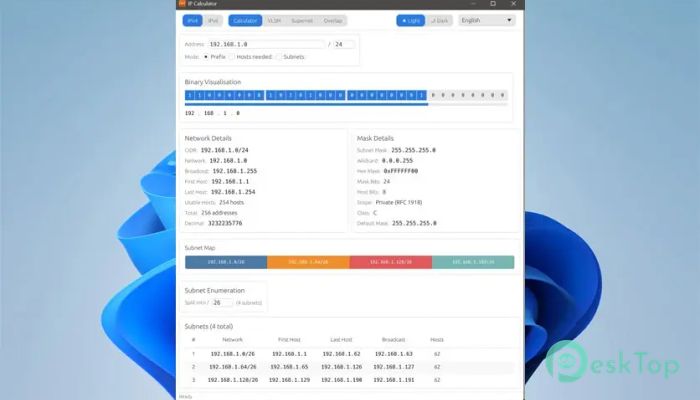
The core functionality revolves around subnet calculations. When a network address and prefix are entered, the software immediately displays a wide range of network details. These include CIDR notation, the total number of hosts, valid host ranges, broadcast addresses, and subnet masks.
The tool offers multiple input modes, allowing flexibility depending on the user's needs. For example, someone can calculate networks based on prefix length, required number of hosts, or the number of subnets. This flexibility makes planning networks much faster and easier.
Instead of performing manual calculations or referencing complicated charts, users simply input their data and receive instant results. It works like a digital calculator specifically designed for networking tasks.
Binary Bit Visualization
One of the most educational features is the binary bit visualization panel. IP addresses are made of bits, but understanding how those bits define network boundaries can be challenging. This feature displays every bit of an address and highlights which ones belong to the network and which belong to the host.
The display updates dynamically when the prefix length changes. As the subnet size increases or decreases, the boundary shifts in real time. This makes subnetting concepts easier to understand, especially for beginners who are learning how IP addressing works.
Think of it like seeing the blueprint of a building rather than just reading the instructions. The visual representation helps users instantly understand how addresses are structured.
Subnet Planning Tools
Planning subnet allocations for an organization can feel like solving a puzzle. Different departments, floors, or VLANs require different address ranges. The tool simplifies this process with an interactive subnet planning interface.
Users can enumerate all available subnets within a given prefix and then split or combine them using a visual bar chart. Each subnet is displayed proportionally, allowing administrators to easily design custom allocation layouts.
Undo and redo features make experimentation safe and convenient. If a design does not work, it can be adjusted instantly without starting from scratch. This interactive approach makes network planning far more intuitive.
VLSM Calculator
Variable Length Subnet Masking (VLSM) allows networks to allocate different subnet sizes based on the number of hosts required. This technique reduces the use of wasted IP addresses and improves overall network efficiency.
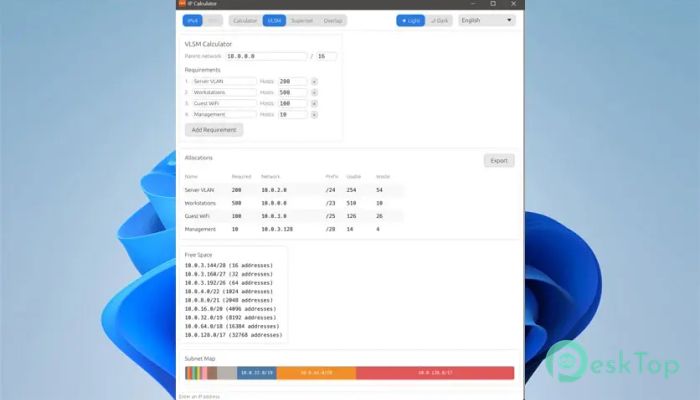
The built-in VLSM calculator automatically assigns subnets based on host requirements. Users can define several network segments with different host counts, and the tool generates the most efficient allocation.
This feature is especially helpful when designing enterprise networks where multiple departments require different address capacities. Instead of manually calculating each subnet, the software performs the optimization instantly.
Route Summarisation
Large networks often contain multiple subnets that can be grouped together using route summarisation. This technique reduces the number of routes that routers must store and advertise.
The application analyzes multiple CIDR networks and consolidates them into the smallest possible set of summary routes. This makes routing tables cleaner and improves network efficiency.
By reducing the complexity of routing information, administrators can maintain better performance and easier network management.
Overlap Detection and Network Analysis
Address conflicts can cause serious network issues. Overlapping networks may result in routing errors, connectivity problems, or security risks. The overlap detection feature helps identify these problems before they occur.
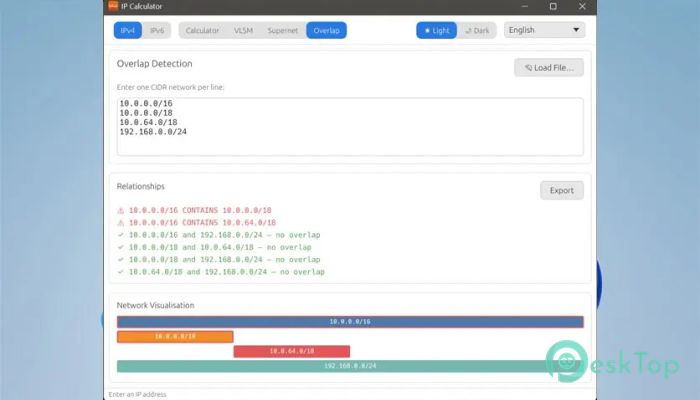
Users can paste a list of network addresses, and the tool automatically analyzes them to detect containment, duplication, or overlapping ranges. It also displays the relationships visually, making it easy to understand how networks interact.
This capability is extremely useful when auditing large infrastructures or integrating networks from multiple departments.
Export and Import Capabilities
Network documentation is an important part of IT management. The software includes export and import functions that help users save their calculations and share them with others.
Subnet tables, VLSM allocations, route summaries, and overlap results can all be exported to CSV or HTML formats. These files can then be added to reports, documentation, or technical records.
It can also load network lists from text files, making it quick and convenient to analyze large sets of network data.
Cross-Platform Compatibility
Although this guide focuses on the Windows version, the tool is also available for macOS and Linux. This cross-platform support ensures flexibility for teams that use different operating systems.
Regardless of the platform, the interface remains simple and consistent. Users can move between systems without needing to learn a new workflow.
Where This Tool Is Most Useful
Network administrators rely on subnet calculations daily. The software becomes valuable when planning new infrastructures, expanding existing networks, or reorganizing address allocations.
Students preparing for networking certifications such as CCNA or CompTIA Network+ can also benefit greatly. The visual subnetting display makes it easier to understand how prefixes and host ranges work.
It is also helpful when configuring firewall rules, writing access control lists, summarizing routes, or auditing IP conflicts across multiple departments.
System Requirements and Technical Details
Operating System: Windows 11 / 10 / 8.1 / 7
Processor: Minimum 1 GHz Processor (2.4 GHz recommended)
RAM: 2GB (4GB or more recommended)
Free Hard Disk Space: 200MB or more is recommended

-
Program size6.65 MB
-
Version26.3
-
Program languagemultilanguage
-
Last updatedBefore 6 Month
-
Downloads48
 RealVNC VNC Server Enterprise
 CrushFTP
 Reqable
 AnyDesk
 AmneziaVPN
 CurrPorts