
 Arabic
  English
  Turkish
  Chinese
  Japanese
  Russian
  Spanish
  German
  French
  Hindi
Hindi Download SoftPerfect Ping Monitor 26.6 for Windows
Download SoftPerfect Ping Monitor 26.6 for Windows.
SoftPerfect Ping Monitor Overview
It is built for anyone who wants to keep an eye on network hosts without using heavy or complex enterprise systems. Whether you manage a small office, a home lab, or just want to track your internet connection stability, it works like a heartbeat monitor for your network. It keeps sending pings to selected devices and records their responses over time. The software tracks key metrics such as latency, packet loss, and jitter in real time. Instead of drowning you in raw numbers, it presents the results visually and clearly. You can instantly see if a host is stable, slowing down, or completely offline. Everything runs locally and stores its data in a built-in SQLite database, so you do not need subscriptions or cloud services.Features of SoftPerfect Ping Monitor
Real-Time Network Monitoring
At its core, the tool continuously monitors hosts using ICMP ping. You can configure how often it checks each device. The interval settings allow you to control how aggressive or relaxed the monitoring should be.
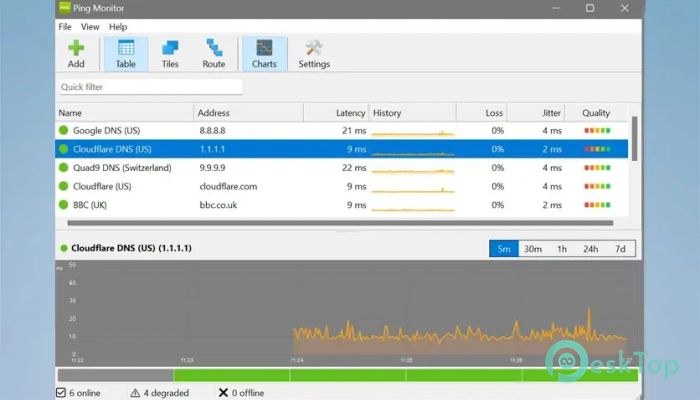
Latency is the time it takes for a device to respond. Packet loss indicates whether data is being dropped. Jitter reveals instability in response times. These three values together give you a full picture of network health. If something starts acting strangely, you will see it immediately instead of discovering it after users complain.
Three Flexible View Modes
The software offers three different ways to view your monitored hosts. Each one feels like switching camera angles on the same scene.
Table View: This mode displays hosts in a sortable list. You can sort by latency, loss, or status. It even includes small sparklines that show performance trends at a glance.
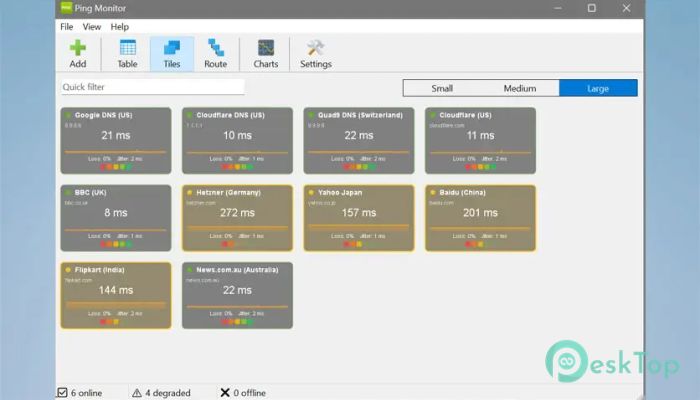
Tile View: This layout presents hosts as visual tiles. You can choose between three tile sizes. It is ideal when you want a quick visual dashboard that shows which devices are healthy and which are in trouble with colors.
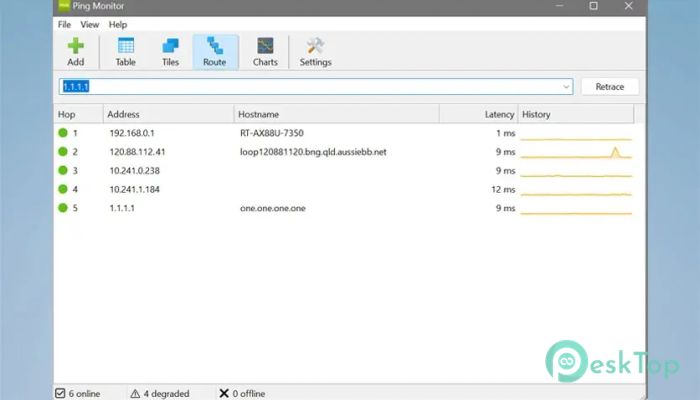
Route Trace: This mode analyzes each hop between your computer and the target device. It works like peeling back layers of the network path. If a slowdown happens somewhere in the middle, you can see exactly where it occurs.
Interactive Graphs and Visual Analysis
Numbers are helpful, but graphs tell stories. The tool includes interactive latency charts with five selectable time ranges, ranging from 5 minutes to 7 days. You can zoom in for a quick check or zoom out to analyze long-term trends.
It also includes 24-hour quality heat strips. These visual strips highlight network stability throughout the day. Good performance appears smooth and consistent, while problem periods stand out clearly. This makes troubleshooting much faster and less frustrating.
Customisable Thresholds and Status Levels
Every network environment is different. What counts as “good” in one office may be unacceptable in another. That is why you can define your own thresholds for latency and quality.
You can set global thresholds for all hosts or apply specific settings to individual devices. The system automatically classifies each host as good, degraded, or critical based on those thresholds. It is like setting traffic lights for your network. Green means smooth. Yellow signals caution. Red demands attention.
Desktop Notifications and Alerts
When a host goes offline or performance drops, the software does not stay silent. It sends desktop notifications to keep you informed. You can also enable optional sound alerts for immediate awareness.
This feature is especially useful if you are multitasking. Instead of constantly checking the dashboard, you can rely on alerts to notify you when something changes. It works like a guard standing watch over your network 24 hours a day.
Color Themes and Display Customization
Monitoring tools should not strain your eyes. The application includes seven built-in graph color themes, and you can fully customize them if you prefer your own style.
Light and dark mode support ensures comfortable viewing in different environments. Whether you work in a bright office or a dim server room, the display adapts to your needs.
Local Database and Privacy
All collected data is stored in a local SQLite database. Nothing is uploaded to external servers. There are no accounts, sign-ups, or subscriptions required.
This local-first approach gives you complete control over your monitoring data. It is simple, secure, and practical. For users who value privacy, this design choice is a major advantage.
Cross-Platform Compatibility
The software runs on Windows. It supports both 32-bit and 64-bit versions, including ARM64 systems. This flexibility makes it suitable for a wide range of environments.
Whether you are managing a mixed network or switching between operating systems, you can rely on the same consistent monitoring experience.
System Requirements and Technical Details
Operating System: Windows 11 / 10 / 8.1 / 7
Processor: Minimum 1 GHz Processor (2.4 GHz recommended)
RAM: 2GB (4GB or more recommended)
Free Hard Disk Space: 200MB or more is recommended

-
Program size8.61 MB
-
Version26.6
-
Program languagemultilanguage
-
Last updatedBefore 3 Month
-
Downloads163
 RealVNC VNC Server Enterprise
 CrushFTP
 Reqable
 AnyDesk
 AmneziaVPN
 CurrPorts