
 Arabic
  English
  Turkish
  Chinese
  Japanese
  Russian
  Spanish
  German
  French
  Hindi
Hindi Download SteelSoft FastCutter 1.0.1 for Windows
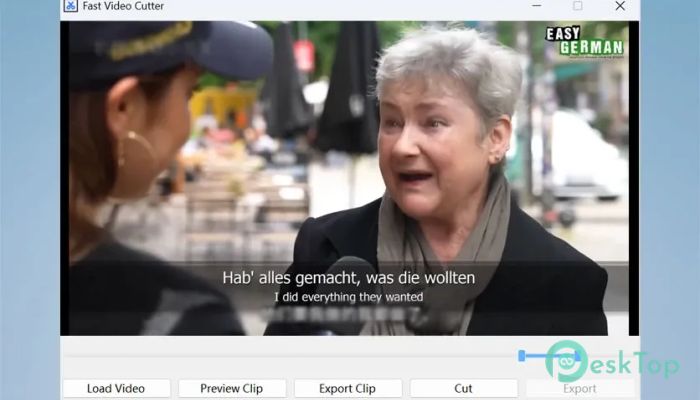
Download SteelSoft FastCutter 1.0.1 for Windows.
SteelSoft FastCutter Overview
Editing videos often feels like trying to solve a puzzle with too many pieces. This tool changes that experience completely. It focuses on speed, simplicity, and clean results. Instead of confusing timelines and endless options, it gives you a smooth and direct way to cut videos in seconds. The software is designed for people who want quick results without learning complex editing skills. Whether you are working on a short clip or a long recording, it helps you get the job done with minimal effort. Think of it like using a sharp knife instead of struggling with a dull one—it just works better and faster.Features of SteelSoft FastCutter
Simple and Fast Editing Experience
One of the biggest highlights is how easy it is to use. The interface is clean and focused, which means you do not waste time searching for tools. Everything is placed right where you expect it to be.
The dual-slider timeline is the real game-changer. Instead of dragging clips across a complicated editor, you simply move sliders to select the exact part you want. It feels natural, almost like trimming a photo on your phone.
This approach makes editing smooth and enjoyable. Even if you have never edited a video before, you can jump in and start cutting clips within minutes.
Lossless Video Cutting Technology
Quality matters, especially when you are working with important videos. This tool uses smart lossless technology, which means it cuts videos without reducing their quality.
Normally, video editing involves re-encoding, which takes time and often lowers quality. Here, that step is skipped completely. The software processes your video in real time, keeping every detail sharp and clear.
The result is instant editing with no compromise. Your videos look exactly the same as before, just cleaner and more focused.
Offline and Secure Workflow
Privacy is a major concern today, and this software takes it seriously. Everything works offline, which means your files never leave your computer.
You do not need to upload videos to any server or cloud. This gives you full control over your content. It is like working in your own private studio, where nothing is shared unless you decide to share it.
This feature is especially useful for professionals handling sensitive content or anyone who values personal data security.
Perfect for Different Users
This tool is built for a wide range of users. It adapts easily to different needs, making it a versatile option.
Content creators can quickly trim long streams or podcasts into short clips. Gamers can create highlight reels from hours of gameplay. Professionals can remove silent parts from meetings or presentations without wasting time.
Even casual users can use it to clean up personal videos. It removes the frustration of editing and replaces it with a smooth and simple experience.
Quick Export and Instant Results
Speed is where this software truly shines. Once you select the part of the video, exporting it takes only seconds. There is no waiting around or dealing with long processing times.
This makes it perfect for people who need a quick turnaround. Whether you are posting content online or sharing clips with friends, you can finish your work almost instantly.
It feels like snapping your fingers and getting results right away.
Clean Interface and Easy Navigation
The design is minimal and distraction-free. There are no unnecessary buttons or complicated menus. Everything is focused on helping you complete your task quickly.
This simplicity reduces stress and saves time. You do not need tutorials or guides to understand how it works. It is built in a way that feels familiar from the first use.
Like driving a car with automatic controls, you can focus on the journey instead of worrying about how things work.
Affordable and One-Time Purchase
Another great advantage is its pricing model. Instead of monthly subscriptions, it offers a one-time payment. This means you pay once and use it freely without worrying about recurring costs.
This approach makes it more accessible and budget-friendly. You get full access to all features, with no hidden fees.
It is a simple deal—pay once and enjoy unlimited editing.
System Requirements and Technical Details
Operating System: Windows 11 / 10
Processor: Minimum 1 GHz Processor (2.4 GHz recommended)
RAM: 2GB (4GB or more recommended)
Free Hard Disk Space: 200MB or more is recommended

-
Program size181.53 MB
-
Version1.0.1
-
Program languagemultilanguage
-
Last updatedBefore 3 Month
-
Downloads24
 Aescripts Autokroma AfterCodecs
 Boris FX Silhouette
 RE:VisionFX ARRI Film Lab
 Gilisoft Video UniReel
 iFunia Video Editor
 Innovision MaxPRO