
 Arabic
  English
  Turkish
  Chinese
  Japanese
  Russian
  Spanish
  German
  French
  Hindi
Hindi Download SteelSoft NoiseTuner 1.0.1 for Windows
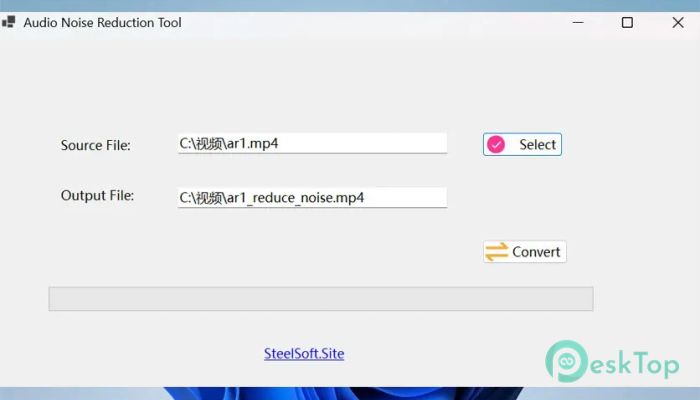
Download SteelSoft NoiseTuner 1.0.1 for Windows.
SteelSoft NoiseTuner Overview
Clean sound and sharp visuals can completely change how content feels. Whether you are editing a podcast, a lecture recording, or a home video, unwanted noise can ruin the experience. This tool is designed to solve that problem quickly and efficiently. It works like a smart filter, removing distractions and keeping what truly matters. The best part is how simple it feels. You do not need to be an expert or spend hours learning complicated settings. Just open your file, adjust a few options, and let the software do its magic. Everything happens directly on your computer, which means your files stay private and secure.Features of SteelSoft NoiseTuner
Audio Noise Removal
Background noise can sneak into recordings in many ways. It could be a fan running in the room, wind hitting the microphone, or even distant traffic. The tool helps reduce these unwanted sounds while keeping voices clear and natural.
Think of it like cleaning a dusty window. Once the dust is gone, everything becomes clearer. In the same way, your audio becomes crisp and easy to understand without losing its original tone.
Video Denoising
Low-light videos often look grainy or noisy. This tool smooths out those imperfections and makes your footage look more professional. It reduces static and improves overall visual quality.
Even shaky or poorly lit clips can look better after processing. It is like adding a soft polish to your video, making it more pleasant to watch without over-editing it.
Simple & Intuitive Interface
No one likes complicated software with endless menus. This one keeps things clean and easy. You can preview your media, adjust noise levels, and apply changes with just a click.
The layout feels natural, so even beginners can start using it right away. It is like using a basic photo editor, but instead of images, you are working with sound and video.
Supports Popular Formats
Compatibility is not an issue here. The tool works with common formats like MP4, AVI, MKV, MOV, WMV for videos, and MP3 or WAV for audio files.
This means you do not need to convert files before using them. Just import your media and start improving it instantly.
Runs Completely Offline
One of the biggest advantages is that everything runs offline. There is no need to upload files to a server or worry about internet speed.
Your data stays on your computer, which makes it safer and faster. It is like having a private studio on your own device without any risks of leaks or tracking.
Who Can Benefit From It
This tool is useful for many different people. Podcasters can improve voice recordings, video creators can fix poor footage, and students can make lectures easier to hear.
Remote workers can clean up meeting recordings, and families can enhance old home videos. It fits into everyday use, making content more enjoyable and easier to understand.
Performance and Speed
Speed matters when working with media files. The software processes files quickly without slowing down your system. You can clean up audio or video in just a few moments.
It balances performance and quality well. You get fast results without sacrificing clarity, making it perfect for everyday use.
Privacy and Security
Online tools often require uploading files, which can raise privacy concerns. This one avoids that completely. Everything stays on your device.
It is like keeping your documents in a locked drawer instead of sending them across the internet. You stay in control of your content at all times.
System Requirements and Technical Details
Operating System: Windows 11 / 10
Processor: Minimum 1 GHz Processor (2.4 GHz recommended)
RAM: 2GB (4GB or more recommended)
Free Hard Disk Space: 200MB or more is recommended

-
Program size190.05 MB
-
Version1.0.1
-
Program languagemultilanguage
-
Last updatedBefore 3 Month
-
Downloads19
 Aescripts Autokroma AfterCodecs
 Boris FX Silhouette
 RE:VisionFX ARRI Film Lab
 Gilisoft Video UniReel
 iFunia Video Editor
 Innovision MaxPRO