
 Arabic
  English
  Turkish
  Chinese
  Japanese
  Russian
  Spanish
  German
  French
  Hindi
Hindi Download Suprow 0.9.9.1 for Windows
Download Suprow 0.9.9.1 for Windows.
Suprow Overview
Managing dozens of browser tabs can quickly become messy and distracting. This software offers a fresh approach by replacing traditional tabs with organized Spaces. Each space works like a dedicated workspace for your tasks, helping you separate personal browsing, work projects, entertainment, and research without confusion. Instead of juggling endless tabs, the tool allows users to create clean, focused environments. Each workspace can have its own cookies, logins, and session data, making it feel like multiple browsers running in a single window. This design improves productivity and keeps browsing organized. Everything runs locally, which means your data stays on your device. There is no need to create accounts or sync data to the cloud. The software focuses on privacy, speed, and simplicity, making it suitable for professionals, students, and everyday users.Features of Suprow
Spaces Instead of Tabs
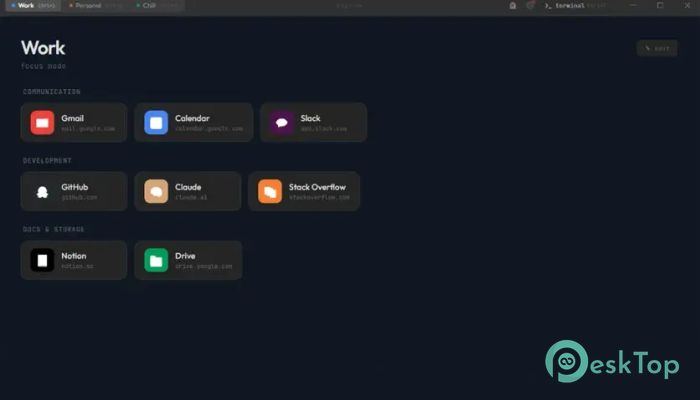
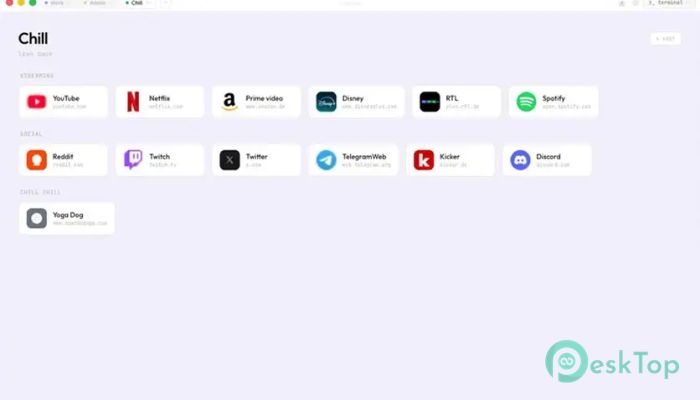
The biggest change introduced by the software is the replacement of tabs with Spaces. These spaces act like separate rooms for different tasks. For example, you can create one space for work, another for social media, and another for streaming.
This structure helps reduce clutter and improve focus. Instead of scrolling through dozens of tabs, you simply switch between spaces. Each workspace remains clean, organized, and independent.
It also allows users to isolate sessions. You can log in to multiple accounts in separate spaces without conflicts. This makes it ideal for developers, marketers, freelancers, and anyone handling multiple accounts.
Independent Cookies and Login Isolation
One of the most useful features is session isolation. Each workspace can store its own cookies and login credentials. This means users can sign in to multiple accounts simultaneously without having to repeatedly log in and out.
This feature saves time and improves workflow. It also adds an extra layer of privacy by separating activities. For professionals working with multiple clients, this becomes extremely helpful.
The isolation works smoothly and does not slow down browsing performance. Each space functions independently within a single browser window.
Built-In Password Vault
Security is an important part of modern browsing. The software includes a built-in password vault that uses AES-256 encryption. This ensures sensitive login information stays protected.
The vault securely stores credentials and provides quick access when needed. Users do not need third-party password managers, reducing complexity and improving security.
Everything stays local, which means passwords are not uploaded to servers. This approach increases privacy and reduces the risk of data exposure.
Command Palette With Terminal Style Access
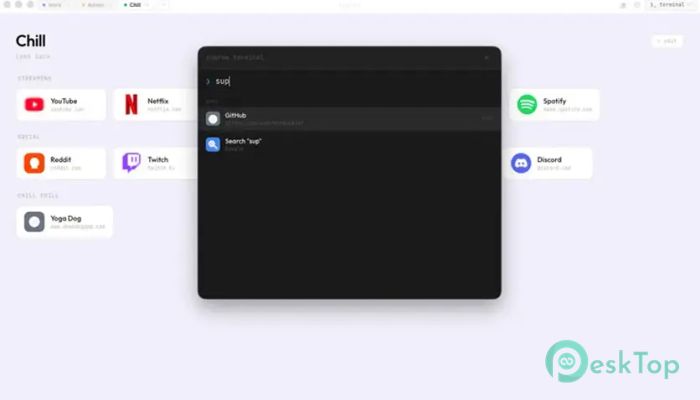
The command palette is another standout feature. It works like a search bar combined with a terminal. Users can quickly navigate tabs, apps, and history using simple commands.
This makes navigation faster and more efficient. Instead of clicking multiple menus, users can open pages instantly. It feels similar to using productivity tools designed for developers.
The palette sits at the center of the interface, making it easy to access anytime. It enhances workflow and keeps browsing smooth.
Tab Switcher Overlay
The tab switcher overlay provides a quick overview of active pages. Users can switch between open pages easily without losing focus.
This feature improves multitasking. It allows users to manage browsing sessions without confusion. The overlay appears instantly and helps navigate quickly.
It also reduces visual clutter. Instead of stacking tabs, the switcher organizes everything cleanly.
Built-in Ad Blocker
The software includes a built-in ad blocker that removes unwanted advertisements. This improves browsing speed and creates a cleaner experience.
Removing ads also reduces distractions. Pages load faster and look more organized. It also helps save bandwidth and improves performance.
The ad blocker works automatically and does not require additional extensions.
Streaming And DRM Support
The browser supports DRM, allowing users to watch streaming services like Netflix. This makes it suitable for both work and entertainment.
Users can easily switch between productivity and entertainment spaces. Streaming runs smoothly without needing external plugins.
This flexibility makes the tool versatile for everyday use.
Picture In Picture Mode
Picture-in-Picture mode allows users to watch videos while working. The floating window stays visible while browsing or using other apps.
This feature improves multitasking. Users can watch tutorials, meetings, or entertainment without switching tabs.
It keeps productivity high and makes browsing more convenient.
Dark Mode And Clean Interface
The interface is designed to be simple and modern. Dark mode reduces eye strain and provides a comfortable viewing experience.
The single-window layout keeps everything organized. Spaces appear in the top bar, and navigation remains easy.
The minimalist design helps users focus on tasks rather than managing clutter.
Privacy Focused Local Operation
Everything runs locally, which means no accounts, no cloud syncing, and no telemetry. This ensures maximum privacy.
Users maintain full control over their data. No background tracking or hidden data collection exists.
This approach makes it suitable for privacy-conscious users.
Customizable Settings
The settings section provides control over search engines, privacy options, appearance, downloads, and more. Users can customize the experience according to their needs.
Data export and import options make backup and migration easy. This makes switching devices simple.
The flexibility ensures the browser adapts to different workflows.
Simple Single Window Design
The single window interface reduces distractions. Users do not need multiple browser windows.
Everything remains accessible from one place. Spaces appear at the top, and commands stay central.
This layout improves productivity and simplifies browsing.
System Requirements and Technical Details
Operating System: Windows 11 / 10
Processor: Minimum 1 GHz Processor (2.4 GHz recommended)
RAM: 2GB (4GB or more recommended)
Free Hard Disk Space: 200MB or more is recommended

-
Program size118.89 MB
-
Version0.9.9.1
-
Program languagemultilanguage
-
Last updatedBefore 2 Month
-
Downloads48
 Samsung Browser
 Suprow
 SSuite NetSurfer Prometheus Browser
 Wavebox Browser
  Waterfox
 Tor Browser