
 Arabic
  English
  Turkish
  Chinese
  Japanese
  Russian
  Spanish
  German
  French
  Hindi
Hindi Download SysTools Outlook Deleted Items Recovery 4.0 for Windows
Download SysTools Outlook Deleted Items Recovery 4.0 for Windows.
SysTools Outlook Deleted Items Recovery Overview
The software is designed to restore important Outlook data that may have been accidentally deleted or corrupted. It works through a RAW Scan method that reads files bit by bit, ensuring deep-level recovery. This makes it a valuable tool for professionals, office users, and anyone who regularly works with PST, OST, or BAK files.Features of SysTools Outlook Deleted Items Recovery
Restore deleted emails from PST, OST, and BAK files
Bring back all mailbox items, including emails, contacts, calendars, tasks, journals, and notes
Recover both soft and hard deleted items without losing structure
Save extracted items in PST, MSG, EML, HTML, PDF, and Office 365
Option to save only permanently deleted data after scanning
Remove SMIME and OpenPGP encryption from deleted emails
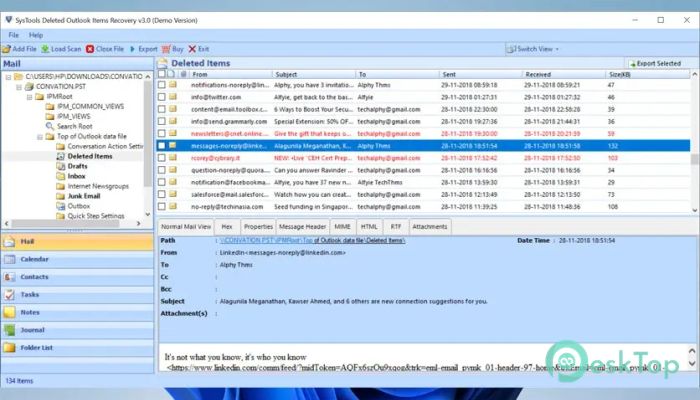
Display recovered deleted items in red color for easy identification
Keep folder hierarchy and email formatting intact
Fully supports all versions of Microsoft Outlook
Works smoothly on Windows 11 and earlier versions
How It Works
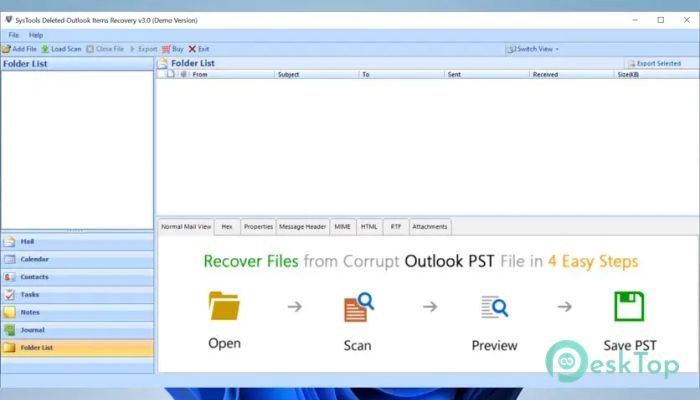
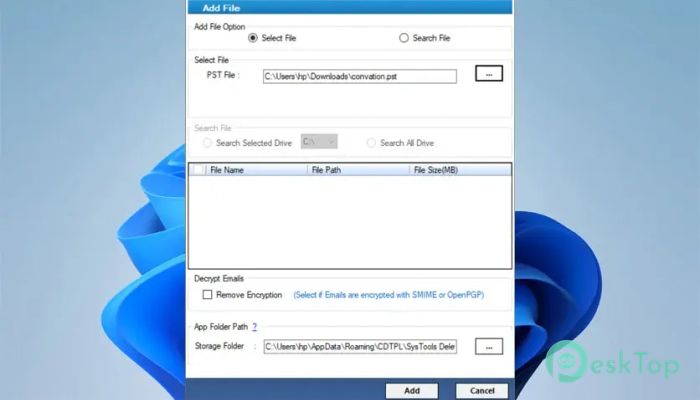
The tool scans Outlook data files using a RAW Scan process. This method checks every bit of the file, helping it recover even deeply buried items that standard recovery tools might overlook. The process is simple: load the file, scan it, preview recovered items, and save them in a preferred format.
Advantages of Using the Software
One of the most significant advantages is reliability. Many recovery utilities struggle with damaged files or permanently deleted content. This tool focuses on accuracy by reconstructing data from the core level. It also supports multiple save formats, making the workflow easier when moving messages across platforms or archiving data.
File Compatibility
The software recognizes PST, OST, and BAK files created with any version of Outlook. Whether you're restoring from Outlook archives or dealing with a recent sync issue, the tool adapts without complications.
Additional Benefits
The ability to remove security layers, such as SMIME or OpenPGP, gives users greater freedom when recovering encrypted emails. The preview panel marks deleted items in red, making the entire process straightforward. It also preserves the original folder structure, ensuring restored files remain clean and organized.
User Experience
The interface is friendly and easy to navigate. Even users with minimal technical knowledge can operate it without confusion. Select the file, begin the scan, view results, and export the recovered items. The entire workflow feels smooth and beginner-friendly.
Export Options
Multiple export formats make this tool helpful for archiving, migrating, or backing up data. Whether you prefer simple EML files or a fresh PST file, the options are flexible. PDF exporting also helps when storing email records for documentation.
System Requirements and Technical Details
Operating System: Windows 11 / 10 / 8.1 / 7
Processor: Minimum 1 GHz Processor (2.4 GHz recommended)
RAM: 2GB (4GB or more recommended)
Free Hard Disk Space: 200MB or more is recommended

-
Program size96.95 MB
-
Version4.0
-
Program languagemultilanguage
-
Last updatedBefore 10 Month
-
Downloads20
 Lazesoft Data Recovery
 Lazesoft Windows Recovery
  Lazesoft Recovery Suite
 Lazesoft Recover My Password
 Lazesoft Recovery Suite Technician
 Windows Password Recovery Tool Ultimate