
 Arabic
  English
  Turkish
  Chinese
  Japanese
  Russian
  Spanish
  German
  French
  Hindi
Hindi Download Tichau File Converter 2.1 for Windows
Download Tichau File Converter 2.1 for Windows.
Tichau File Converter Overview
This software is designed to make file conversion simple for everyday users. With its right-click menu integration, you can transform documents, videos, audio files, and images in just a few seconds. There is no complicated setup, no confusing options, and no extra steps. Everything works smoothly inside your file explorer, making the whole experience fast and effortless. The tool is entirely free, open source, and has no ads or data collection. It was started as a personal project in 2014 and has been improved over the years with a clear purpose: to make file conversion easy for everyone.Features of Tichau File Converter
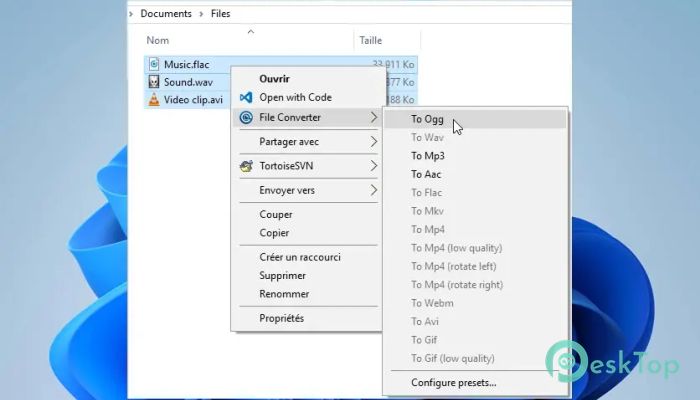
The tool allows users to convert and compress multiple formats without opening a separate application. You right-click the file, choose the format you want, and the process begins instantly. This saves time, especially when handling many files at once.
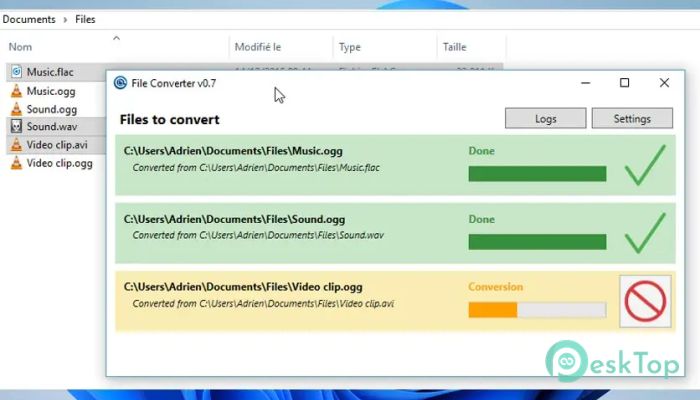
It also supports converting multiple files at once. Whether you are working with documents, audio clips, videos, or images, the tool keeps everything simple.
Right-Click Menu Integration
One of the most valuable features is its integration with the context menu. There is no need to search through menus or open bulky programs. You right-click your file, and all conversion options appear immediately.
This feature is perfect for users who want a fast solution without having to go through long steps. It feels as natural as copying or renaming a file.
Supported File Types
The software works with a wide range of file formats, including:
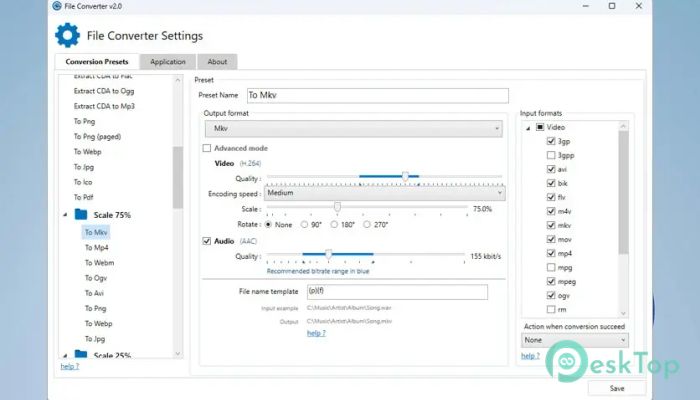
Videos (MP4, MKV, AVI, MOV)
Images (JPG, PNG, BMP, GIF)
Audio files (MP3, WAV, FLAC)
Documents (PDF, TXT, DOC formats depending on system support)
Simple and Clean Interface
Even though this tool runs mostly through the right-click menu, its small interface is easy to understand. You never feel lost or overwhelmed. Everything is organized so beginners can use it easily, while advanced users still enjoy the speed and reliability.
Open Source and No Ads
Since the tool is open source under GPLv3, anyone can view the source code. There are no hidden charges, no advertisements, and zero data tracking. It focuses only on providing a smooth, safe, and transparent experience.
Why This Tool Is Useful
This tool becomes especially valuable when you need quick conversions without installing large programs that slow down your PC. It’s like having a tiny, powerful assistant built right inside your explorer window.
If you often work with media files, images, or documents, this tool helps reduce file size, change formats, and prepare files for online use—saving time and storage space.
How It Improves Your Workflow
The tool fits naturally into your daily tasks. Instead of opening separate apps each time you need to convert something, you use the right-click option and finish in seconds.
The conversion process is also optimized to use minimal system resources. This means your computer stays responsive, even when converting several files at once.
System Requirements and Technical Details
Operating System: Windows 11 / 10 / 8.1 / 7
Processor: Minimum 1 GHz Processor (2.4 GHz recommended)
RAM: 2GB (4GB or more recommended)
Free Hard Disk Space: 200MB or more is recommended

-
Program size50.42 MB
-
Version2.1
-
Program languagemultilanguage
-
Last updatedBefore 10 Month
-
Downloads53
 Mass Image Compressor
  SteelSoft Quantum Press
 7-Zip
7-Zip WinRAR
 Bandizip
  NanaZip