
 Arabic
  English
  Turkish
  Chinese
  Japanese
  Russian
  Spanish
  German
  French
  Hindi
Hindi Download TidyPanel Pro 1.1.0 for Windows
Download TidyPanel Pro 1.1.0 for Windows.
TidyPanel Pro Overview
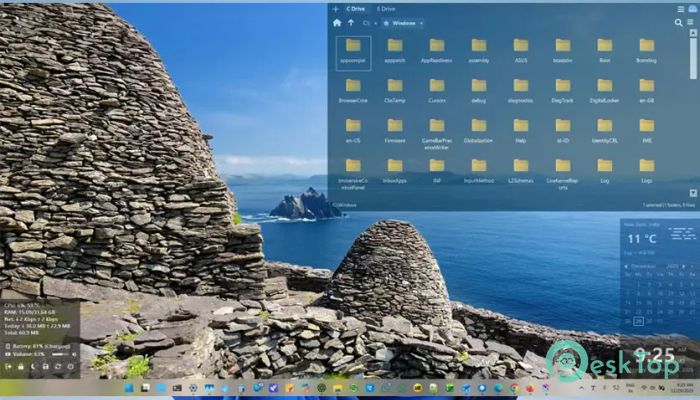
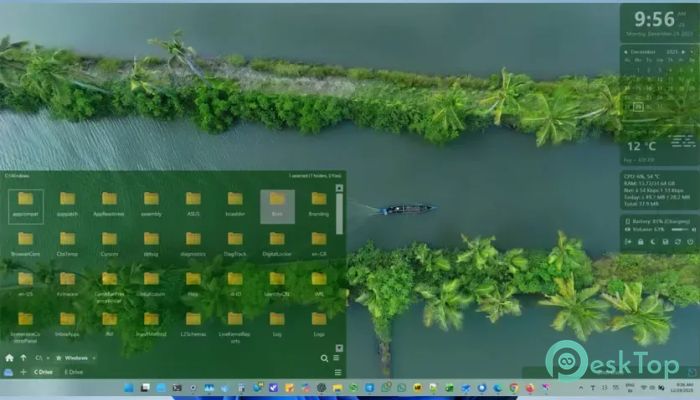
Keeping important information within reach can make a big difference in daily productivity. This software is designed to bring useful widgets and desktop panels to Windows users who want quick access to system data, reminders, shortcuts, and other essential information without opening multiple applications. Inspired by the convenience of mobile home screen widgets, it transforms the desktop into a personalized workspace. Whether you want to monitor network activity, track tasks, or launch frequently used programs, the tool makes everything available at a glance.Features of TidyPanel Pro
A Modern Take on Desktop Widgets
Many users remember the gadget system introduced in older versions of Windows. While that feature eventually disappeared, the concept of having useful information displayed directly on the desktop remained popular. This software revives that idea with a modern and safer approach.
Instead of cluttering the desktop with unnecessary elements, it provides practical widgets that fit naturally into everyday workflows. Think of it as turning your desktop into a smart dashboard that always keeps important details visible.
Lightweight and Easy to Use
One of the strongest advantages of the software is its simplicity. Unlike complex desktop customization platforms that require extensive setup and configuration, it focuses on ease of use.
Installation is quick, and users can start placing widgets on their screens within minutes. The interface remains clean and approachable, making it suitable for both beginners and advanced users.
Flexible Widget Placement
Customization is all about freedom, and the tool delivers exactly that. Widgets can be positioned almost anywhere on the screen, allowing users to create layouts that match their personal workflow.
Whether you prefer keeping widgets along the edges of the display or integrating them into empty desktop areas, the software adapts easily. This flexibility ensures that panels never interfere with ongoing tasks.
Real-Time Network Monitoring
Internet speed and bandwidth usage are important for many users, especially those who stream content, work remotely, or regularly download large files. The built-in network monitoring widget helps keep track of upload and download speeds in real time.
Instead of opening task managers or additional utilities, users can instantly see network activity directly from their desktop. This makes identifying connection issues much faster and more convenient.
Built-In Calendar and Reminders
Managing schedules becomes easier with the included calendar functionality. The widget allows users to view dates, organize events, and create reminders for upcoming tasks.
For people who frequently forget appointments or deadlines, this feature acts like a personal assistant sitting quietly on the desktop. It helps ensure important activities are never overlooked.
Quick Access Shortcut Boards
Launching applications and opening files becomes significantly faster thanks to customizable shortcut boards. Users can create dedicated panels containing links to their most-used programs, folders, and documents.
Instead of searching through menus and directories, everything remains only a single click away. This can save valuable time during busy workdays.
Customizable Appearance Settings
Every desktop setup is unique, and the software recognizes that. Various customization options allow users to adjust widget sizes, colors, transparency levels, and positioning.
Opacity controls are particularly useful because they prevent widgets from covering wallpapers or distracting from other desktop elements. Users can create a balanced appearance that feels both functional and visually appealing.
An Alternative to Complex Customization Suites
Some desktop customization platforms offer countless features, but often overwhelm users with complicated configurations. This tool takes a more practical route by focusing on the essentials.
It provides useful widgets and customization features without requiring advanced technical knowledge. As a result, users can enjoy a personalized desktop experience without spending hours learning complicated settings.
Improved Productivity and Organization
A well-organized workspace can significantly improve efficiency. By displaying important information directly on the desktop, the software reduces the need to switch between multiple applications throughout the day.
Whether checking reminders, monitoring internet activity, or accessing favorite programs, everything remains visible and accessible. This streamlined workflow helps users stay focused and productive.
Ideal for Everyday Users
The software is suitable for a wide range of users. Students can track assignments and schedules, professionals can monitor tasks and network performance, and home users can organize shortcuts for entertainment and daily activities.
Because of its lightweight nature, it runs comfortably alongside other applications without consuming significant system resources. This makes it an excellent addition to almost any Windows setup.
System Requirements and Technical Details
Operating System: Windows 11 / 10
Processor: Minimum 1 GHz Processor (2.4 GHz recommended)
RAM: 2GB (4GB or more recommended)
Free Hard Disk Space: 200MB or more is recommended

-
Program size10.41 MB
-
Version1.1.0
-
Program languagemultilanguage
-
Last updatedBefore 2 Month
-
Downloads24
 Reuschtools ClassicMenu
 AI Aquarium Screensaver
  Rainmeter
 Rainlendar Pro
 N-Button Pro
 Stardock DeskScapes