
 Arabic
  English
  Turkish
  Chinese
  Japanese
  Russian
  Spanish
  German
  French
  Hindi
Hindi Download VectorBee 1.0 for Windows

Download VectorBee 1.0 for Windows.
VectorBee Overview
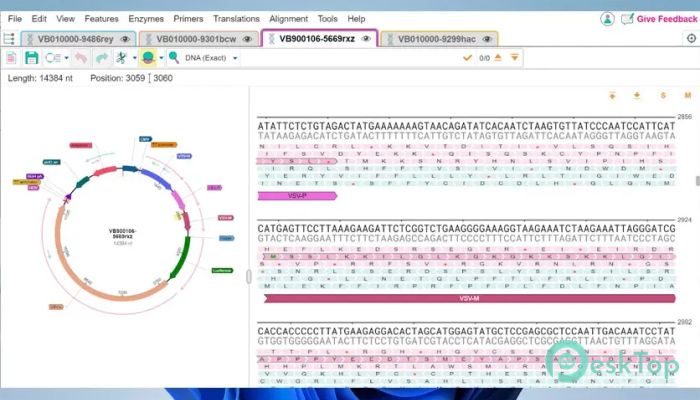
This software is developed by VectorBuilder and guided by Professor Bruce Lahn, a respected scientist with decades of experience in molecular biology. With over 100 publications to his name, he understands what researchers truly need. That deep scientific insight is built directly into the tool, making it practical, reliable, and easy to use. It is designed for students, researchers, and lab professionals who work with DNA and protein sequences daily. Instead of overwhelming you with complex menus and confusing layouts, the software keeps things clean and intuitive. You can focus on your research rather than fighting with the interface.Features of VectorBee
User-Friendly Interface
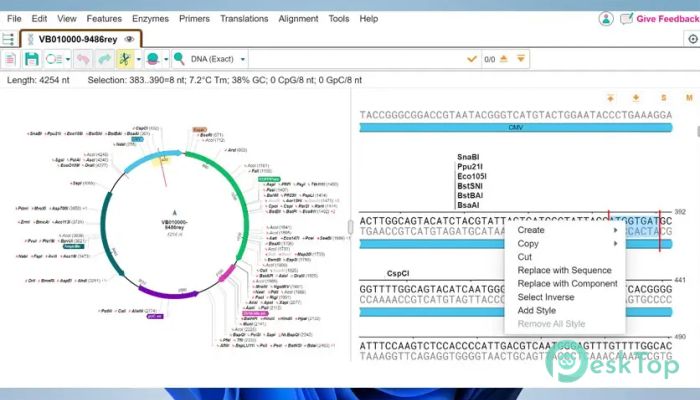
One of the strongest points of the tool is its clean and simple design. When you open it, everything feels organized and logical. You do not need hours of training to understand how it works. It feels more like using a well-arranged notebook rather than a complicated laboratory machine.
Menus are clearly labeled, and key features are easy to find. Whether you are importing a sequence, editing a gene, or analyzing protein data, the workflow remains smooth. Even beginners can quickly adapt without feeling lost.
DNA Sequence Viewing and Editing
Working with DNA sequences can sometimes feel like reading a long string of random letters. This software makes that process much clearer. It displays sequences in an organized way and highlights important regions, helping you quickly identify key elements.
You can easily insert, delete, or modify nucleotides. Editing feels precise and controlled, almost like using a text editor built specifically for molecular biology. Every change is handled carefully, reducing the risk of mistakes in your research.
Protein Sequence Analysis
Protein analysis is another major strength. The tool allows you to view amino acid sequences clearly and analyze them without confusion. It helps you understand structural and functional aspects more effectively.
Instead of jumping between different programs, you can manage your DNA and protein tasks in one place. That saves time and keeps your research workflow consistent and organized.
Built by Experts in Molecular Biology
The development team behind this platform includes experienced biologists and skilled IT engineers. Under the leadership of Professor Bruce Lahn, the system was shaped by real laboratory experience. It was not built only by programmers; it was designed by scientists who understand the daily challenges of genetic research.
This background makes a big difference. Features are practical, not theoretical. Every function feels like it was added because someone in a lab truly needed it.
Advanced Analysis Tools
The software offers powerful analysis features without making them difficult to use. You can perform sequence comparisons, analyze gene structures, and study protein details in a streamlined way. The complexity remains under the hood, while the interface stays simple.
Think of it like driving a modern car. You do not need to understand every mechanical part to benefit from its performance. The technology works quietly in the background while you stay focused on your research goals.
Efficient Workflow for Research
Time is precious in any laboratory. This platform helps you work faster by keeping everything integrated. You can load sequences, edit them, analyze results, and save projects without switching tools.
It supports a smooth research process from start to finish. Instead of juggling multiple programs, you have a single workspace that keeps your projects organized and accessible.
Suitable for Students and Professionals
Whether you are a university student learning genetic engineering or a senior researcher handling complex experiments, the software adapts to your needs. Beginners appreciate its simplicity, while experts value its precision and analytical depth.
It acts like a bridge between learning and advanced research. You can start small and gradually explore more powerful features as your knowledge grows.
Performance and Stability
Stability is critical when handling scientific data. The tool runs smoothly on Windows systems and manages large sequences without slowing down. You can trust it to handle important projects without unexpected crashes.
Its lightweight structure ensures it does not overload your computer. Even standard systems can run it comfortably, making it accessible for many users.
System Requirements and Technical Details
Operating System: Windows 11 / 10 / 8.1 / 7
Processor: Minimum 1 GHz Processor (2.4 GHz recommended)
RAM: 2GB (4GB or more recommended)
Free Hard Disk Space: 200MB or more is recommended

-
Program size106.44 MB
-
Version1.0
-
Program languagemultilanguage
-
Last updatedBefore 7 Month
-
Downloads10
 Autodesk 3DS MAX
 Autodesk AutoCAD Electrical
 Autodesk Maya
 Autodesk AutoCAD Architecture
 Autodesk AutoCAD Map 3D
 Autodesk AutoCAD Plant 3D