
 Arabic
  English
  Turkish
  Chinese
  Japanese
  Russian
  Spanish
  German
  French
  Hindi
Hindi Download VovSoft Audio to Lyrics Converter 1.2 for Windows
Download VovSoft Audio to Lyrics Converter 1.2 for Windows.
VovSoft Audio to Lyrics Converter Overview
It is designed for users who need a quick and reliable way to turn spoken words or song lyrics into text. Instead of manually typing every sentence, the software listens to audio files and automatically creates synchronized transcripts with impressive accuracy. The best part is that everything happens directly on your computer. There is no need for internet access, cloud services, or expensive subscription plans. Your files stay private while the conversion process runs locally using advanced AI models.Features of VovSoft Audio to Lyrics Converter
Offline AI-Powered Transcription
The software uses modern AI speech recognition technology to understand spoken or sung words from audio recordings. Think of it as having a personal assistant who listens carefully and writes down everything it hears.
Because processing happens offline, users can work anywhere without worrying about internet connectivity. This also provides an extra layer of privacy since audio files never leave the computer.
Support for Popular Audio Formats
The tool works smoothly with many commonly used audio formats. Whether your files are stored as MP3, WAV, OGG, or FLAC, they can be imported without additional conversion steps.
This broad compatibility saves time and allows users to work with existing music collections, podcasts, interviews, voice recordings, and educational content.
Multiple Export Options
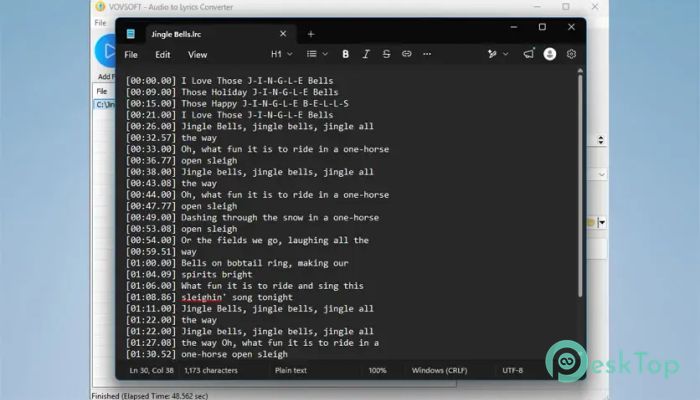
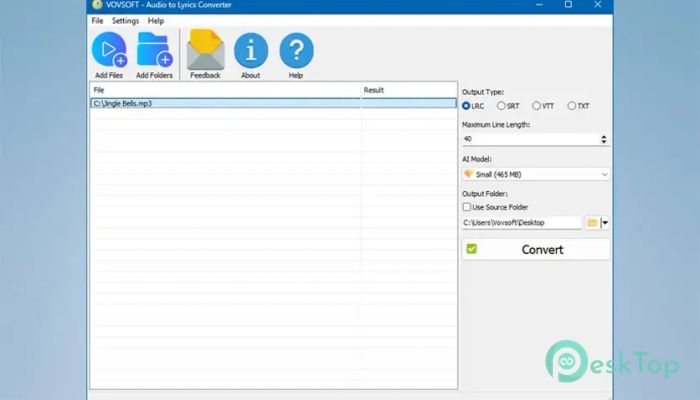
Different projects require different output formats, and the software handles that with ease. Users can export transcriptions as LRC files for music players, SRT files for subtitles, VTT files for web videos, or simple TXT documents.
This flexibility makes it suitable for musicians, content creators, educators, podcasters, and video editors who need professional text output for various purposes.
Automatic Timestamp Generation
One of the most useful features is the automatic creation of synchronized timestamps. The software generates precise timing markers that match the audio playback.
These timestamps ensure that lyrics appear at the correct moment or subtitles stay synchronized with spoken dialogue. It is like giving every sentence its own perfectly timed schedule.
Efficient Batch Processing
Working with dozens of files can become exhausting when each one requires individual attention. Fortunately, the software includes batch processing capabilities that simplify large projects.
Users can add multiple files or entire folders to the queue and let the tool process everything automatically. This feature significantly improves productivity and reduces repetitive tasks.
Customizable Text Layout
Different screens and media players display text differently. To solve this issue, the software allows users to adjust the maximum line length of generated text.
This customization helps create cleaner subtitles and more readable lyrics. Whether the content is viewed on a smartphone, computer monitor, or television, the output can be optimized accordingly.
Simple Drag-and-Drop Interface
Ease of use is one of the strongest advantages of this utility. Users can simply drag audio files or folders directly into the application window to begin processing.
The straightforward interface removes unnecessary complexity, making the tool accessible to both beginners and experienced users alike.
Powered by OpenAI Whisper Models
The software utilizes advanced OpenAI Whisper technology running locally on the PC. Users can select different AI models depending on their preferred balance between speed and accuracy.
For quick jobs, lightweight models provide fast processing. For more demanding projects, larger models can deliver higher transcription quality while maintaining full offline functionality.
Ideal for Content Creators and Professionals
The tool serves a wide range of users. Musicians can create synchronized karaoke lyrics, video creators can generate subtitles, and students can convert lectures into searchable notes.
Podcasters, journalists, researchers, and business professionals can also save countless hours by automatically transcribing interviews, meetings, and recorded conversations.
Privacy and Security Benefits
Many online transcription services require users to upload sensitive recordings to remote servers. This utility takes a different approach by keeping everything local.
Since processing occurs entirely on the user's machine, confidential audio remains private. This makes it particularly valuable for businesses, researchers, and anyone working with sensitive information.
System Requirements and Technical Details
Operating System: Windows 11 / 10
Processor: Minimum 1 GHz Processor (2.4 GHz recommended)
RAM: 2GB (4GB or more recommended)
Free Hard Disk Space: 200MB or more is recommended

-
Program size133.10 MB
-
Version1.2
-
Program languagemultilanguage
-
Last updatedBefore 3 Month
-
Downloads11
 Teletone Audio Prism Plate
 Stryde Audio Swayed
  Electric Smudge SnappySnap
 PSPaudioware PSP Flare
 DW Soundworks Gretsch USA Custom Expansion Pack
 Sonic Academy V4lve