
 Arabic
  English
  Turkish
  Chinese
  Japanese
  Russian
  Spanish
  German
  French
  Hindi
Hindi Download Winstep Nexus Ultimate 26.6 for Windows


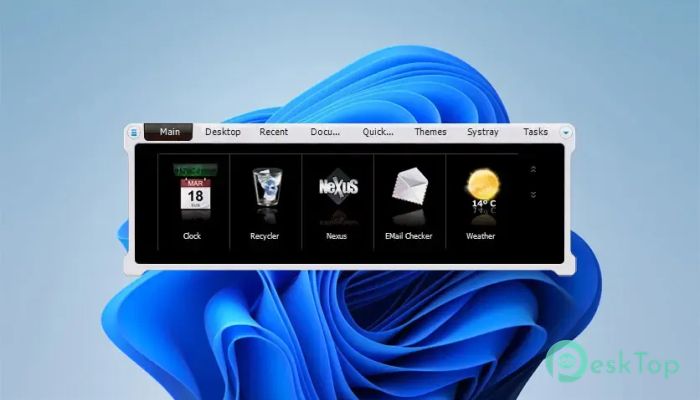
Download Winstep Nexus Ultimate 26.6 for Windows.
Winstep Nexus Ultimate Overview
It is a premium desktop enhancement tool that transforms the way you interact with Windows. Instead of relying solely on the traditional taskbar, it offers a stylish dock where your favorite applications, folders, and system tools are always within easy reach. The interface is smooth, responsive, and highly customizable, making everyday computing both productive and visually appealing. The software is designed for users who want a cleaner desktop without sacrificing functionality. Whether you use your PC for work, gaming, or everyday tasks, it helps organize everything in one convenient place while adding beautiful animations and smart features.Features of Winstep Nexus Ultimate
Advanced Docking Experience
The software replaces the ordinary Windows taskbar with an elegant dock that keeps your favorite programs only a click away. Every shortcut can be arranged exactly how you like, making your desktop feel more organized and efficient.
Unlike a standard launcher, it supports running applications, grouped tasks, customizable icons, and advanced filtering options. This means your workspace stays tidy even when multiple programs are open.
Beautiful Visual Effects
The tool brings your desktop to life with eye-catching animations and smooth transitions. Icons can zoom, bounce, swing, glow, spin, or even create realistic water-like effects whenever you interact with them.
Live reflections make icons look even more realistic, updating instantly whenever an icon changes or animates. These effects are optional, allowing users to balance appearance with performance.
Powerful Shelf and Tabbed Dock
One of the biggest highlights is the Shelf feature. Instead of keeping dozens of desktop icons scattered everywhere, you can organize applications, folders, and system locations into convenient tabs.
The Shelf can display Desktop contents, Control Panel, My Computer, Documents, Recent Files, and even custom folders. It helps reduce desktop clutter while keeping everything close at hand.
Flexible Dock Management
Managing docks is incredibly simple thanks to drag-and-drop controls. You can create new docks, duplicate existing ones, convert docks into sub-docks, or rearrange them with only a few mouse movements.
This flexibility makes it easy to build a desktop layout that perfectly matches your workflow without spending hours adjusting settings.
Smart Drag and Drop Support
The software supports object-based drag-and-drop throughout the interface. You can move files, folders, shortcuts, and applications directly into the dock without complicated setup.
Changing shortcut icons is just as simple. Drop PNG, ICO, or TIF image files onto any dock item, and the icon updates instantly. Animated icons are also supported without requiring additional plugins.
Useful Built-in Modules
Beyond launching applications, the tool includes several practical modules that display useful information directly on the dock. Weather forecasts, CPU usage, RAM monitoring, email notifications, network traffic, clocks, and recycling tools are always available.
The Ultimate edition also introduces an advanced battery and UPS monitoring module that can track battery events and trigger custom actions when power levels drop.
Advanced Task and Window Management
The dock serves as a complete taskbar replacement, displaying running applications with grouping and customization features. Windows can even be minimized directly into the dock, keeping the desktop clean and organized.
Thanks to support for Aero Peek and modern task management, switching between applications feels quick and natural, even on older Windows versions.
Special Commands and Productivity Tools
The software includes more than eighty built-in commands that perform useful system actions instantly. You can empty the Recycle Bin, control your CD drive, hibernate the computer, turn off the monitor, display the Start Menu, and much more.
Unlimited clock alarms and reminders also help users stay organized. You can schedule recurring tasks, launch programs automatically, or receive reminders throughout the day.
Customization Without Limits
Almost every part of the interface can be personalized. Users can adjust dock size, icon spacing, magnification, transparency, animations, behavior, themes, and much more.
Support for third-party skins allows even greater customization, giving your desktop a completely unique appearance while keeping everything functional.
Multi-Monitor and System Integration
The software fully supports multi-monitor setups, allowing separate docks on different screens or floating docks positioned wherever you prefer. It also reserves screen space, so maximized windows never cover your dock.
Integration with Windows system folders and virtual objects makes it easy to access Control Panel items, special folders, and frequently used locations without opening File Explorer.
Automatic Updates and Reliable Performance
The built-in Update Manager keeps the software up to date with minimal effort. New versions can be installed automatically, ensuring you always receive the latest improvements and features.
Extensive testing by thousands of users has helped create a stable, reliable desktop enhancement solution that runs smoothly on both older and newer Windows systems.
System Requirements and Technical Details
Operating System: Windows 11 / 10 / 8 / 7
Processor: Minimum 1 GHz Processor (2.4 GHz recommended)
RAM: 2GB (4GB or more recommended)
Free Hard Disk Space: 200MB or more is recommended

-
Program size61.20 MB
-
Version26.6
-
Program languagemultilanguage
-
Last updatedBefore 2 Month
-
Downloads82
 Reuschtools ClassicMenu
 AI Aquarium Screensaver
  Rainmeter
 Rainlendar Pro
 N-Button Pro
 Stardock DeskScapes