
 Arabic
  English
  Turkish
  Chinese
  Japanese
  Russian
  Spanish
  German
  French
  Hindi
Hindi Download Allround Automations Plyxon 2.0.0.910 for Windows
Download Allround Automations Plyxon 2.0.0.910 for Windows.
Allround Automations Plyxon Overview
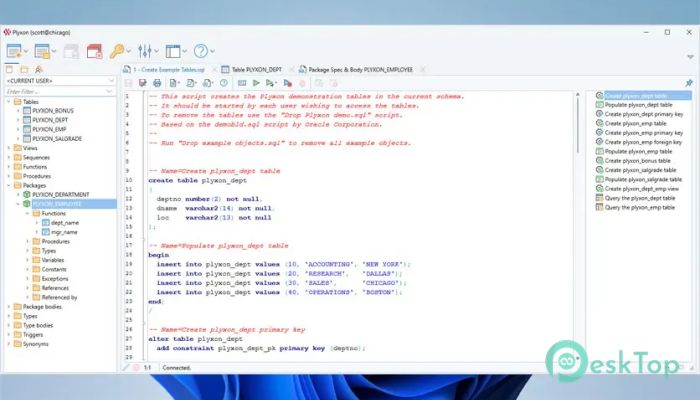
This modern development solution is built for professionals who work with Oracle databases every day. Created with decades of Oracle expertise, it provides a fast, reliable, and user-friendly environment for writing, testing, and maintaining SQL and PL/SQL code. The software is designed to help developers focus on coding rather than dealing with complex setups or unnecessary tools. Unlike many database development platforms, it functions as a native Oracle client application and requires no additional third-party components. This makes installation quick and allows users to start working almost immediately. Its multi-threaded architecture ensures smooth performance, even when handling large projects and complex database operations.Features of Allround Automations Plyxon
Powerful PL/SQL Editor
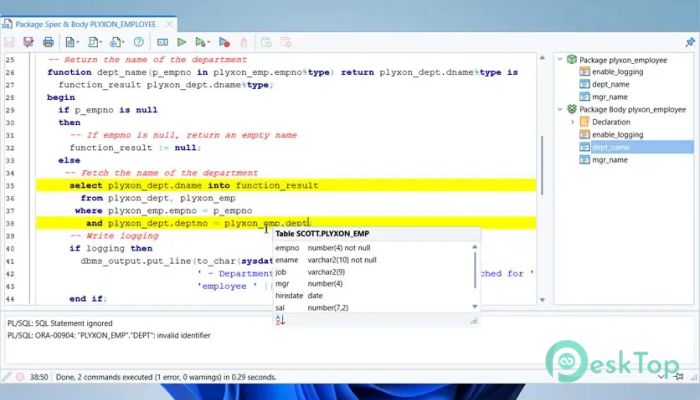
The editor is the heart of the platform. It comes packed with advanced tools that make coding faster and more efficient. Features such as syntax highlighting, code assistance, object descriptions, hyperlink navigation, and code contents help developers work with confidence.
Think of it as having a skilled assistant sitting beside you while you code. It helps you find objects, navigate through procedures, and understand database structures without wasting time. These capabilities improve productivity and reduce the chance of errors.
The built-in macro library further enhances workflow by automating repetitive tasks. Whether you are writing small scripts or managing large enterprise applications, the editor provides the flexibility needed to complete projects efficiently.
Integrated Debugging Environment
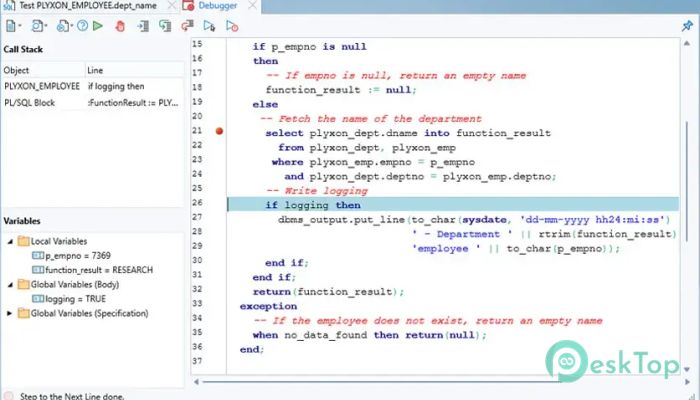
Finding and fixing bugs can be one of the most challenging parts of software development. The integrated debugger makes this process straightforward by providing a complete set of debugging tools.
Developers can use Step In, Step Over, Step Out, Run Until Exception, Breakpoints, Variable Monitoring, and Call Stack viewing. These functions allow users to inspect code behavior in real time and identify issues quickly.
One of the biggest advantages is the ability to debug program units without modifying them. Even complex objects such as triggers and object types can be analyzed directly. This saves valuable time and reduces development interruptions.
AI-Powered Coding Assistance
Artificial intelligence has become an essential part of modern software development, and this tool embraces that trend through its integrated AI Assistant. By connecting an AI account through an authorization key, developers can access intelligent coding support whenever needed.
The assistant can create new SQL statements, improve existing procedures, optimize performance, fix coding errors, and complete unfinished code segments. It acts as a knowledgeable teammate, always available to provide guidance.
Beyond code generation, the feature can also explain complex logic, review scripts, add comments, and answer development-related questions. This makes it useful for both experienced professionals and those who are still learning Oracle development.
Custom AI Functions
In addition to predefined AI capabilities, users can build their own AI functions tailored to specific workflows. This flexibility allows organizations to create personalized automation solutions that match their coding standards and business requirements.
Custom functions can be designed for code reviews, naming conventions, documentation generation, or project-specific tasks. As a result, teams can maintain consistency while reducing manual effort.
This adaptability turns artificial intelligence into a practical productivity tool rather than just a simple coding assistant.
PL/SQL Beautifier for Cleaner Code
Readable code is easier to maintain, debug, and share with team members. The built-in Beautifier helps achieve this by automatically formatting SQL and PL/SQL code according to user-defined rules.
Developers can configure formatting preferences and apply them whenever code is opened, saved, or compiled. This ensures that scripts remain clean and organized throughout the development lifecycle.
Imagine turning a cluttered desk into a perfectly arranged workspace. That is exactly what this feature does for database code. It improves readability and helps teams work together more effectively.
High Performance Architecture
Speed plays a major role in developer productivity. The software is built on a multi-threaded architecture that enables multiple operations to run efficiently simultaneously. This design keeps the application responsive even when handling demanding workloads.
Large database projects, extensive scripts, and complex queries can be managed without noticeable slowdowns. The optimized performance helps developers spend more time creating solutions and less time waiting for processes to finish.
This focus on efficiency makes it suitable for both individual developers and enterprise environments where performance matters.
Easy Installation and Cross-Platform Support
Getting started is simple because the platform requires minimal setup. As a native Oracle client tool, it avoids the complexity often associated with database development software.
Support for Windows, macOS, and Linux allows teams to work across different operating systems without sacrificing functionality. This flexibility is particularly useful for organizations with diverse development environments.
The straightforward installation process means developers can quickly move from setup to productive work without unnecessary delays.
Improved Development Productivity
Every feature is designed with productivity in mind. The combination of intelligent editing, powerful debugging, AI assistance, automatic formatting, and high-speed performance creates an efficient development workflow.
Tasks that once required multiple tools can now be handled from a single environment. This reduces complexity and allows developers to concentrate on solving business problems rather than managing software limitations.
Whether working on small database utilities or enterprise-level systems, the platform provides the resources needed to develop and maintain Oracle applications effectively.
System Requirements and Technical Details
Operating System: Windows 11 / 10 / 8 / 7
Processor: Minimum 1 GHz Processor (2.4 GHz recommended)
RAM: 2GB (4GB or more recommended)
Free Hard Disk Space: 200MB or more is recommended

-
Program size38.34 MB
-
Version2.0.0.910
-
Program languagemultilanguage
-
Last updatedBefore 3 Month
-
Downloads3
 Reportizer
 AccdbMerge
 RdpGuard
 Checkbook For Excel
 SysTools SQL Recovery
 Pointdev Ideal Dispatch