
 Arabic
  English
  Turkish
  Chinese
  Japanese
  Russian
  Spanish
  German
  French
  Hindi
Hindi Download AutoIt OSD Background 1.0 for Windows
Download AutoIt OSD Background 1.0 for Windows.
AutoIt OSD Background Overview
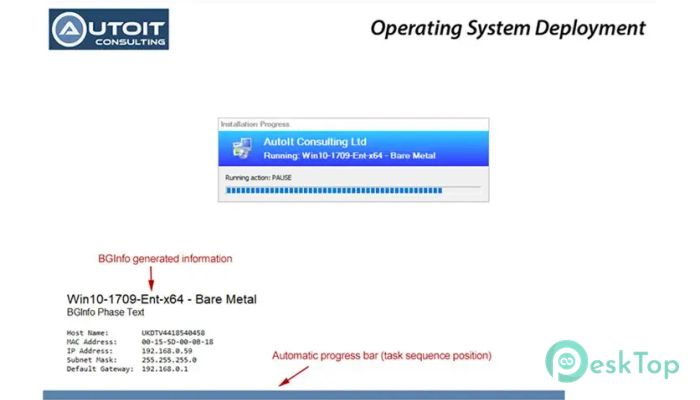
This utility is built for IT professionals who manage Microsoft Configuration Manager and MDT deployments. It focuses on improving how deployment screens appear and function during system build. Instead of staring at a plain screen, it delivers a clean, informative background that reflects progress and system details in real time.Features of AutoIt OSD Background
Purpose and Practical Value
During operating system deployment, visibility matters. It functions as a status board, showing the build's current stage and keeping users informed. This helps reduce confusion and support calls, especially in enterprise environments where clarity saves time.
Background Customization During Deployment
Customizing the deployment background is a common requirement. The tool creates a screen layer that behaves like a desktop wallpaper, even while other deployment windows are running. This gives a professional look and maintains branding consistency throughout the build process.
Integration with Deployment Workflows
The software works smoothly alongside common deployment workflows. It can be launched at any stage and automatically adapts to the progress of the task sequence. Once set up, it runs quietly in the background, updating visuals without manual intervention.
Progress Tracking Made Simple
A customizable progress bar updates itself based on the current task sequence step. Think of it as a GPS for deployment, always showing where you are and how far is left. This makes long builds feel more controlled and predictable.
Automatic Window Management
On modern systems, default progress windows can clutter the screen. It automatically hides these windows, removing the need for extra scripts. This keeps the display clean and focused on the most critical information.
Built-In Debug and Support Tools
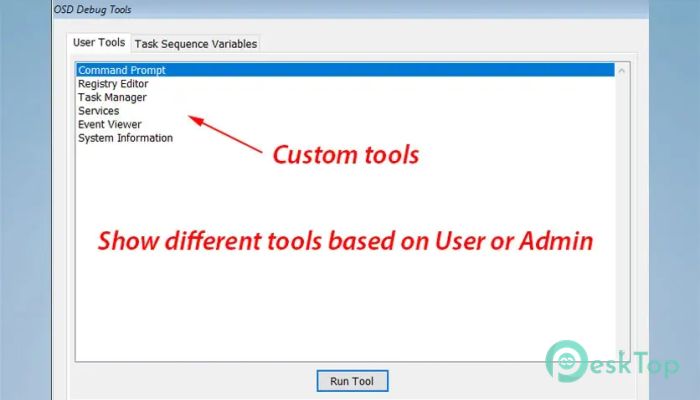
A hidden debug menu can be opened with a hotkey, offering quick access to diagnostics. This menu supports two password levels, granting standard users limited access while administrators have access to advanced tools.
Secure Access Control
Security is handled smartly. Tools can be locked behind user or admin passwords, ensuring sensitive actions are protected. This separation helps maintain control without blocking essential troubleshooting features.
Custom Tools and Commands
The tools menu is fully configurable. Administrators can add command prompts, Registry Editor, or System Information utilities. Each item can be marked as admin-only, keeping the interface simple for regular users.
Task Sequence Variable Management
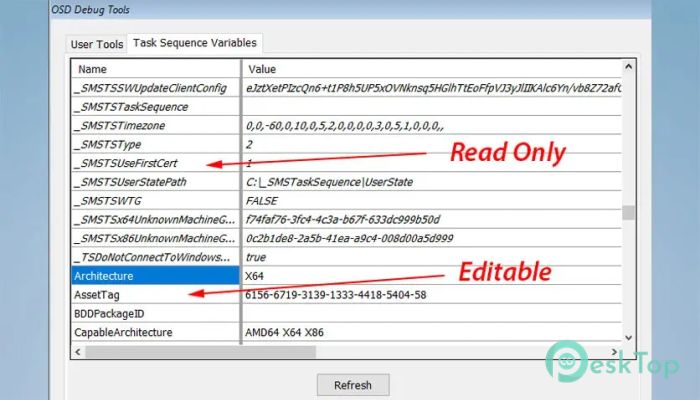
Reviewing and editing task sequence variables becomes straightforward. Instead of guessing values, administrators can inspect and adjust them directly, saving time and avoiding redeployments.
Reliability Across Reboots
If launched multiple times, the tool automatically closes previous instances. This prevents clutter and removes the need for manual cleanup. It behaves like a well-trained assistant, knowing when to step aside.
System Requirements and Technical Details
Operating System: Windows 11 / 10 / 8.1 / 7
Processor: Minimum 1 GHz Processor (2.4 GHz recommended)
RAM: 2GB (4GB or more recommended)
Free Hard Disk Space: 200MB or more is recommended

-
Program size159.61 KB
-
Version1.0
-
Program languagemultilanguage
-
Last updatedBefore 9 Month
-
Downloads5
 Reportizer
 AccdbMerge
 RdpGuard
 Checkbook For Excel
 SysTools SQL Recovery
 Pointdev Ideal Dispatch