
 Arabic
  English
  Turkish
  Chinese
  Japanese
  Russian
  Spanish
  German
  French
  Hindi
Hindi Download Browser Automation Studio 30.2.0 for Windows
Download Browser Automation Studio 30.2.0 for Windows.
Browser Automation Studio Overview
Browser automation has become an essential part of modern digital workflows, making the process much easier. It allows users to build automated applications without spending countless hours writing code from scratch. Whether you need to automate web tasks, manage online data, interact with websites, or handle repetitive processes, the platform provides everything in one place. The tool combines multiple technologies into a single environment. It includes browser automation, HTTP requests, email handling, file management, and various other functions. This all-in-one approach helps users save time and increase productivity while creating reliable automation projects.Features of Browser Automation Studio
Easy-to-Use Visual Interface
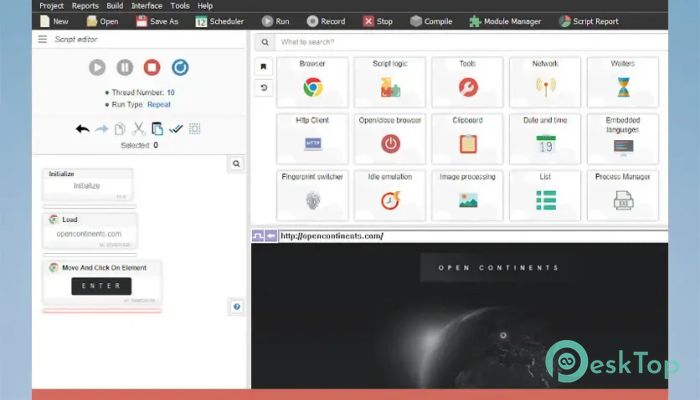
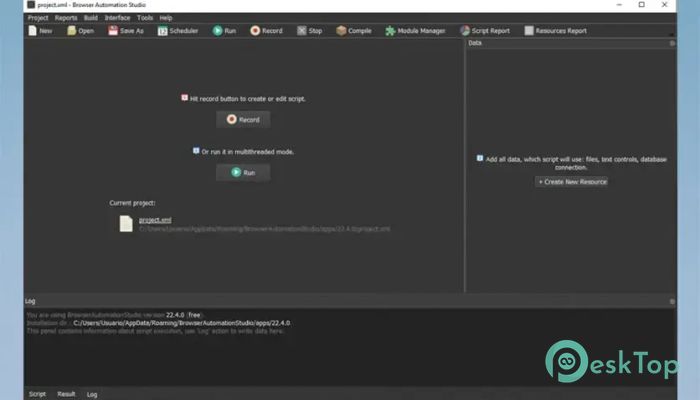
One of the biggest advantages of the software is its visual development environment. Instead of dealing with complex programming structures, users can create automation workflows through a simple and organized interface.
The scenario panel acts like a roadmap for your project. Every action is displayed visually, making it easier to understand how the automation process works. Even beginners can quickly learn how to create scripts and manage tasks without feeling overwhelmed.
Powerful Toolbar with Organized Modules
The toolbar contains a wide range of features grouped into different modules. This structure keeps everything organized and easy to access. Users can open a specific module and select the action they need without having to search through endless menus.
A built-in search function makes navigation even faster. Instead of manually browsing categories, users can quickly locate the desired feature and continue building their projects without interruption.
Visual Scenario Builder
The scenario panel is the heart of the development environment. It contains the automation script and displays every action in a clear visual format. Think of it as a flowchart where every step connects to the next.
This visual representation makes troubleshooting and editing much easier. Users can instantly identify where changes are needed and modify workflows without rewriting large portions of the project.
Advanced Browser Automation
The software excels at browser automation. Users can interact with websites just as a real person would. Clicking buttons, filling forms, navigating pages, collecting information, and performing various online actions can all be automated with ease.
The recording feature is especially useful. Instead of manually creating every step, users can perform actions in the browser while the software records them automatically. This dramatically reduces setup time and simplifies project creation.
Automatic Action Recording
Creating automation scripts becomes much faster thanks to automatic recording. Whenever users interact with a website, the tool captures those actions and converts them into executable steps.
This feature works like having a personal assistant taking notes while you work. Once the recording is complete, the captured actions can be edited, expanded, or customized to suit specific project requirements.
Manual Script Customization
While automatic recording is convenient, the platform also allows manual script creation. Users who need greater control can add actions individually and fine-tune every aspect of the automation process.
This flexibility makes it suitable for both beginners and advanced users. Simple projects can be built quickly, while complex workflows can be customized with precision.
HTTP Client Integration
The built-in HTTP client provides another powerful way to interact with online services. Instead of relying solely on browser automation, users can send requests directly to web servers and retrieve data efficiently.
This method often improves speed and performance by bypassing unnecessary browser rendering. It is especially useful for data collection, API communication, and web service integration.
Email Automation Capabilities
Email management can consume a significant amount of time, especially when dealing with repetitive tasks. The software includes email client functionality that allows users to automate sending, receiving, and processing messages.
This feature is ideal for customer support, marketing campaigns, notifications, and workflow management. Automated email handling reduces manual effort while ensuring consistency and accuracy.
Large Collection of Built-In Libraries
Beyond browser and email automation, the platform includes numerous libraries that expand its capabilities. Users can work with files, databases, text processing, network communication, and many other functions without installing additional tools.
Having everything integrated into a single environment simplifies development and helps projects stay organized. It also reduces compatibility issues that often arise when combining multiple external applications.
Suitable for Many Automation Tasks
The software can be used across a wide range of industries and projects. Businesses can automate routine operations, marketers can manage campaigns, researchers can gather information, and developers can create custom automation solutions.
Whether the goal is web scraping, account management, data processing, testing, or workflow automation, the platform provides the necessary tools to complete tasks efficiently.
Improved Productivity and Efficiency
Automation is all about saving time, and this solution does exactly that. Tasks that normally require hours of repetitive work can be completed automatically in minutes. This allows users to focus on more valuable activities while the software handles routine operations.
By reducing manual effort and minimizing errors, it helps improve overall efficiency and makes daily workflows smoother and more reliable.
System Requirements and Technical Details
Operating System: Windows 11 / 10 / 8.1 / 7
Processor: Minimum 1 GHz Processor (2.4 GHz recommended)
RAM: 2GB (4GB or more recommended)
Free Hard Disk Space: 2GB or more is recommended

-
Program size549.36 MB
-
Version30.2.0
-
Program languagemultilanguage
-
Last updatedBefore 3 Month
-
Downloads23
 Reportizer
 AccdbMerge
 RdpGuard
 Checkbook For Excel
 SysTools SQL Recovery
 Pointdev Ideal Dispatch